What is Pixelcut AI Photo Editor?
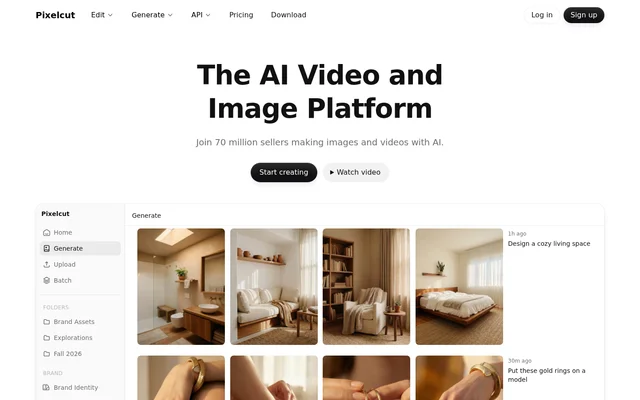
Pixelcut AI Photo Editor is an AI image and video tool for sellers, creators, brands, and businesses producing visual content. Pixelcut AI Photo Editor combines product image generation, promotional video creation, and everyday editing in a shared creative workspace. The website presents product showcases, talking advertisements, and consistent personas as core workflows.
Pixelcut AI Photo Editor also includes a creative agent that interprets prompts, plans tasks, and executes creative work using models such as Nano Banana Pro and Sora 2. The website states that special prompting is not required. This prompt-based approach sits alongside dedicated tools for background removal, retouching, upscaling, and other image adjustments.
What Pixelcut AI Photo Editor can do
Pixelcut AI Photo Editor supports both generating new visual content and modifying existing files. Product-focused workflows create imagery from prompts, while persona and character features support consistency across images and video frames. Editing capabilities cover individual adjustments as well as batches of files, with several model choices available for image upscaling.
- Pixelcut AI Photo Editor generates product showcase images from prompts.
- Pixelcut AI Photo Editor creates talking videos for brand promotion.
- Pixelcut AI Photo Editor removes backgrounds from images and videos.
- Pixelcut AI Photo Editor upscales images up to 16x using models including Topaz.
- Pixelcut AI Photo Editor expands image boundaries and retouches images with generative fill.
- Pixelcut AI Photo Editor generates shadows.
- Pixelcut AI Photo Editor applies edits across hundreds of files.
How Pixelcut AI Photo Editor works
Pixelcut AI Photo Editor accepts prompts for creative tasks and offers dedicated editing workflows for operations such as background removal and upscaling. The creative agent plans and carries out tasks using available models. Certain advanced AI models, particularly those supplied by third-party partners, consume credits when users create or edit images.
Pixelcut AI Photo Editor is available through apps downloaded from the App Store or Google Play. Pro access also works in mobile and desktop browsers. Paid teams share an organization's credits, and each plan includes a set number of members rather than charging separately for every seat.
Who Pixelcut AI Photo Editor is for
Pixelcut AI Photo Editor targets sellers, creators, brands, and businesses that need product and marketing visuals. The website highlights product showcases, promotional talking videos, and consistent branded characters. Batch editing supports work across many files, while shared team access supports colleagues producing visual content within the same organization.
- Pixelcut AI Photo Editor helps sellers generate product photos.
- Pixelcut AI Photo Editor helps brands create talking promotional videos.
- Pixelcut AI Photo Editor helps creators maintain consistent personas across content.
- Pixelcut AI Photo Editor helps teams process image edits in batches.
Pixelcut AI Photo Editor pricing and plans
Pixelcut AI Photo Editor offers Free, Pro, and Business plans. Free includes limited background removal and upscaling with watermark-free exports. The yearly-billed Pro price is $8 per month, and the yearly-billed Business price is $24 per month. The pricing page advertises a 20% saving for annual subscriptions and allows cancellation at any time.
Pixelcut AI Photo Editor Pro includes 600 monthly AI credits, a 3-person team, and 1,000 monthly batch exports. Business includes 3,600 monthly AI credits, a 10-person team, and 2,000 monthly batch exports. Both paid plans list access to all AI models, unlimited background removal, unlimited upscaling, and a commercial license.
Pixelcut AI Photo Editor strengths and limitations
Pixelcut AI Photo Editor combines image generation, video creation, and routine editing with access across apps and browsers. Watermark-free exports are included on the free plan, and paid plans include team collaboration without per-seat charges. These benefits come with plan-specific limits, particularly around free editing access, advanced model credits, and monthly batch exports.
- Pixelcut AI Photo Editor limits background removal and upscaling on Free.
- Pixelcut AI Photo Editor consumes credits for certain advanced AI models.
- Pixelcut AI Photo Editor caps monthly batch exports according to the paid plan.
Pixelcut AI Photo Editor FAQ
What is Pixelcut AI Photo Editor?
Pixelcut AI Photo Editor is an AI image and video creation and editing tool for sellers, creators, brands, and businesses. Pixelcut AI Photo Editor supports product photography, talking promotional videos, background removal, upscaling, generative fill, and batch editing.
Is Pixelcut AI Photo Editor free?
Pixelcut AI Photo Editor offers a free plan with limited background removal, limited upscaling, and watermark-free exports. Pixelcut AI Photo Editor also offers paid Pro and Business subscriptions with access to all AI models, monthly credits, commercial licensing, and team features.
Can Pixelcut AI Photo Editor be used on iPhone and Android?
Pixelcut AI Photo Editor offers apps for iPhone and Android through the App Store and Google Play. Pixelcut AI Photo Editor Pro can also be used in mobile and desktop browsers to access an account and edit images.
How do Pixelcut AI Photo Editor credits work?
Pixelcut AI Photo Editor uses credits when creating or editing images with certain advanced AI models, particularly models from third-party partners. Pixelcut AI Photo Editor Pro includes 600 monthly AI credits, while Business includes 3,600 monthly AI credits.
Does Pixelcut AI Photo Editor support teams?
Pixelcut AI Photo Editor supports teams with included seats rather than per-seat charges. Pixelcut AI Photo Editor Pro includes 3 seats, and Business includes 10+ seats according to the website's team FAQ. Team members share the organization's credits.
Can Pixelcut AI Photo Editor subscriptions be canceled?
Pixelcut AI Photo Editor subscriptions can be canceled at any time. Pixelcut AI Photo Editor offers monthly and yearly subscription options, and the pricing page states that annual subscriptions save 20% compared with monthly payments.
From the community
No reviews yet
Be the first to review this tool. What you write helps the next person choose.