What is Photoroom?
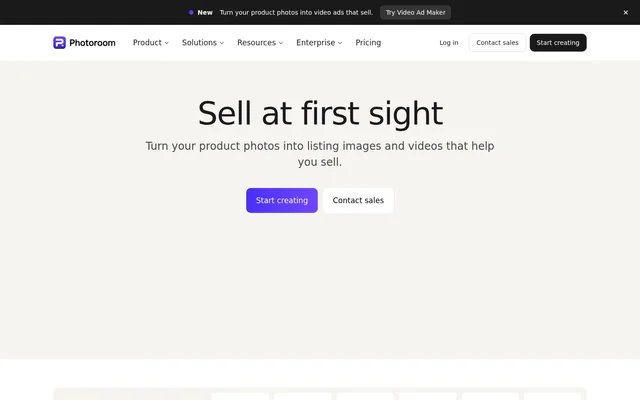
Photoroom is an AI photo and video editing tool for e-commerce product visuals. Photoroom helps sellers turn product photos into listing images, lifestyle shots, and advertising assets. The service supports solo entrepreneurs, growing brands, scaling businesses, and enterprise teams managing catalog production.
Photoroom combines image creation, editing, and automation within web and mobile workflows. Product-focused tools include background removal, AI-generated scenes, shadows, recoloring, and resizing. Photoroom also creates video ads from product photos, extending the workflow from static listing assets to content for social advertising channels.
What Photoroom can do
Photoroom provides tools for creating new product visuals and editing existing catalog images. Brand Library stores visual rules, while batch processing applies selected parameters across a catalog. Photoroom also supports exports and publishing workflows for marketplace listings, online stores, and social advertising formats.
- Photoroom generates product visuals from uploaded product photos.
- Photoroom removes backgrounds for white-background listings or transparent exports.
- Photoroom adds natural shadows and changes product colors.
- Photoroom places products in lifestyle scenes and seasonal contexts.
- Photoroom saves brand colors, logos, fonts, and layouts.
- Photoroom resizes images for Instagram, Amazon, Shopify, and other channels.
- Photoroom creates video ads with actors, music, and voiceover.
- Photoroom runs batch edits through the web app or API.
How Photoroom works
Photoroom starts image generation with an uploaded product photo. For batch workflows, users choose editing parameters, apply them across catalog images, and export marketplace-ready visuals. Brand rules can apply automatically on upload, including backgrounds, padding, colors, logos, and formats, with role-based access to the Brand Library.
Photoroom is available on iOS, Android, and the web. Photoroom also provides a REST API with endpoint-level control and native PIM, DAM, and cloud connectors. Marketplace Sync publishes to Shopify and marketplace feeds, while usage dashboards track credits by key, feature, and user.
Who Photoroom is for
Photoroom serves businesses selling products online, from sellers preparing their first listings to global teams handling catalog-scale production. Growing brands can create product photos and video ads, while scaling businesses can batch edit assets and publish to Shopify. Enterprise teams can access custom models, API workflows, and dedicated support.
- Photoroom helps sellers prepare clean product listing images.
- Photoroom helps brands create lifestyle shots and seasonal visuals.
- Photoroom helps catalog teams apply consistent styling across product images.
- Photoroom helps marketing teams turn product photos into social video ads.
Photoroom pricing and access
Photoroom offers a free starting option, and its application listing identifies subscription access. Photoroom directs enterprise customers to sales for custom AI models, dedicated capacity, custom endpoints, and support. Custom models trained on a customer's products and brand rules are available through Enterprise contracts.
Photoroom strengths and limitations
Photoroom combines product-image editing, brand controls, batch processing, and publishing integrations in a connected workflow. Photoroom also states that enterprise security includes independently audited SOC 2 Type 2 controls and GDPR compliance. Enterprise options include SLA-backed uptime and an output guarantee tied to agreed product-fidelity criteria.
- Photoroom limits custom catalog-trained models to Enterprise contracts.
- Photoroom uses credits, with dashboard alerts before exhaustion.
- Photoroom requires upfront fidelity criteria for its Enterprise Guarantee.
Photoroom FAQ
What is Photoroom?
Photoroom is an AI photo and video editor for e-commerce product content. Photoroom creates listing images, removes backgrounds, generates lifestyle scenes, batch edits catalogs, and turns product photos into video ads for sellers, brands, and enterprise teams.
Is Photoroom free?
Photoroom offers a free starting option, and its application listing identifies subscription access. Photoroom also provides enterprise sales for businesses seeking custom AI models, dedicated capacity, custom endpoints, and dedicated support.
Does Photoroom have an API or Shopify integration?
Photoroom provides a REST API for image production and batch editing, along with Marketplace Sync for publishing to Shopify and marketplace feeds. Photoroom also lists native PIM, DAM, and cloud connectors for connecting catalog inputs to visual production workflows.
Can Photoroom create video ads from product photos?
Photoroom turns product photos into video ads with actors, music, and voiceover. Photoroom supports video ad formats for Meta, TikTok, and YouTube, alongside its product-image editing and catalog production tools.
Which devices support Photoroom?
Photoroom is available on iOS, Android, and the web. Photoroom lists downloads through the Apple App Store and Google Play, while the web app and API support batch image editing and automated production workflows.
From the community
No reviews yet
Be the first to review this tool. What you write helps the next person choose.