What is Fotor?
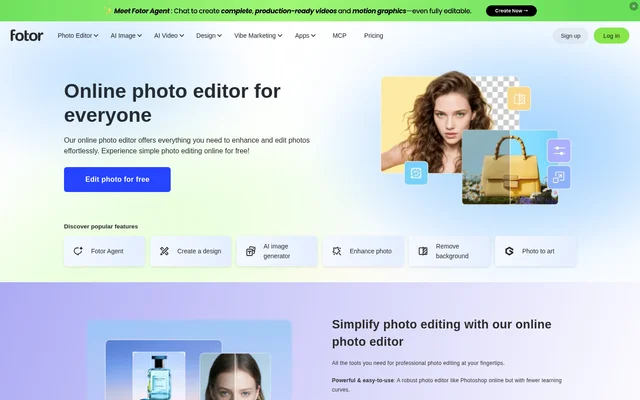
Fotor is an online photo editor that combines conventional image adjustments with AI editing, image generation, graphic design, and video tools. Fotor supports personal photo projects, professional profile images, and product marketing visuals. The website presents free online photo editing as a starting point, alongside tools for more specialized creative tasks.
Fotor includes controls for brightness and contrast as well as portrait retouching, filters, and image enhancement. Fotor also provides design assets and templates, allowing users to combine photo editing with layouts, typography, and decorative elements rather than limiting their work to adjustments to the original photograph.
What Fotor can do
Fotor covers image correction, content removal, generative editing, and visual composition. Fotor can improve existing photographs or create new images from written descriptions. The available tools also extend to videos, including image-to-video generation, video enhancement, and removal of backgrounds or unwanted objects from video footage.
- Fotor adjusts lighting, color, exposure, brightness, and contrast.
- Fotor enhances image quality, reduces blur, and restores old photos.
- Fotor removes image backgrounds, objects, people, and text.
- Fotor generates images from text descriptions.
- Fotor replaces selected image content using a text prompt.
- Fotor expands images beyond their original borders.
- Fotor edits and enhances photos in batches.
- Fotor creates collages with adjustable layouts and spacing.
How Fotor works
Fotor starts the online editing workflow with a photo upload or a drag-and-drop action. Fotor then provides adjustments for lighting, color, and exposure, plus effects and customization options such as text, stickers, and frames. For generative image creation, users describe the image they want in a text prompt.
Fotor uses different inputs for specific AI tasks. Object replacement involves brushing over an area and describing the desired addition or change. Avatar creation starts with uploaded selfies. Image expansion analyzes the existing picture and generates surrounding content, supporting changes in aspect ratio or the addition of visual content beyond the original frame.
Who Fotor is for
Fotor addresses personal photo editing, professional profile creation, and commercial visual production. Fotor describes headshots for LinkedIn and CVs, profile pictures for Instagram and messaging apps, and product imagery for e-commerce. Design tools such as flyer, logo, poster, and card makers support users producing graphics alongside edited photographs.
- Fotor helps individuals enhance personal photos and assemble memory collages.
- Fotor creates headshots and avatars for professional and social profiles.
- Fotor generates product backgrounds, fashion model photos, and listing images.
- Fotor produces product videos and marketing ad visuals.
Fotor pricing and access
Fotor offers free online photo editing and repeatedly presents a free editing entry point on the page. Fotor's supplied page text does not describe subscription plans, paid prices, or the access conditions for each individual AI tool. The free editing offer therefore should not be interpreted as confirmation that every listed capability is available without charge.
Fotor strengths and limitations
Fotor brings photo adjustments, AI content generation, batch editing, and design resources into the same product offering. Fotor's stock photos, stickers, icons, fonts, and collage layouts support projects that need more than image correction. The supplied page leaves tool-specific pricing and usage allowances unspecified, so those details cannot be established from this source.
Fotor FAQ
What is Fotor?
Fotor is an online photo editor with AI image generation, design, and video tools. Fotor supports photo enhancement, background removal, object replacement, collages, avatars, and product visuals for personal editing, professional profiles, and marketing projects.
Is Fotor free?
Fotor offers free online photo editing. Fotor's supplied page does not specify paid plan prices or explain which individual AI features are included in free access, so the free editing offer does not establish that every listed tool is free.
How do you edit photos with Fotor?
Fotor lets users upload or drag and drop a photo into the online editor, then adjust lighting, color, and exposure. Fotor also provides photo effects, text, stickers, and frames for further customization.
Can Fotor generate images from text?
Fotor generates images from text descriptions through an AI image generator. Fotor lists realistic photos, logos, characters, and digital illustrations as examples, and also offers prompt-based replacement of selected objects within existing photos.
Can Fotor edit multiple photos at once?
Fotor supports editing multiple photos through a batch photo editor. Fotor describes batch editing and enhancement as a way to work on photos together rather than processing each image separately.
Can Fotor create product marketing visuals?
Fotor provides tools for product backgrounds, AI photoshoots, listing images, fashion model photos, and product videos. Fotor also lists poster generation and tools that turn product links into video ads.
From the community
No reviews yet
Be the first to review this tool. What you write helps the next person choose.