What is Pixlr?
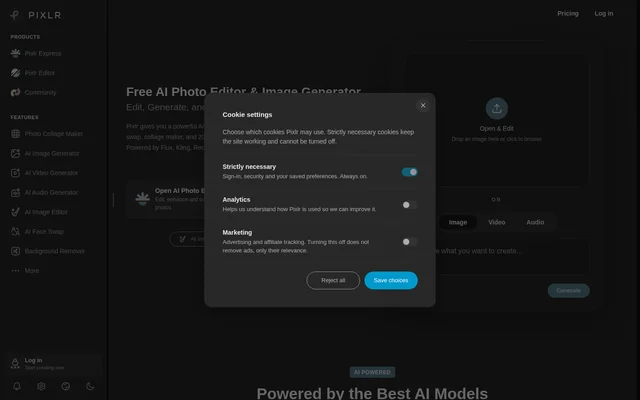
Pixlr is an online photo editing, design and AI media creation suite for beginners and experienced editors. Pixlr combines conventional image adjustments with generative tools for creating and changing visual content. Browser access requires no downloads or installation, while the page also describes mobile and desktop availability and lists iOS and Android support.
Pixlr covers photo editing alongside image, video and audio generation. Named models include Flux, Kling, Recraft, Google Veo and Qwen. This combination supports workflows such as generating an image from a text prompt, refining the result with editing tools and preparing visuals for social media, blogs or business content.
What Pixlr can do
Pixlr provides tools for changing existing media and generating new material from descriptions or reference images. Editing capabilities include subject isolation, object removal, AI-assisted expansion and natural-language instructions. Generative options extend beyond still images to video clips, speech and music, with separate tools for specific media tasks.
- Pixlr generates images from text prompts and transforms existing images with text-guided editing.
- Pixlr removes backgrounds and unwanted objects from photos.
- Pixlr fills selected areas and expands images beyond their original boundaries.
- Pixlr moves, resizes and rotates objects with generative transform.
- Pixlr upscales images to 25 megapixels and reduces image noise.
- Pixlr generates video from text and animates still images.
- Pixlr converts text to speech, transcribes audio and generates music.
- Pixlr creates photo collages and swaps faces in photos or videos.
How Pixlr works
Pixlr lets users open an image by dropping a file onto the page or browsing for a file. The page also provides direct links to the photo editor, image generator, video generator and collage maker. The free version can be used without an account, providing a browser-based starting point for editing.
Pixlr uses different inputs for different editing tasks. Generative fill starts with a selected area and a description of what to generate. Object removal uses a drawn selection around unwanted content, while the AI assistant applies changes described in natural language. Image-to-image generation combines an existing image with text-guided changes and style control.
Who Pixlr is for
Pixlr serves people making quick image adjustments as well as users carrying out more involved photo editing. The page identifies beginners and experienced editors, and highlights social media, blogging and image touch-ups. Customer examples also describe product photography, marketing visuals and small-business content creation, illustrating uses across personal and business work.
- Pixlr helps social media creators generate graphics and customize images.
- Pixlr supports product photo editing and marketing image preparation.
- Pixlr helps bloggers enhance visual content and make quick photo touch-ups.
- Pixlr supports designers combining generated images with photo editing.
Pixlr pricing and plans
Pixlr offers a free version without account requirements or charges, alongside paid Plus and Premium options. Plans start at $1.99/month. The paid suite advertises ad-free editing, AI credits, access to all image, video and audio models, private mode, a priority generation queue, and a library of fonts, templates and elements.
Pixlr also lists an Enterprise plan for larger corporations, covering users across an entire domain. Education offerings include both free and paid plans tailored to educational needs. The page directs users to its pricing page for subscription details rather than specifying individual prices or credit allocations for each named plan.
Pixlr strengths and limitations
Pixlr combines browser access, a no-account free version and several media creation tools in one suite. These are practical strengths for users who want to generate images and continue editing without installing software. However, the page distinguishes free access from paid benefits, so free availability should not be read as unrestricted access to every model and feature.
- Pixlr requires paid access for an ad-free editing experience.
- Pixlr lists access to all image, video and audio models as a paid-suite benefit.
- Pixlr reserves private mode and the priority generation queue for the paid suite.
Pixlr FAQ
What is Pixlr?
Pixlr is an online suite of photo editors, design tools and AI media tools for browser, mobile and desktop. Pixlr combines image editing with image generation, video creation, collage layouts and audio capabilities for beginners and experienced editors.
Is Pixlr free?
Pixlr offers a free version that does not require an account or payment. Pixlr also offers paid Plus, Premium and Enterprise plans, with plans starting at $1.99/month. Paid benefits include ad-free editing, AI credits, private mode and access to all image, video and audio models.
What AI photo editing tools does Pixlr offer?
Pixlr offers background removal, object removal, generative fill, generative expand, generative transform and natural-language editing. Pixlr also supports image generation, face swapping, noise reduction and AI upscaling up to 25 megapixels.
Can Pixlr generate video and audio?
Pixlr can generate videos from text or images and animate still images. Pixlr also offers video face swapping, text-to-speech, speech-to-text transcription and music generation from descriptions, including controls for music genre and mood.
Do you need to download Pixlr?
Pixlr can be used through a web browser without downloads or installation. Pixlr also describes mobile and desktop availability, and the page's application information lists Web, iOS and Android as supported operating systems.
Who is Pixlr for?
Pixlr is for beginners and experienced photo editors who need image adjustments, AI enhancements or generated visuals. Pixlr highlights social media content, blogging and quick touch-ups, while customer examples describe product photos, marketing images and small-business design work.
From the community
No reviews yet
Be the first to review this tool. What you write helps the next person choose.