What is ArcBox?
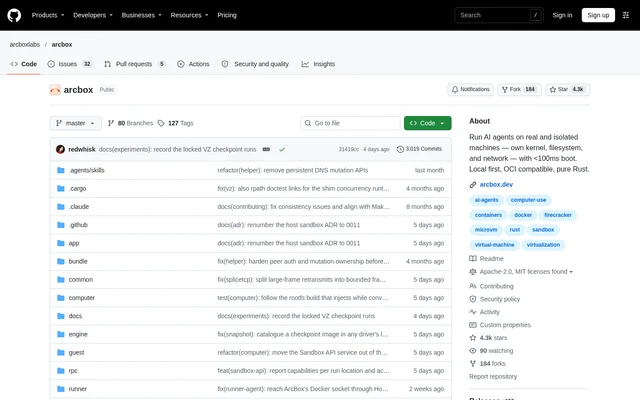
ArcBox is an open-source container and virtual machine runtime for macOS, built from scratch in Rust. ArcBox provides a local environment for developers running Docker containers, Kubernetes clusters, AI agent sandboxes and full operating-system guests. The project presents ArcBox as an open-source alternative to Docker Desktop and OrbStack.
ArcBox brings containers, sandboxes, Linux machines and macOS guests together under one daemon and one CLI. These workloads run locally on the Mac rather than requiring a Platform account or cloud control plane. ArcBox includes its own virtual machine monitor, VirtIO devices, filesystem sharing and network datapath, and remains in public beta.
What ArcBox can do
ArcBox supports container development alongside isolated code execution and complete virtual machines. Docker compatibility covers existing command-line workflows, while the local Kubernetes integration manages a k3s cluster. ArcBox also exposes guest files to host tools and provides resource monitoring for the System VM and running containers.
- ArcBox runs Docker containers, Compose projects and BuildKit/Buildx builds.
- ArcBox manages a local k3s cluster with kubectl integration.
- ArcBox creates disposable microVM sandboxes for AI agents, untrusted code and CI jobs.
- ArcBox runs Linux machines with independent kernels and persistent disks.
- ArcBox clones published base images into disposable macOS guests.
- ArcBox displays CPU, memory, disk and network usage through the CLI.
- ArcBox migrates images, named volumes, bridge networks and containers from Docker Desktop or OrbStack.
How ArcBox works
ArcBox installation is available through Homebrew or a shell installation script. The documented container workflow starts the daemon, enables Docker compatibility and then uses ordinary Docker commands. Enabling compatibility creates and activates the ArcBox Docker context, while a separate setup command installs and manages matching Docker, Buildx and Compose binaries.
ArcBox sandboxes can start from built-in templates, Docker images or Dockerfiles. The CLI supports command execution, file transfer, port exposure and checkpoint restoration. ArcBox also exposes these sandbox operations through gRPC on the daemon socket, allowing SDKs and custom tooling to drive local sandboxes directly.
Who ArcBox is for
ArcBox serves Mac developers who need local container workflows, isolated agent execution or complete guest environments. ArcBox supports Alpine, Arch Linux, Debian, Fedora and Ubuntu machines, with directory mounts, interactive shells and command execution. The Claude Code workflow attaches a terminal to an agent inside a disposable microVM.
- ArcBox supports developers moving existing Docker and Compose workflows to a local alternative.
- ArcBox isolates AI coding agents and untrusted binaries from host-mounted files.
- ArcBox provides local Kubernetes environments with host-accessible service ports.
- ArcBox supplies persistent Linux development machines and disposable macOS guests.
ArcBox pricing and access
ArcBox is distributed as an open-source project under MIT/Apache-2.0 licences, with installation available through Homebrew or the published installation script. ArcBox runs workloads locally without a required Platform account or cloud control plane. The repository provides documentation, command examples and issue reporting for the public beta.
ArcBox strengths and limitations
ArcBox combines Docker compatibility, local Kubernetes and multiple VM workflows in a shared runtime. Existing Docker scripts and Compose files work without changes, and Finder access makes guest data available to host tools. ArcBox also provides explicit isolation for agent workloads, but hardware, filesystem and lifecycle requirements restrict some operations.
- ArcBox sandboxes require Apple Silicon M3 or newer with macOS 15+ on the default VZ backend.
- ArcBox macOS guests require Apple Silicon, Virtualization.framework and an APFS data directory, with a limit of 2 guests per host.
- ArcBox refuses Linux machine clone and export operations while the machine is running.
- ArcBox remains in public beta.
ArcBox FAQ
What is ArcBox?
ArcBox is an open-source container and virtual machine runtime for macOS, written in Rust. ArcBox runs Docker containers, local Kubernetes, disposable AI agent sandboxes, full Linux machines and macOS guests through a shared local daemon and CLI.
Does ArcBox work with existing Docker commands and Compose files?
ArcBox exposes a Docker-compatible socket and proxies to a guest dockerd, allowing existing Docker CLI commands, scripts and Compose files to work without changes. ArcBox supports container builds, port forwarding, bind mounts, named volumes and interactive execution.
What does ArcBox require to run AI agent sandboxes?
ArcBox sandboxes require Apple Silicon M3 or newer with macOS 15+ on the default VZ backend because sandbox isolation uses nested virtualization. ArcBox reports a clear error on unsupported hosts. Each disposable sandbox has its own kernel and runs through Firecracker inside the guest.
Does ArcBox have an API for sandbox automation?
ArcBox exposes sandbox operations through gRPC on the local daemon socket, with server reflection enabled. ArcBox SDKs and custom tooling can create sandboxes, execute commands, transfer files, expose ports, receive lifecycle events and manage snapshots without a cloud control plane.
How do you install ArcBox?
ArcBox can be installed through Homebrew or the installation script published on its website. ArcBox documents starting the daemon and enabling Docker compatibility before running containers, with abctl doctor available to check the runtime and abctl --help available to inspect commands.
Is ArcBox open source?
ArcBox is an open-source project distributed under MIT/Apache-2.0 licences. ArcBox runs locally on a Mac and does not require a Platform account or cloud control plane. The repository provides installation instructions, documentation and public issue reporting.
From the community
No reviews yet
Be the first to review this tool. What you write helps the next person choose.