What is Archsynth?
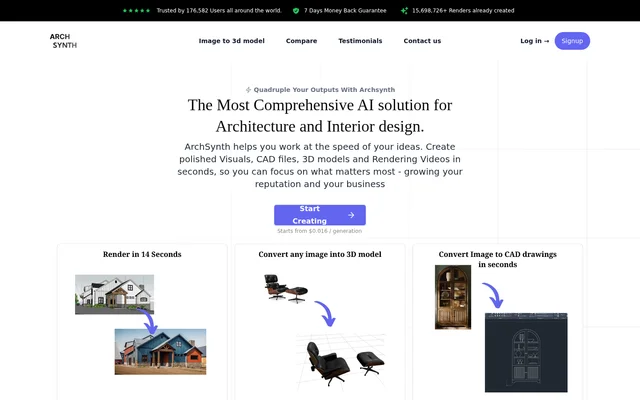
Archsynth is an AI tool for architectural rendering and interior design that produces visuals, CAD files, 3D models and rendering videos. Archsynth serves architects and designers working on concepts, presentation materials and client-facing designs. The website presents these capabilities together rather than as separate applications, with additional tools for image editing, textures and image analysis.
Archsynth supports both creating new images and modifying existing visual material. Sketches and wireframes can become rendered images, while text descriptions can generate visuals. Other features address interior design, virtual staging and landscaping. Examples on the website include sketch-to-render and image-to-3D outputs, alongside illustrations intended for presentations.
What Archsynth can do
Archsynth groups image generation, architectural visualization and editing capabilities into its Student and Pro plans. The feature comparison lists the same capabilities for both plans, including image-to-CAD, image-to-3D and an AI assistant. Dedicated feature descriptions also cover style-reference rendering, tileable textures and editing images through written instructions.
- Archsynth transforms sketches and wireframes into rendered images.
- Archsynth generates images from text descriptions and moodboards.
- Archsynth creates 3D models from images and drawings.
- Archsynth offers image-to-CAD and image-to-video generation.
- Archsynth fills missing image areas and removes backgrounds.
- Archsynth upscales images and edits them with text commands.
- Archsynth generates tileable textures and renders with style references.
- Archsynth analyzes uploaded images through a built-in AI assistant.
How Archsynth works
Archsynth uses different inputs for different tasks: sketches for rendered visuals, text descriptions for image generation, and images or drawings for 3D model creation. For image analysis, the website explicitly describes uploading an image and asking the built-in assistant questions. Archsynth also supports modifying images with simple textual commands.
Archsynth provides signup links as the access path. The website states that generated 3D models can be used in Sketchup, Rhino, Revit and 3ds max. This describes compatibility with those design applications; the page does not specify file formats or explain a direct integration workflow.
Who Archsynth is for
Archsynth is aimed at architecture and interior design work, with examples centered on drawings, models, interiors and presentation illustrations. Architects can use Archsynth to develop visual material for clients and stakeholders, while interior designers can use its interior design and virtual staging features. A Student plan also appears in the pricing comparison.
- Archsynth turns architectural sketches into visuals for presentations.
- Archsynth creates 3D models from drawings for design work.
- Archsynth supports interior design concepts and virtual staging.
- Archsynth generates textures and patterns for models.
Archsynth pricing and plans
Archsynth lists a Student plan at $10 per month and a Pro plan at $24 per month. Both columns include every capability in the website’s feature comparison, from sketch-to-render to the AI assistant. Archsynth also advertises a starting price of $0.016 per generation and a 7-day money-back guarantee. Signup links are provided on the page.
Archsynth strengths and limitations
Archsynth combines several tasks relevant to architectural visualization: rendering, image editing, CAD creation, model generation and video generation. Support for style references, moodboards and input color preservation adds options for developing design visuals. The main access constraint shown is paid pricing. Although both plans list the same features, the supplied page does not explain generation allowances or other differences between Student and Pro.
Archsynth FAQ
What is Archsynth?
Archsynth is an AI rendering and design tool for architecture and interior design. Archsynth creates visuals, CAD files, 3D models and rendering videos, with additional features for image editing, virtual staging, landscaping and image analysis.
How much does Archsynth cost?
Archsynth lists Student at $10 per month and Pro at $24 per month. Archsynth also advertises generation starting from $0.016 and a 7-day money-back guarantee. Both plans include the features shown in the website’s comparison.
Can Archsynth turn images into 3D models?
Archsynth creates 3D models from images and drawings. The website states that these models can be used in Sketchup, Rhino, Revit and 3ds max, but does not specify export file formats or a direct integration process.
What image editing tools does Archsynth include?
Archsynth includes AI inpainting, upscaling, background removal and editing through text commands. Archsynth also lists generative fill, photo enhancement and maintaining colors from an input image, alongside tools for creating images from sketches and text.
Can Archsynth analyze uploaded images?
Archsynth includes a built-in AI assistant that analyzes images. The website describes uploading an image and asking Archsynth questions about it, with the assistant providing answers. The assistant appears in both the Student and Pro feature lists.
From the community
No reviews yet
Be the first to review this tool. What you write helps the next person choose.