What is AudioTranscription?
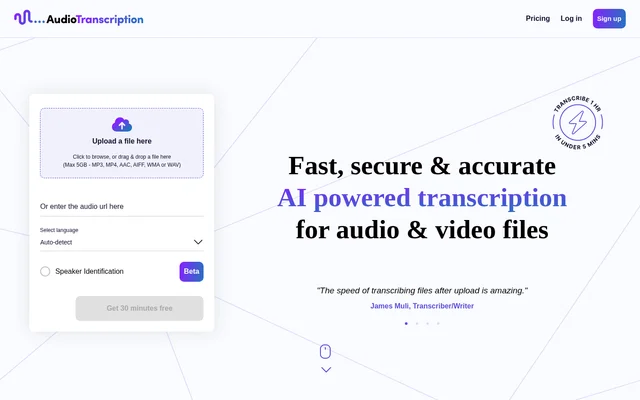
AudioTranscription is an AI-powered service for converting audio and video recordings into text. AudioTranscription combines file submission, language selection, optional speaker labeling and transcript downloads in an online workflow. The website includes testimonials from journalists, a transcriber and writer, and an editor, illustrating its relevance to people who work with recorded speech.
AudioTranscription also provides a dashboard for managing completed transcriptions rather than treating each download as a separate task. Users can return to stored transcripts, download different formats or delete records. The service offers free introductory transcription time and then charges through credit purchases rather than subscription plans.
What AudioTranscription can do
AudioTranscription supports transcription of both audio and video, including recordings containing multiple languages. The website states that an hour of recorded material can be transcribed in under 5 minutes. Available output options include different transcript layouts and timestamps, while optional speaker identification adds labels to distinguish speakers in the completed text.
- AudioTranscription accepts MP3, MP4, AAC, AIFF, WMA and WAV files.
- AudioTranscription accepts an audio URL as an alternative to a file upload.
- AudioTranscription offers speaker identification marked as beta.
- AudioTranscription provides timestamped transcript layouts.
- AudioTranscription sends transcription files by email.
- AudioTranscription lets users view, re-download and delete transcripts through a dashboard.
How AudioTranscription works
AudioTranscription starts with a file upload or an audio URL. Users can browse for a file or drag and drop a recording into the upload area, then select a language. Speaker identification can be selected before transcription so that speaker-labeling options are available when the transcript is complete.
AudioTranscription lets users preview the appearance of available download formats before choosing an output. Transcription files are also delivered by email. The website says completed transcriptions are stored securely and can be managed from the dashboard, including downloading another format or deleting a transcript when the user no longer needs the stored copy.
Who AudioTranscription is for
AudioTranscription addresses people who need text versions of recorded speech. The website's testimonials include journalists, a transcriber and writer, and an editor and program designer. Relevant workflows include preparing recorded material for writing, reviewing spoken content as text, and keeping downloadable transcripts available for later reference.
- Journalists can use AudioTranscription to convert recordings into text.
- Writers and editors can use AudioTranscription to review transcribed speech.
- Users can use AudioTranscription to distinguish speakers through optional labels.
- Users can use AudioTranscription to retain timestamped versions of recordings as text.
AudioTranscription pricing and plans
AudioTranscription offers 30 minutes free and then uses pay-as-you-transcribe credits. The website states that no plans, packages or commitments are required, while presenting selectable credit bundles. Users can top up when needed, and larger purchases receive discounts. The pricing interface offers currency selection between euros and dollars.
AudioTranscription lists euro bundles including €4 for 1 hour, €10 for 2.5 hours and €18 for 5 hours. Larger listed bundles include €32 for 10 hours, €70 for 25 hours, €120 for 50 hours and €200 for 100 hours. These are credit purchases rather than recurring subscription prices.
AudioTranscription strengths and limitations
AudioTranscription combines flexible credit purchases with several ways to retrieve and organize transcripts. Multiple upload formats, downloadable layouts, email delivery and dashboard access support different transcription workflows. The website also describes a REST API connected to an encrypted online portal, but presents API access with a waitlist rather than an immediate access path.
- AudioTranscription limits uploaded files to 5GB.
- AudioTranscription marks speaker identification as beta.
- AudioTranscription lists the text editor as coming soon.
- AudioTranscription directs prospective REST API users to a waitlist.
AudioTranscription FAQ
What is AudioTranscription?
AudioTranscription is an AI service that converts audio and video recordings into text. AudioTranscription accepts file uploads or an audio URL and provides downloadable transcripts, optional speaker labels, timestamped layouts and a dashboard for managing completed transcriptions.
Is AudioTranscription free?
AudioTranscription offers 30 minutes free, followed by pay-as-you-transcribe credit purchases. AudioTranscription lists bundles such as €4 for 1 hour and offers discounts on larger purchases, with no subscription plans or ongoing commitments required.
Which file formats does AudioTranscription support?
AudioTranscription accepts MP3, MP4, AAC, AIFF, WMA and WAV uploads, with a maximum file size of 5GB. AudioTranscription also provides an audio URL input and lets users download completed transcripts in different layouts, including timestamped versions.
Can AudioTranscription identify different speakers?
AudioTranscription offers optional speaker identification for labeling speakers in audio and video recordings. AudioTranscription marks this feature as beta, and users select speaker identification before transcription to make the corresponding options available with the completed transcript.
Does AudioTranscription have an API?
AudioTranscription describes a REST API that connects to an encrypted online portal for transcription or caption workflows, including large orders. AudioTranscription presents a waitlist for API access, so the page does not establish immediate availability.
How long does AudioTranscription take to transcribe a recording?
AudioTranscription states that a 1 hour audio or video file can be transcribed in under 5 minutes. AudioTranscription provides downloadable output in various formats and sends transcription files by email after processing.
From the community
No reviews yet
Be the first to review this tool. What you write helps the next person choose.