What is Audo Studio?
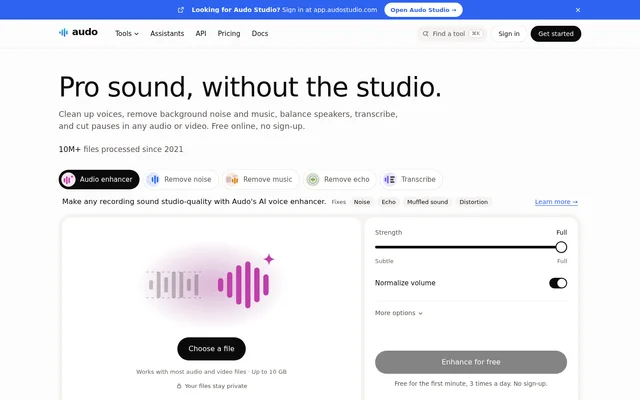
Audo Studio is an online audio and video toolkit for voice cleanup, transcription, captions, recording, and editing. Audo Studio combines speech-focused processing with tools for music, sound effects, file conversion, and video framing. The website presents workflows such as improving a quiet, echoey guest recording and removing pauses from a podcast.
Audo Studio runs in the browser without installed software and supports both audio and video uploads. Audo Studio also provides developer access through an API and assistant access through an MCP server. Free processing is available without sign-up, although the amount of a file processed and daily allowances depend on the tool.
What Audo Studio can do
Audo Studio provides tools for cleaning recordings, changing voices, producing captions, editing speech, and preparing video files. Audo Studio distinguishes voice enhancement from dedicated noise, echo, and music removal workflows. The broader collection also includes recording, loudness measurement, generated music, sound effects, and audio or video conversion.
- Audo Studio enhances voices and removes background noise or echo.
- Audo Studio separates dialogue, background music, and sound effects.
- Audo Studio transcribes speech with speaker identification and generates captions.
- Audo Studio cuts filler words, long pauses, and selected words or time ranges.
- Audo Studio creates voiceovers through text to speech, voice cloning, and voice design.
- Audo Studio resizes, crops, reframes, converts, and compresses video.
How Audo Studio works
Audo Studio starts with an uploaded audio recording or video file. For voice enhancement, users can keep Strength at Full to rebuild the voice or move toward Subtle to blend the original sound back in. Audo Studio provides before-and-after listening and downloads, with output choices including WAV, MP3, M4A, and FLAC.
Audo Studio supports assistant-driven workflows through an MCP server connected to ChatGPT, Claude, Claude Code, Codex, or Cursor. Users can request cleanup, transcription, or editing in plain language, then download the result or refine cuts in the browser editor. Developers can obtain an API key to access the tools from an application.
Who Audo Studio is for
Audo Studio supports people working with spoken recordings, podcasts, voiceovers, and captioned video. Audo Studio addresses practical tasks such as making speakers equally audible, removing music beneath dialogue, and turning a wide video into a vertical clip with captions. Developers can also add the processing tools to their own applications.
- Audo Studio helps podcast editors remove filler words and long pauses.
- Audo Studio helps video creators retain speech while removing background music.
- Audo Studio helps voiceover users turn scripts into spoken audio.
- Audo Studio gives developers programmatic access to audio and video processing.
Audo Studio pricing and plans
Audo Studio offers limited free usage and pay-as-you-go credits without a subscription. Browser editing and loudness checking are always free. Voice enhancement and noise removal process the first minute free, 3 times a day; transcription processes the first 2 minutes free, 3 times a day. Other tools have different allowances.
Audo Studio prices credits at 1¢ each, with credit packs starting at $5. Paid processing supports whole files up to 10 hours, and charges apply only when a job succeeds. Credits never expire. The pricing page states that one balance covers the website and assistant usage, while API access is also pay as you go.
Audo Studio strengths and limitations
Audo Studio combines browser editing, speech cleanup, transcription, and assistant access without requiring software installation. Audo Studio states that files remain private and specifies retention windows rather than indefinite storage. The free allowances make individual tools accessible without sign-up, while pay-as-you-go processing avoids a recurring subscription.
- Audo Studio limits free processing by file duration and daily usage.
- Audo Studio removes music and other sounds during voice enhancement, so that workflow is intended for voices.
- Audo Studio deletes uploads after 24 hours and free results after 1 hour.
- Audo Studio requires paid credits for processing beyond free allowances.
Audo Studio FAQ
What is Audo Studio?
Audo Studio is an online AI audio and video toolkit for voice enhancement, noise removal, transcription, captions, and editing. Audo Studio also includes voice generation, music and sound effects tools, recording, conversion, and developer access through an API.
Is Audo Studio free?
Audo Studio offers free browser editing and loudness checking, plus limited free processing for other tools without sign-up. Voice enhancement covers the first minute, 3 times a day. Longer processing uses pay-as-you-go credits, with no subscription and credit packs starting at $5.
Can Audo Studio remove music from a video?
Audo Studio can separate dialogue, background music, and sound effects from an uploaded video or audio recording. Audo Studio lets users download the video without music along with separate dialogue, music, and effects tracks.
Does Audo Studio work with ChatGPT or Claude?
Audo Studio connects to ChatGPT, Claude, Claude Code, Codex, and Cursor through an MCP server. Audo Studio supports requests to clean speech, transcribe with speaker diarization, remove filler words and pauses, and run multi-step workflows, with results available to download or refine in the browser editor.
What files does Audo Studio support?
Audo Studio supports audio formats including WAV, MP3, M4A, AAC, FLAC, OGG, Opus, WebM, and AIFF, plus MP4, MOV, MKV, WebM, and AVI video. Audo Studio accepts files up to 10 GB without an account and up to 10 hours when signed in.
What happens to files uploaded to Audo Studio?
Audo Studio states that uploaded files stay private. Audo Studio deletes uploads after 24 hours and free results after 1 hour, so the service does not retain those files indefinitely.
From the community
No reviews yet
Be the first to review this tool. What you write helps the next person choose.