What is Trebble?
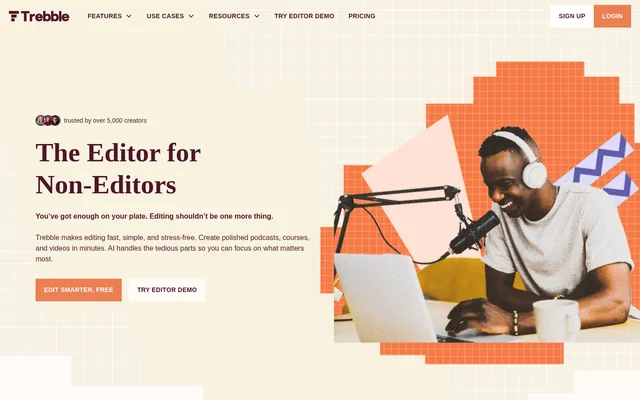
Trebble is an AI-assisted audio and video editor for creators who prefer editing text to manipulating waveforms or timelines. Trebble lets users highlight and delete unwanted words to change a recording. The service focuses on spoken content, including podcasts, courses, coaching recordings, and videos, with automated cleanup tools intended to reduce manual editing work.
Trebble combines text-based editing with speech enhancement and recording cleanup. The website identifies solo creators as the main audience, including people who handle their own podcast production or create educational and social media content. Trebble is described as browser-based in a customer testimonial, and the website offers both a free starting option and an editor demo.
What Trebble can do
Trebble provides tools for changing the content of a recording and improving spoken-audio quality. Text-based editing handles unwanted words, while automated cleanup addresses filler words, pauses, and repeated material. Trebble also introduces DeepCut as an AI editing feature that reviews recordings, spots distractions, drafts a plan, and adapts that plan to the creator’s goals.
- Trebble edits audio and video when users highlight and delete text.
- Trebble enhances speech quality with Vocal Glow.
- Trebble automatically detects and removes filler words such as um, uh, and like.
- Trebble locates and removes long silences and awkward pauses.
- Trebble supports cutting repetitions and rambles.
- Trebble uses DeepCut to review recordings and draft editing plans.
How Trebble works
Trebble’s editing workflow centers on the text associated with an audio or video recording. Users highlight words they do not want and delete them to edit the recording, rather than cutting sections on a timeline. Trebble supports recording and uploading audio, and users can continue editing audio they have already transcribed without a limit on those subsequent edits.
Trebble offers transcription in multiple languages and regional variants, including French-free examples such as Afrikaans, Albanian, Arabic, Chinese, Dutch, and English. The listed English options include Australian, British, Indian, Irish, New Zealand, Scottish, South African, US, and Welsh variants. Trebble also provides high-quality audio export across the plans shown on the pricing page.
Who Trebble is for
Trebble targets solo creators who produce spoken recordings without wanting a complex editing workflow. The website specifically names podcasters, coaches, course creators, teachers, content creators, social media experts, real estate or mortgage professionals, and wellness or mindfulness guides. These audiences can use the editing and cleanup tools to prepare recordings for their respective listeners, students, clients, or viewers.
- Trebble helps solo podcasters remove unwanted speech and pauses.
- Trebble supports course creators and teachers editing recorded lessons.
- Trebble helps coaches and mindfulness guides clean up spoken recordings.
- Trebble supports content creators editing audio and video.
Trebble pricing and plans
Trebble offers a free Basic plan and paid Starter and Pro plans. Basic includes 30 minutes of transcription per month, Starter includes 5 hours, and Pro includes 20 hours. All plans include the full editing suite and high-quality audio export. The free plan requires no credit card, and its monthly transcription allowance starts from the registration day.
Trebble’s free-plan FAQ also lists unlimited recording, unlimited hosting, Magic Sound Enhancer, AI-powered noise reduction, and a music and sounds catalog. Users can cancel a paid plan through settings and retain premium features until the billing cycle ends. Monthly subscription downgrades apply at the next billing cycle, while annual downgrades apply at the following annual billing cycle.
Trebble strengths and limitations
Trebble’s main strength is the combination of text-based editing and automated speech cleanup in an editing suite available across all plans. The free plan provides a way to use the editor without entering payment details. Trebble separates transcription allowances from continued editing of already-transcribed audio, which remains available without an additional editing-time limit stated in the FAQ.
- Trebble limits free transcription to 30 minutes each month.
- Trebble requires a paid plan for a larger monthly transcription allowance.
- Trebble applies subscription downgrades at the next applicable billing cycle.
Trebble FAQ
What is Trebble?
Trebble is a browser-based AI audio and video editor that lets users edit recordings by changing text. Trebble includes speech enhancement, filler-word removal, silence trimming, and tools for cutting repetitions and rambles, with a focus on solo creators producing spoken content.
Is Trebble free?
Trebble offers a free Basic plan with 30 minutes of transcription each month, the full editing suite, and high-quality audio export. Trebble does not require a credit card for the free plan. Paid Starter and Pro plans provide larger monthly transcription allowances.
How does text-based editing work in Trebble?
Trebble lets users highlight and delete unwanted words in text to edit the corresponding audio or video recording. Trebble presents this workflow as an alternative to waveform editing and timeline cutting, alongside automated removal of filler words and unwanted pauses.
Who is Trebble for?
Trebble is designed for solo podcasters, coaches, course creators, teachers, content creators, social media experts, real estate or mortgage professionals, and wellness or mindfulness guides. Trebble supports editing and cleaning up spoken audio and video for these audiences.
What is included in Trebble's free transcription allowance?
Trebble provides 30 minutes of audio transcription each month on the free plan, with the monthly period starting on the registration day. Trebble allows users to record and upload unlimited audio and continue editing audio they have already transcribed.
Can Trebble subscriptions be canceled or downgraded?
Trebble allows subscription cancellation and downgrades through user settings. Trebble retains premium-feature access until the billing cycle ends after cancellation. Monthly downgrades take effect during the next billing cycle, while annual downgrades take effect on the following annual billing cycle.
From the community
No reviews yet
Be the first to review this tool. What you write helps the next person choose.