What is TimeBolt?
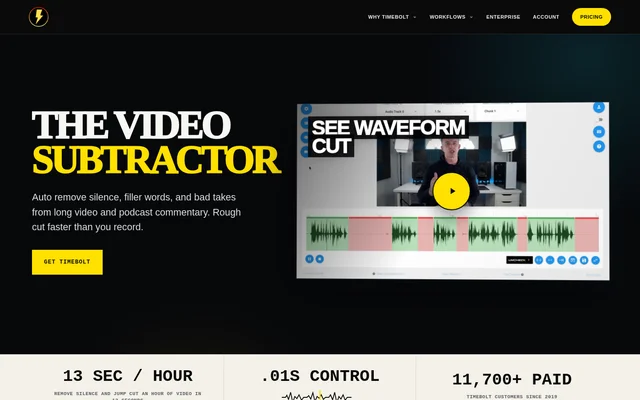
TimeBolt is video editing software for macOS and Windows that combines local editing with built-in NVIDIA Parakeet transcription. TimeBolt supports speech-focused editing tasks, including removing silence, filler words, bad takes and repeats. Caption correction and timeline review are also part of the listed capabilities, making the software relevant to people working with spoken video content.
TimeBolt distinguishes local transcription from software pricing. The product description states that transcription requires no audio upload and carries no additional per-minute charge, while the software itself is priced separately. The available information describes editing and transcription capabilities but does not explain individual plan entitlements.
What TimeBolt can do
TimeBolt combines transcription, speech cleanup and caption work within a video editing product. The listed removal tools address both pauses and spoken material, including user-defined phrases. TimeBolt also provides reviewable timeline edits, so reviewing cuts is an explicitly supported capability alongside removing unwanted content.
- TimeBolt transcribes on-device using NVIDIA Parakeet.
- TimeBolt removes silence from video.
- TimeBolt removes filler words and custom phrases.
- TimeBolt removes bad takes and repeats.
- TimeBolt supports caption correction and SRT export.
- TimeBolt provides reviewable timeline edits.
How TimeBolt works
TimeBolt uses built-in NVIDIA Parakeet for native on-device transcription on its listed desktop operating systems, macOS and Windows. Local transcription requires no audio upload, separate WhisperX installation or MCP setup. The editing capabilities include removing unwanted speech and silence, correcting captions, and reviewing cuts on the timeline; the source does not provide a detailed installation or editing tutorial.
Who TimeBolt is for
TimeBolt is relevant to people editing videos that contain spoken material. The combination of transcription, filler word removal, bad take removal and caption correction supports cleanup of recorded speech. TimeBolt also supports people who need SRT caption export or want to review cuts on a timeline rather than work only with transcription text.
- TimeBolt supports cleaning up pauses and filler words.
- TimeBolt supports removing repeated speech and bad takes.
- TimeBolt supports correcting captions and exporting SRT files.
TimeBolt strengths and limitations
TimeBolt combines local transcription with concrete video cleanup and caption capabilities. Avoiding audio uploads and additional per-minute transcription charges are stated benefits, as is the absence of a separate WhisperX installation or MCP setup requirement. The available information is less complete about purchasing: offer amounts are listed, but plan contents and a working checkout are not supplied.
- TimeBolt lists macOS and Windows as supported operating systems.
- TimeBolt does not provide individual plan details in the supplied text.
- TimeBolt's supplied ThriveCart checkout link returns a missing-page message.
TimeBolt FAQ
What is TimeBolt?
TimeBolt is video editing software for macOS and Windows with built-in NVIDIA Parakeet transcription. TimeBolt supports removing silence, filler words, bad takes, repeats and custom phrases, as well as correcting captions, exporting SRT files and reviewing timeline edits.
Does TimeBolt upload audio for transcription?
TimeBolt does not require audio uploads for local transcription. TimeBolt uses native on-device NVIDIA Parakeet transcription, with no additional per-minute charge and no requirement for a separate WhisperX installation or MCP setup.
Can TimeBolt remove filler words and repeated speech?
TimeBolt supports removing filler words, repeats, bad takes, silence and custom phrases. TimeBolt also provides reviewable timeline edits, allowing cuts to be reviewed alongside its speech cleanup and caption correction capabilities.
Does TimeBolt support captions and SRT export?
TimeBolt supports caption correction and SRT export. TimeBolt combines those caption capabilities with local NVIDIA Parakeet transcription and reviewable timeline edits, alongside tools for removing silence and unwanted spoken material.
What operating systems does TimeBolt support?
TimeBolt lists macOS and Windows as supported operating systems. TimeBolt combines local video editing with built-in on-device transcription, and the supplied product information does not list other supported operating systems.
From the community
No reviews yet
Be the first to review this tool. What you write helps the next person choose.