What is Cleanvoice AI?
Cleanvoice AI is an AI editing and cleanup tool for spoken audio and video recordings. Cleanvoice AI serves podcasters, media agencies, businesses, audio engineers and video editors who need to remove distracting sounds or tighten spoken content. The website also presents examples involving vocals, audiobooks, voiceovers, interviews and phone recordings.
Cleanvoice AI combines automatic editing, noise cleanup and voice enhancement in an upload, clean and export workflow. The service is presented as usable without editing experience, while timeline export and developer interfaces provide options for editors and technical users who want to continue working outside the initial cleanup workflow.
What Cleanvoice AI can do
Cleanvoice AI handles both speech editing and recording cleanup. Cleanvoice AI can identify filler words and long pauses, remove unwanted sounds, and enhance a raw recording. For conversations recorded on separate tracks, automatic multitrack editing applies cuts across speakers while keeping those tracks synchronized.
- Cleanvoice AI removes background noise, hum and echo.
- Cleanvoice AI cuts filler words, stutters, hesitations and long silences.
- Cleanvoice AI removes mouth sounds and breaths.
- Cleanvoice AI enhances and normalizes audio.
- Cleanvoice AI edits multiple speaker tracks in sync.
- Cleanvoice AI exports editable timelines for further adjustments.
- Cleanvoice AI offers transcription and podcast summarization.
How Cleanvoice AI works
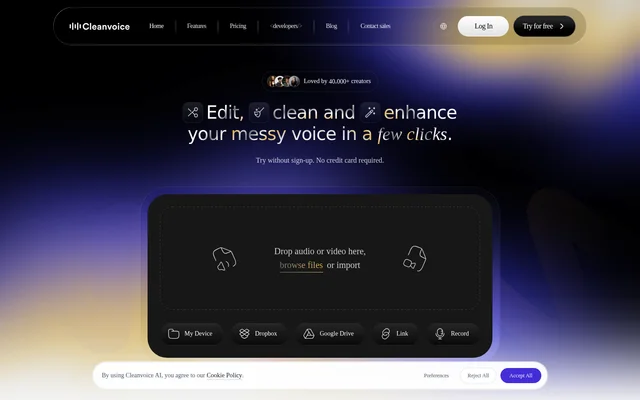
Cleanvoice AI accepts audio or video through drag-and-drop upload, file browsing, Dropbox, Google Drive, a link or direct recording. The stated workflow is to upload a recording, clean the content and export the result. Timeline export provides a way to open the resulting cuts in another editor and adjust them manually.
Cleanvoice AI also provides developer access through Python, JavaScript and REST. The Python example processes a recording with options for filler words, stutters, mouth sounds, hesitations, long silences, breaths, noise removal, normalization and studio sound. The example then downloads the cleaned audio, and the page provides a path to obtain an API key.
Who Cleanvoice AI is for
Cleanvoice AI is intended for both people editing their own recordings and professionals handling audio or video for others. The website explicitly names podcasters, media agencies, businesses, audio engineers and video editors. Its recording examples also cover audiobook narration, voiceover work, calls, interviews and recordings made on a phone.
- Podcasters can remove filler words and dead air from interviews.
- Narrators and voiceover artists can clean breaths and mouth sounds.
- Video editors can reduce unwanted noise in recorded footage.
- Audio editors can export automatic cuts for further adjustment.
- Developers can integrate audio processing through the API.
Cleanvoice AI pricing and free access
Cleanvoice AI offers a free trial for uploaded audio or video, with no sign-up or credit card required to try the service. Cleanvoice AI also provides an additional 30 minutes of free credits after sign-up. The supplied page does not specify paid plan names, subscription prices or ongoing usage allowances.
Cleanvoice AI strengths and workflow considerations
Cleanvoice AI combines automatic cleanup with options for continued editing, including synchronized multitrack cuts and timeline export. Multiple import methods and developer interfaces accommodate different workflows. The website states GDPR compliance, EU data storage and ISO 27001 certification. API use involves obtaining an API key, while editors who want to revise exported cuts can continue in another editor.
Cleanvoice AI FAQ
What is Cleanvoice AI?
Cleanvoice AI is an AI audio and video editing tool that removes background noise, filler words, long pauses, mouth sounds and breaths. Cleanvoice AI also supports voice enhancement, synchronized multitrack editing, transcription, podcast summarization and editable timeline export.
Can you try Cleanvoice AI for free?
Cleanvoice AI offers a free trial for audio and video editing without sign-up or a credit card. Cleanvoice AI provides an additional 30 minutes of free credits once a user signs up.
Who is Cleanvoice AI for?
Cleanvoice AI is for podcasters, media agencies, businesses, audio engineers and video editors. Cleanvoice AI also presents recording examples for audiobook narration, voiceovers, calls, interviews and phone recordings, covering both individual creators and professional editing workflows.
Does Cleanvoice AI support multitrack editing?
Cleanvoice AI supports automatic multitrack editing that removes filler words and dead air across speaker tracks while keeping them synchronized. Cleanvoice AI also exports the cuts as a timeline that can be opened and adjusted in another editor.
Does Cleanvoice AI have an API or cloud imports?
Cleanvoice AI provides developer access through Python, JavaScript and REST, with an API key available through the website. Cleanvoice AI also accepts imports from Dropbox, Google Drive and links, alongside device uploads and direct recording.
Where does Cleanvoice AI store data?
Cleanvoice AI states that data is stored in the EU. Cleanvoice AI also states GDPR compliance and ISO 27001 certification on the supplied page, alongside its audio cleanup, editing and enhancement capabilities.
From the community
No reviews yet
Be the first to review this tool. What you write helps the next person choose.