What is Auri?
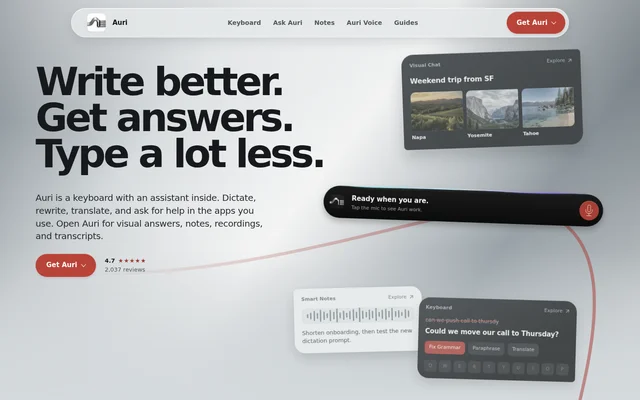
Auri is an AI keyboard and assistant for writing, dictation, chat, transcription, and note-taking across Apple devices. Auri serves people who want help composing messages, translating text, recording ideas, or organizing spoken content. The available apps cover iPhone, iPad, Mac, and Apple Watch, with different capabilities on each device.
Auri places writing tools and assistant access inside the iOS keyboard, while the main app provides visual answers, notes, recordings, and transcripts. On Mac, Auri carries chats and notes, while the separate Auri Voice app focuses on dictation at the cursor and meeting notes.
What Auri can do
Auri combines text editing, speech input, and assistant tasks rather than limiting the keyboard to voice entry. Auri also formats chat answers as visual content and converts recordings into written outputs. The keyboard supports swipe typing and multiple layouts, including QWERTY, AZERTY, QWERTZ, and Dvorak.
- Auri corrects grammar, paraphrases text, translates, and helps continue writing.
- Auri supports keyboard typing in 85 languages, dictation and transcription in 58, and translation into 31.
- Auri Chat presents charts, comparisons, steps, tables, and interactive screens.
- Auri transcribes recordings, imported audio or video, and YouTube links with speaker labels.
- Auri turns transcripts into summaries, meeting notes, and to-do lists.
- Auri can read and create calendar events and reminders, look up contacts, and search and send Gmail.
- Auri Voice removes fillers and false starts, adds punctuation, and inserts dictated text at the Mac cursor.
How Auri works across Apple devices
Auri is available through the App Store for iPhone, iPad, and Apple Watch. To enable the iOS keyboard, users open Settings, Auri, and Keyboards, then enable Allow Full Access. Holding the globe key on a keyboard lets users select Auri. Full Access allows server connections for dictation and writing tools.
Auri Voice starts Mac dictation through a keyboard shortcut and places the resulting text in the app being used. Auri also accepts voice recordings, imported media, and YouTube links for transcription. Notes, recordings, and transcripts sync through iCloud, chats follow the Auri account, and added words carry across Auri and Auri Voice.
Who Auri is for
Auri is for Apple device users who need writing support, multilingual input, or a way to turn speech into organized text. The source describes uses ranging from email replies and social posts to work transcription and meeting notes. Apple Watch support also lets users ask questions, record ideas, or dictate to an iPhone or Mac.
- Auri helps message and email writers revise grammar and wording without leaving the app.
- Auri helps multilingual users translate text and switch between supported keyboard languages.
- Auri helps meeting participants convert recordings into summaries and action checklists.
- Auri helps Mac users dictate text instead of typing.
Auri pricing and plans
Auri has a free plan covering the keyboard, dictation, writing tools, Ask Auri, chat, transcription, and notes, with minutes and daily uses counted. Auri Pro removes those limits and costs $10 a month billed yearly at $120, or $17 monthly. The subscription covers iPhone, iPad, and Apple Watch; Auri Voice for Mac is a separate app with its own free plan.
Auri strengths and limitations
Auri combines in-app writing assistance with transcription, visual answers, and cross-device notes. Auri states that typed content is not collected, notes and chats are encrypted in the user's iCloud, and AI requests carry no personal identifiers. Auri Voice can run locally on Mac, while iPhone offers offline recording transcription through an on-device English engine.
- Auri limits minutes and daily uses on the free plan.
- Auri uses the cloud for keyboard dictation, writing tools, and chat.
- Auri keeps the keyboard out of password and card fields by design.
- Auri requires users to permit connected sources and confirm assistant actions.
Auri FAQ
What is Auri?
Auri is an AI keyboard and assistant for iPhone, iPad, Mac, and Apple Watch. Auri provides grammar correction, paraphrasing, translation, dictation, visual chat, transcription, and notes, with keyboard-based assistance on iOS and a separate Mac dictation app called Auri Voice.
Is Auri free?
Auri offers a free plan for the keyboard, dictation, writing tools, Ask Auri, chat, transcription, and notes, subject to minute and daily-use limits. Auri Pro removes those limits for $10 a month billed yearly at $120, or $17 monthly. Auri Voice for Mac has its own free plan.
Does Auri work offline?
Auri supports offline recording transcription on iPhone through an on-device English engine. Auri Voice can also dictate offline on Mac using a local speech engine. Auri keyboard dictation, writing tools, and chat use the cloud, so offline support does not cover every feature.
Can Auri transcribe meetings and YouTube videos?
Auri transcribes meetings and YouTube videos from recordings, imported audio or video files, or pasted YouTube links. Auri includes speaker labels and can turn the resulting transcript into meeting notes, a summary, or a checklist.
Does Auri collect what users type?
Auri states that typed content is not collected and nothing is used to train AI models. Auri stores encrypted notes and chats in the user's iCloud and sends AI requests without personal identifiers. Auri Voice can run locally or send encrypted request content to a selected cloud provider.
How do you enable the Auri keyboard on iPhone?
Auri is enabled under Settings, Auri, Keyboards, with Allow Full Access turned on. Users then hold the globe key on a keyboard and select Auri. Full Access lets Auri reach its servers for dictation and writing tools; the keyboard does not appear in password or card fields.
From the community
No reviews yet
Be the first to review this tool. What you write helps the next person choose.