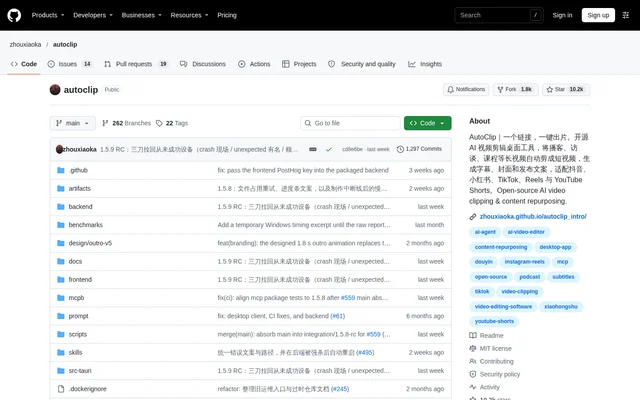
What is AutoClip?
AutoClip is an open-source project for AI video clipping and content repurposing. AutoClip turns longer podcasts, interviews, courses and talking-head recordings into shorter videos, alongside subtitles, covers and publishing text. The project provides a desktop application and alternative deployment options for people who want a self-hosted service or automated processing.
AutoClip supports output for Douyin, Xiaohongshu, TikTok, Reels, YouTube Shorts, Bilibili and YouTube. Editing and rendering happen on the user's computer rather than requiring a cloud rendering service. Analysis and transcription can use local models or configured cloud providers, depending on the user's setup.
What AutoClip can do
AutoClip combines clip selection with the assets needed to prepare a video for publication. AutoClip applies the selected platform's aspect-ratio and duration requirements, ranks candidate clips and keeps additional candidates available for later generation. Users can review the results and enter the editor when adjustments are needed.
- AutoClip generates subtitles, covers, titles, descriptions and hashtags.
- AutoClip follows the speaker while preserving the full frame in shots without people.
- AutoClip offers interview-style and full-screen podcast portrait layouts.
- AutoClip exports ZIP publishing packages for generated clips.
- AutoClip accepts existing subtitles or local and cloud transcription.
- AutoClip supports posting through connected accounts.
How AutoClip works
AutoClip's desktop workflow starts with installing a release and configuring an analysis model in settings. Cloud providers require an API key, while Ollama and LM Studio require a running local model service. A bundled example project lets users inspect sample results without an API key before processing their own material.
AutoClip users paste a video link, select a destination platform and generate clips, then preview subtitles, framing and content completeness before exporting or posting. Desktop installers include Python and FFmpeg. Docker supports a self-hosted web interface, while CLI and MCP provide batch processing and agent access through the same production pipeline.
Who AutoClip is for
AutoClip is aimed at workflows involving interviews, podcasts, courses and talking-head material, which the repository identifies as its main validated scenarios. AutoClip also provides a visual-recognition option for gameplay recordings or material with less speech, using a model that supports images, but users still need to check the selected segments.
- Podcast creators can produce short excerpts with subtitles and publishing copy.
- Interview editors can prepare portrait clips with speaker-following framing.
- Course creators can repurpose longer lessons into shorter videos.
- Automation users can run batch workflows through CLI or MCP.
AutoClip pricing and access
AutoClip is free software distributed under the MIT license, with downloads available through GitHub Releases. Cloud analysis, transcription and AI image generation are charged by the selected service provider and require the user's own credentials. Automatically designed covers do not call paid image-generation services by default.
AutoClip supports local analysis through Ollama or LM Studio without a cloud API key, although suitable hardware is required. Existing author subtitles can bypass transcription. Direct publishing requires the user's own Bilibili or Upload-Post account, and completed videos are uploaded to connected platforms only when the user chooses to submit them.
AutoClip strengths and limitations
AutoClip combines local editing and rendering with a choice of local or cloud model services. AutoClip also provides desktop, web and automation paths rather than restricting use to a single interface. Local processing does not mean every workflow stays offline: cloud analysis sends relevant subtitles and copy, cloud transcription sends audio, and some visual tasks send sampled frames.
- AutoClip has no desktop installer for Intel Mac or Linux; those users use Docker or CLI.
- AutoClip requires users to review generated subtitles, framing and segment completeness.
- AutoClip's maintainer does not offer immediate support or individual deployment services.
AutoClip FAQ
What is AutoClip?
AutoClip is an open-source AI video clipping tool that repurposes long podcasts, interviews, courses and talking-head videos into shorter clips. AutoClip also generates subtitles, covers, titles, descriptions and hashtags, with desktop, Docker, CLI and MCP access.
Is AutoClip free?
AutoClip is free software released under the MIT license. Cloud analysis, transcription and AI image generation are billed separately by the selected provider and require the user's credentials. Local analysis through Ollama or LM Studio does not require a cloud API key but needs suitable hardware.
Does AutoClip upload videos to the cloud?
AutoClip performs editing and rendering locally, but cloud features send the data they require: subtitles and copy for analysis, audio for transcription, and sampled frames for certain visual tasks. AutoClip uploads completed videos to connected publishing platforms only when users choose to submit them.
Which operating systems does AutoClip support?
AutoClip provides desktop installers for macOS on Apple Silicon and Windows x64, with Python and FFmpeg included. AutoClip does not currently provide an Intel Mac desktop installer. Intel Mac and Linux users can use Docker or CLI instead.
Can AutoClip work with local AI models?
AutoClip supports local analysis through Ollama and LM Studio, plus local transcription using Whisper or SenseVoice. AutoClip can also use existing author subtitles to skip transcription. Local analysis and local transcription avoid the corresponding cloud APIs, although local models require suitable hardware.
Does AutoClip support automation and MCP?
AutoClip provides CLI and MCP access for batch processing and agent workflows, using the same clipping pipeline as the desktop application. AutoClip documents MCP client configuration and OpenCode setup. CLI and MCP installation requires Python, FFmpeg and FFprobe.
From the community
No reviews yet
Be the first to review this tool. What you write helps the next person choose.