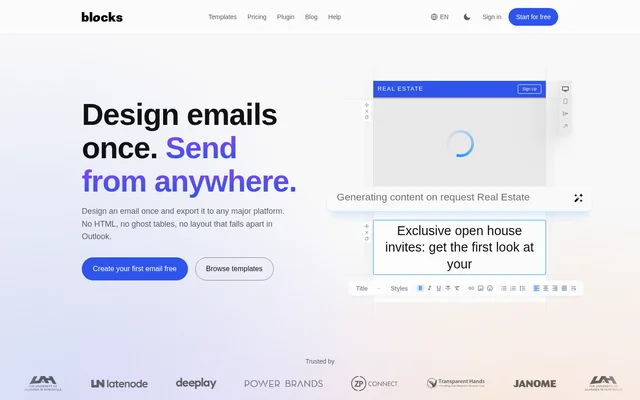
What is Blocks?
Blocks is a web-based email design tool for creating responsive messages without hand-writing HTML tables. Blocks serves marketers building campaigns, designers preparing reusable templates and teams producing email across brands. Blocks also offers an embeddable editor for software products that include email creation, such as marketing platforms, CRMs and shop administration tools.
Blocks separates email design from the sending destination. Users build a message in the editor and move the finished template to a supported email platform or export format. The website lists 395 ready-made templates, 59 export platforms and 100+ building blocks, with templates covering welcome messages, abandoned carts, order confirmations and seasonal promotions.
What Blocks can do
Blocks combines visual email construction with content editing, previews and export tools. Blocks lets users add, configure and reorder saved email parts rather than build every message from an empty file. Paid plans add AI writing and image tools, while collaboration and access controls depend on the selected plan.
- Blocks edits email copy directly in the preview.
- Blocks rewrites paragraphs, sharpens subject lines and generates illustrations with AI tools.
- Blocks converts imported HTML into editable email blocks.
- Blocks previews email layouts at different screen sizes and shares preview links.
- Blocks stores edit history so users can return to earlier states.
- Blocks hosts uploaded images or connects to a user's own image storage.
How Blocks works
Blocks offers an interactive website demo that requires neither registration nor a download, although part of the toolset is disabled. Users can drag a block, change the copy and inspect the result. Inside the account-based editor, Blocks also offers brand styles and fonts, saved blocks and templates, version history, team access and export options, subject to plan availability.
Blocks transfers templates directly into accounts on integrated services, avoiding an export-file and re-upload workflow for supported destinations. Listed services include Mailchimp, Klaviyo, Shopify, Amazon SES, Salesforce and HubSpot. Other workflows use HTML, ZIP, PDF or Outlook exports. Blocks also supports opening an email generated in Figma through the FigMail plugin.
Who Blocks is for
Blocks targets marketers who want to build campaigns without waiting for a developer, alongside designers and developers working with email templates. Blocks positions Personal for solo campaign work, Advanced for small teams and Pro for agencies or in-house teams managing multiple brands. Software platforms can use the editor plugin instead of building an email editor themselves.
- Blocks supports welcome emails, abandoned-cart messages and order confirmations.
- Blocks supports seasonal promotions built from ready-made templates.
- Blocks helps teams reuse saved blocks and templates across campaign work.
- Blocks provides an editor option for marketing platforms, CRMs and shop admins.
Blocks pricing and plans
Blocks has a Free plan with 1 user, 1 project and 10 saved email templates, but no email exports. Personal costs $17 per month with yearly billing, Advanced costs $38 and Pro costs $80 on the same billing schedule. Monthly and quarterly billing are also available. Blocks offers a free 14-day trial with all Pro features and does not require a card to start.
Blocks includes integrations, exports, an AI text assistant and an image generator on every paid plan. Personal has limited export types, while Advanced and Pro include unlimited export types. Blocks also offers a custom Enterprise plan with custom seats and support options. Custom template design, building and testing are available from $200.
Blocks strengths and limitations
Blocks combines reusable email components, existing-HTML conversion and several export routes in one editor. Responsive layouts avoid maintaining separate phone and desktop versions, while preview sharing and version history support review work. Access is tiered: the free editor can support initial design work, but exports and AI content tools require a paid plan or the trial.
- Blocks limits Personal to 1 user and 1 project.
- Blocks provides user roles and access levels on Advanced and Pro, not Free or Personal.
- Blocks restricts dynamic code support to Advanced and Pro in the plan comparison.
- Blocks reserves support over Zoom, Skype and other platforms for Enterprise.
Blocks FAQ
What is Blocks?
Blocks is a web-based, no-code email builder for creating responsive email templates. Blocks combines drag-and-drop blocks, ready-made templates, HTML import and preview tools, with AI writing and image generation available on paid plans.
Is Blocks free?
Blocks offers a Free plan with 1 user, 1 project and 10 saved email templates, but email exports and AI tools are not included. Blocks also offers a free 14-day trial of Pro features without requiring a card to start.
How much does Blocks cost?
Blocks offers Personal at $17 per month, Advanced at $38 per month and Pro at $80 per month when billed yearly. Blocks also has monthly and quarterly billing, a Free plan and a custom Enterprise plan.
Which platforms does Blocks integrate with?
Blocks lists integrations with email and business services including Mailchimp, Klaviyo, Shopify, HubSpot, Salesforce and Amazon SES. Blocks supports direct template transfers for integrated platforms and also provides HTML, ZIP, PDF and Outlook export options on paid plans.
Can Blocks edit existing HTML emails?
Blocks can load existing HTML from another builder, a developer or a language model and convert that HTML into editable blocks. Blocks allows users to continue working with imported email content in its visual editor.
Who is Blocks for?
Blocks serves marketers, designers, developers, agencies and in-house teams producing email campaigns. Blocks also offers an editor plugin for software products such as marketing platforms, CRMs and shop administration tools that need built-in email creation.
From the community
No reviews yet
Be the first to review this tool. What you write helps the next person choose.