What is BlueWillow?
BlueWillow is an AI image generator for creating pictures from plain-language descriptions. BlueWillow supports logos, characters, digital artwork and photorealistic images for projects such as branding, games and book covers. BlueWillow began as a Discord bot and now runs on LimeWire, where users can generate images through a browser-based studio rather than relying on a chat interface.
What BlueWillow can do
BlueWillow converts a text prompt into a selection of images that users can refine or regenerate. BlueWillow combines image generation with several model choices, stored artwork and different image framings. The available outputs cover illustration, graphic concepts and photographic styles, with an upscaler for work that needs print resolution rather than screen resolution.
- BlueWillow generates logos and brand marks from descriptions of shape, mood and colours.
- BlueWillow creates characters and illustrations for games, book covers and avatars.
- BlueWillow produces photorealistic product shots, interiors and landscapes.
- BlueWillow generates backgrounds, textures, wallpapers and banners.
- BlueWillow supports square images alongside wider and taller framings.
- BlueWillow provides an upscaler for images intended for print.
How BlueWillow works
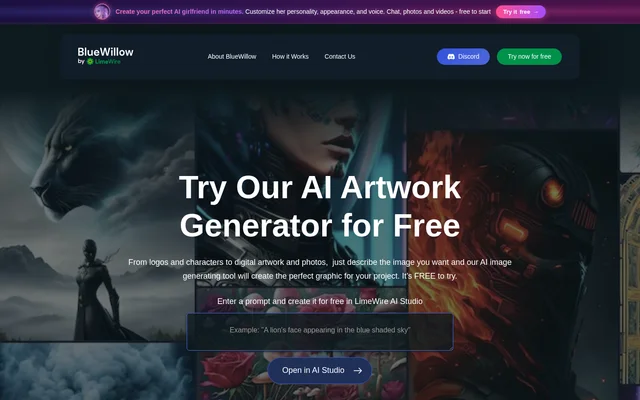
BlueWillow starts with a prompt entered into the website’s text input. Users select Open in AI Studio and enter an email address to continue. BlueWillow then returns a selection of images based on the prompt, which users can refine, regenerate or share with the community. The studio keeps images together instead of requiring users to find earlier results in a chat log.
Who BlueWillow is for
BlueWillow is designed to be accessible regardless of experience or expertise. BlueWillow supports people who need visual material for branding, storytelling, games and other creative projects. The same prompt box accommodates different subjects and styles, so users can describe a brand mark, an illustrated character or a photographic scene without changing the basic generation workflow.
- BlueWillow supports brand concept work through logo and brand-mark generation.
- BlueWillow supports games and tabletop campaigns through character illustrations.
- BlueWillow supports visual projects with book covers, avatars, banners and backdrops.
BlueWillow pricing and plans
BlueWillow offers a free tier that allows image generation without payment or a credit card. BlueWillow also uses paid LimeWire plans for people who need more generations, higher resolution and commercial use. The website describes the free option as an ongoing tier rather than a short trial. LimeWire terms apply to BlueWillow, including the details of commercial image use.
BlueWillow strengths and limitations
BlueWillow combines free access with browser-based generation, so a Discord account is not needed to make images. BlueWillow also maintains a free Discord community for questions, examples and prompt ideas. Model choice, image refinement and upscaling provide ways to adjust results, while the website notes that prompts work best in English and places commercial use within paid plans.
- BlueWillow requires an email address to continue in AI Studio.
- BlueWillow offers more generations and higher resolution through paid LimeWire plans.
- BlueWillow provides more prompt control in English than in other languages.
- BlueWillow covers commercial use on paid plans under LimeWire terms.
Getting started with BlueWillow
BlueWillow recommends building prompts around the subject, style, framing and light, rather than treating the prompt as a search query. Users can also describe elements they do not want. When a result is nearly right, the website recommends changing one detail at a time to preserve what already works. The Discord community provides further prompt ideas, questions and studio announcements.
BlueWillow FAQ
What is BlueWillow?
BlueWillow is an AI image generator that turns text descriptions into logos, characters, illustrations and photorealistic images. BlueWillow runs on LimeWire and provides a browser-based studio with model choices, image refinement and stored artwork.
Is BlueWillow free?
BlueWillow offers free image generation without a credit card. BlueWillow also has access to paid LimeWire plans for more generations, higher resolution and commercial use. The website describes the free tier as ongoing rather than a short trial.
Do you need Discord to use BlueWillow?
BlueWillow does not require a Discord account to generate images because the generator runs in a browser-based studio. BlueWillow still has a free Discord community where people can ask questions, find prompt ideas and read news and announcements.
Can BlueWillow images be used commercially?
BlueWillow covers commercial use through paid LimeWire plans, with the details governed by LimeWire terms. BlueWillow states that generated images are users’ to use, while specifically placing commercial use within the paid plans.
What image sizes does BlueWillow support?
BlueWillow generates square images by default and also offers wider and taller framings. BlueWillow provides an upscaler for images that need print resolution rather than screen resolution, while paid LimeWire plans offer higher resolution.
Can BlueWillow understand prompts in languages other than English?
BlueWillow works best with English prompts because the models were trained on English. BlueWillow usually still produces an image from prompts in other languages, but the website says English prompts provide more control over the result.
From the community
No reviews yet
Be the first to review this tool. What you write helps the next person choose.