What is Chat Summary?
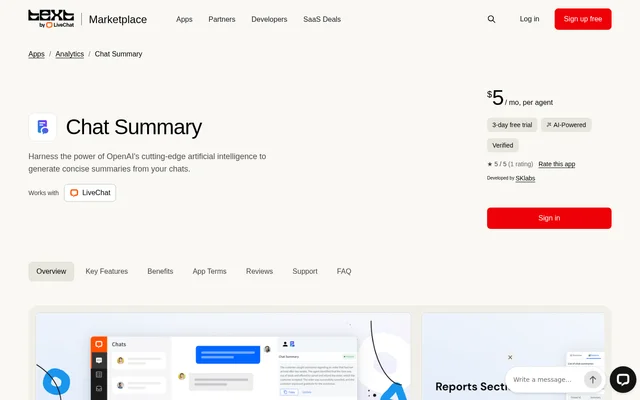
Chat Summary is an AI chat summarization app for customer support teams using LiveChat. Developed by SKlabs, Chat Summary uses OpenAI natural language processing to turn chat transcripts into concise summaries. Chat Summary also analyzes conversation sentiment, identifies key discussion points and keywords, and provides actionable feedback for agents.
Chat Summary is listed in the LiveChat Marketplace and works with LiveChat accounts. Chat Summary combines conversation summaries with a reports section containing the associated chat ID, thread ID, and full transcript. These records support review of both the condensed conversation and the original chat.
What Chat Summary can do
Chat Summary combines transcript summarization with conversation analysis and reporting. Chat Summary supports automatic generation tied to archived chats or selected tags, as well as manual generation. The listed capabilities cover both condensing customer conversations and reviewing details that can inform feedback on agent performance.
- Chat Summary generates concise summaries from chat transcripts using OpenAI.
- Chat Summary automatically generates summaries when chats are archived.
- Chat Summary generates summaries based on selected tags in settings.
- Chat Summary supports manual summary generation from the Details section.
- Chat Summary analyzes the emotional tone of chat conversations.
- Chat Summary extracts key points and keywords from chats.
- Chat Summary provides actionable agent feedback.
- Chat Summary displays summaries, chat IDs, thread IDs, and full transcripts in reports.
How Chat Summary works
Chat Summary is configured with a LiveChat account, with setup instructions available through the app tutorial. Chat Summary can create a summary when a chat is archived or according to selected tags in settings. For a manual workflow, Chat Summary offers summary generation from the Details section.
Chat Summary makes generated summaries available in a centralized reports section. Chat Summary reports include identifiers for the chat and thread alongside the complete transcript. The listing also links to documentation for further information and directs support requests, improvement suggestions, and feature requests to SKlabs.
Who Chat Summary is for
Chat Summary is for customer support agents and teams working in LiveChat who need summarized conversation records and feedback on customer interactions. Chat Summary supports reviewing the emotional tone and main discussion points of chats, while keeping full transcripts available alongside summaries in the reports section.
- Chat Summary helps agents review condensed versions of lengthy chat transcripts.
- Chat Summary supports teams reviewing sentiment and key discussion points.
- Chat Summary provides feedback intended to improve agent performance and customer interactions.
- Chat Summary supports tracking conversations through chat IDs, thread IDs, and transcripts.
Chat Summary strengths and limitations
Chat Summary brings automatic summaries, manual generation, sentiment analysis, keyword extraction, and agent feedback into the LiveChat workflow. Chat Summary also provides report access to full transcripts rather than summaries alone. The main practical constraints are the need for a LiveChat account and the recurring charge calculated per agent.
- Chat Summary requires a LiveChat account for configuration and use.
- Chat Summary carries a monthly subscription charge per agent.
- Chat Summary installation is subject to the Marketplace Terms and App Privacy Policy.
Chat Summary FAQ
What is Chat Summary?
Chat Summary is a LiveChat app developed by SKlabs that uses OpenAI natural language processing to summarize chat transcripts. Chat Summary also analyzes sentiment, extracts key points and keywords, and provides actionable agent feedback.
Does Chat Summary generate summaries automatically?
Chat Summary generates summaries automatically when chats are archived or based on selected tags configured in settings. Chat Summary also allows users to generate summaries manually from the Details section.
What information appears in Chat Summary reports?
Chat Summary reports include generated summaries alongside chat IDs, thread IDs, and full chat transcripts. Chat Summary provides this centralized reporting section so users can review summaries together with the underlying conversation details.
Can Chat Summary analyze sentiment and provide agent feedback?
Chat Summary analyzes chat sentiment to highlight emotional tone and key discussion points. Chat Summary also extracts keywords and critical insights and provides actionable agent feedback intended to improve performance and customer interactions.
How do you set up Chat Summary?
Chat Summary provides an app tutorial with instructions for setup and configuration with a LiveChat account. Chat Summary also links to documentation, and users can contact SKlabs for support, improvement suggestions, or feature requests.
From the community
No reviews yet
Be the first to review this tool. What you write helps the next person choose.