What is Circleback?
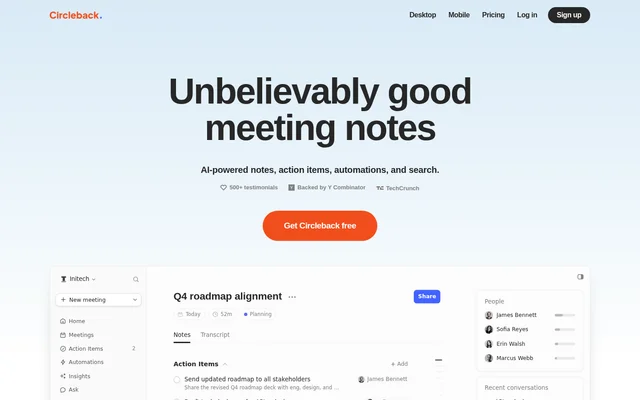
Circleback is an AI meeting assistant that turns conversations into organized notes, action items, and searchable transcripts. Circleback serves people and teams that need to retain meeting context and follow through on commitments. Circleback supports online meetings, in-person conversations, and imported audio or video recordings.
Circleback combines meeting capture with search and connected workflows. Users can ask questions across previous conversations rather than reviewing individual recordings. Circleback also connects meeting information to email, calendars, customer records, and project tools, making conversation context available alongside the applications used for follow-up work.
What Circleback can do
Circleback automatically writes meeting notes and captures, assigns, and organizes action items. Circleback supports over 100 languages and identifies speakers by name. From saved meeting video, Circleback can include material shown on screen in notes, allowing slides, dashboards, and documents to contribute to searchable meeting context.
- Circleback answers questions using information from past meetings.
- Circleback imports past meetings from Fathom, Fireflies, Granola, and Read AI.
- Circleback sends notes and answers questions in Slack.
- Circleback updates Notion pages and databases after meetings.
- Circleback updates contacts and deals in HubSpot.
- Circleback exposes meeting data through API, MCP, CLI, and webhooks.
How Circleback works
Circleback connects to Google Calendar or Microsoft Outlook Calendar to detect and automatically join meetings. Circleback supports meeting services including Zoom, Google Meet, Microsoft Teams, WebEx, Slack huddles, and GoTo. Users who do not want a bot joining calls can record through the desktop app for macOS and Windows.
Circleback also provides mobile and Apple Watch apps for in-person meetings. Existing audio or video can be imported for notes, action items, and a searchable transcript. MCP connections make Circleback context available to AI applications such as ChatGPT, Claude, and Cursor, while CLI access supports command-line workflows and AI agents.
Who Circleback is for
Circleback is for people and teams that need conversation records and follow-up workflows across their business applications. Circleback supports customer-related work through CRM updates, project coordination through task and issue tools, and recruiting workflows through Ashby. Shared notes and viewer access also support teammates who need meeting information without recording their own conversations.
- Circleback can update Salesforce contacts and opportunities after meetings.
- Circleback can create Linear issues from meeting discussions.
- Circleback can search Asana and create or edit tasks.
- Circleback can create candidates, add notes, and update applications in Ashby.
Circleback strengths and limitations
Circleback combines recording options, multilingual transcription, searchable meeting context, and connected workflows in one meeting assistant. Circleback includes unlimited meetings even on Free and states that customer data is not used to train models. Retention, automation availability, and administrative controls vary by plan, making those differences relevant when choosing access for a team.
- Circleback Free retains meeting and recording history for 30 days.
- Circleback Free includes limited automations rather than automations with all integrations.
- Circleback reserves unlimited recording storage, single sign-on, and SCIM provisioning for Enterprise.
Circleback FAQ
Is Circleback free?
Circleback offers a Free plan with unlimited meetings, AI meeting notes, action items, Ask Circleback, and API, MCP, and CLI access. Circleback Free includes limited automations and a 30-day meeting and recording history. Paid Pro, Business, and Enterprise plans add retention, integrations, and administrative features.
Can Circleback record meetings without a bot?
Circleback can record online meetings without a bot through its desktop app for macOS and Windows. Circleback records meeting video by default through the desktop app and includes information shown on screen in meeting notes. Circleback also supports bot-based recording.
Does Circleback work for in-person meetings?
Circleback supports in-person meetings through recording options that include mobile and Apple Watch apps. Circleback also accepts imported audio or video from past meetings and generates notes, action items, and searchable transcripts from those recordings.
What integrations does Circleback support?
Circleback connects with Google Calendar, Gmail, Outlook, Slack, Notion, Linear, HubSpot, Salesforce, Attio, and other business tools. Circleback also provides API, MCP, CLI, and webhook access. Supported actions vary by integration, including sending notes, updating CRM records, creating issues, and searching connected applications.
Does Circleback use meeting data to train AI models?
Circleback states that customer data is not used to train AI models. Circleback also provides a security information page, while its Enterprise plan lists HIPAA compliance alongside single sign-on, SCIM provisioning, and other organizational controls.
What languages and meeting platforms does Circleback support?
Circleback supports over 100 languages, including English, Spanish, French, German, Italian, Portuguese, Dutch, and Japanese. Circleback supports in-person meetings and meeting platforms including Zoom, Google Meet, Microsoft Teams, WebEx, Slack huddles, and GoTo.
From the community
No reviews yet
Be the first to review this tool. What you write helps the next person choose.