What is Clip Studio Paint?
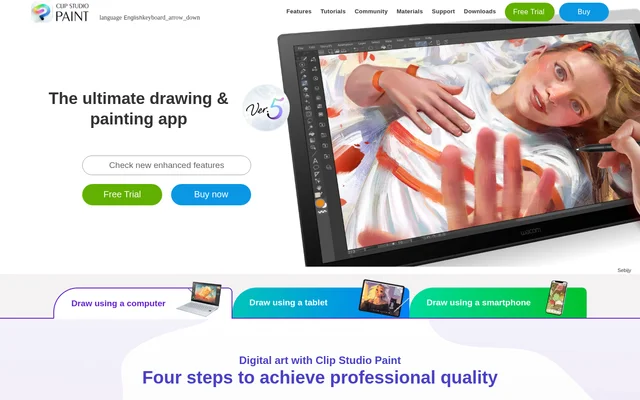
Clip Studio Paint is drawing and painting software for digital illustrations, comics, manga, webtoons, and animation. Clip Studio Paint serves professional creators, people drawing for fun, and beginners developing their skills. The app combines brushes that imitate traditional materials with reference tools, editable line art, coloring features, and project management. Supported platforms include Windows, macOS, iPad, iPhone, Galaxy, Android, and Chromebook.
Clip Studio Paint also supports work beyond individual drawings, including artbooks, merchandise, storyboards, and multi-page projects. The website describes saving artwork in industry-standard file formats and moving work between creative software, without naming specific external applications or file extensions.
What Clip Studio Paint can do
Clip Studio Paint provides tools for sketching, inking, coloring, correcting, and finishing artwork. Customizable brushes cover watercolor, oil paint, crayons, colored pencils, and decorative elements. Reference models and rulers help with anatomy, backgrounds, and perspective, while layers and deformation tools allow artists to revise existing work rather than redraw every element.
- Clip Studio Paint preserves editable line art in vector layers.
- Clip Studio Paint provides perspective and symmetry rulers for guided drawing.
- Clip Studio Paint uses Shading Assist to suggest rendering based on a placed light source.
- Clip Studio Paint adjusts artwork with Puppet Warp, Liquify, and mesh transformation.
- Clip Studio Paint provides panel frames, speech balloons, text, and screen tones.
- Clip Studio Paint supports animation with light table and onion-skin features.
How Clip Studio Paint works
Clip Studio Paint supports a workflow from drawing and reference setup through coloring, editing, and export. Artists can customize brushes and drawing settings, position reference models, and use fill tools for base colors. Vector layers allow lines to be moved or resized after drawing, while masks, clipping, and reversible layer effects support further changes. Printing and exporting tools prepare finished work for other uses.
Who Clip Studio Paint is for
Clip Studio Paint addresses illustrators, comic artists, animators, and people learning to draw digitally. Beginners can use anatomy references, background materials, and official tutorials, while experienced creators can use multi-page management, export tools, and editable vector line art. The website identifies character art, comics, manga, webtoons, animation, concept art, and design as supported creative areas.
- Clip Studio Paint supports character illustrations and concept art.
- Clip Studio Paint supports comics, manga, and webtoons for print or web.
- Clip Studio Paint supports looping animations and storyboard creation.
- Clip Studio Paint provides reference tools for practicing anatomy and backgrounds.
Clip Studio Paint pricing and access
Clip Studio Paint is available through a free trial and a purchase option on the website. The supplied page does not specify purchase prices, trial duration, or individual plan terms. Clip Studio Paint lists desktop, tablet, and phone platforms, but the supplied text does not explain whether purchase conditions differ between those platforms.
Clip Studio Paint strengths and available learning resources
Clip Studio Paint combines painting, comic production, and animation tools with several ways to revise artwork after drawing. Vector layers preserve scalable line art, and deformation tools adjust shapes and proportions. CLIP STUDIO ASSETS offers brushes and materials, CLIP STUDIO TIPS provides official tutorials, and CLIP STUDIO ASK offers community questions and answers. The page also points users to a support team.
Clip Studio Paint FAQ
What is Clip Studio Paint?
Clip Studio Paint is a digital drawing and painting app for illustrations, comics, manga, webtoons, and animation. Clip Studio Paint includes customizable brushes, vector layers, reference models, coloring tools, and features for managing multi-page projects.
Is Clip Studio Paint free?
Clip Studio Paint offers a free trial and a purchase option. The supplied website text does not state prices, trial duration, or plan details, so the free trial should not be described as a permanent free tier.
What devices does Clip Studio Paint support?
Clip Studio Paint supports Windows, macOS, iPad, iPhone, Galaxy, Android, and Chromebook. The website presents Clip Studio Paint for desktop, tablet, and phone drawing, including sketching and inking directly on a phone.
Can Clip Studio Paint make comics and webtoons?
Clip Studio Paint supports comics, manga, and webtoons for print or web. Clip Studio Paint provides panel frames, speech balloons, text, effect lines, screen tones, paper settings, export tools, and multi-page project management.
Can Clip Studio Paint be used for animation?
Clip Studio Paint supports projects ranging from simple GIFs to full animations. Clip Studio Paint includes light table and onion-skin features for viewing adjacent frames, along with tools for creating looping animations and storyboards.
What drawing references does Clip Studio Paint provide?
Clip Studio Paint provides head models, drawing figures, props, and background materials as references. Clip Studio Paint also includes perspective rulers, model lighting, and a Hand Scanner that poses model hands using live video captured by a camera.
From the community
No reviews yet
Be the first to review this tool. What you write helps the next person choose.