What is Clips AI?
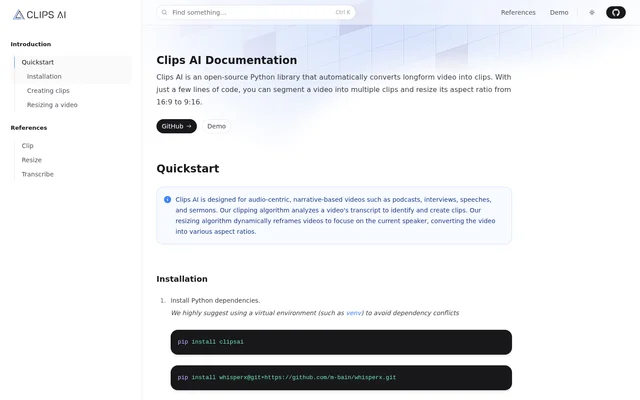
Clips AI is an open-source Python library for converting longform videos into clips and changing video aspect ratios. Clips AI is designed for audio-centric, narrative-based recordings, including podcasts, interviews, speeches, and sermons. The documented approach combines transcript analysis for clip discovery with dynamic reframing that follows the current speaker.
Clips AI is used through Python code rather than a documented visual editing workflow. The website provides a quickstart, installation commands, and code examples for finding clips and calculating video crops. Separate clipping and resizing references cover trimming the original video and resizing footage to the desired aspect ratio.
What Clips AI can do
Clips AI provides related capabilities for finding segments and adapting video framing. Transcript analysis identifies clip boundaries, while the resizing algorithm focuses the frame on the current speaker. The documentation demonstrates both workflows with Python examples and describes conversion from landscape footage into a portrait aspect ratio.
- Clips AI analyzes video transcripts to identify clips.
- Clips AI uses WhisperX to transcribe video before clip discovery.
- Clips AI returns start and end times for identified clips.
- Clips AI dynamically reframes video around the current speaker.
- Clips AI supports aspect-ratio conversion from 16:9 to 9:16.
How Clips AI works
Clips AI installation involves installing the clipsai Python package, WhisperX, libmagic, and ffmpeg. The documentation recommends a virtual environment such as venv to avoid dependency conflicts. For clipping, the example creates a Transcriber, transcribes a video file, and passes the resulting transcription to ClipFinder to retrieve clip boundaries.
Clips AI resizing uses a video file path, a target aspect ratio, and a Pyannote authentication token. Pyannote provides speaker diarization, and a Hugging Face access token is required for that workflow. The example returns crop segments; the resizing reference explains resizing the original video to the desired aspect ratio.
Who Clips AI is for
Clips AI is intended for work with audio-centric videos whose content follows a narrative. The named examples are podcasts, interviews, speeches, and sermons. Because the documented workflows use Python installation commands and code, Clips AI fits users who can run Python and install the required video and transcription dependencies.
- Clips AI can identify clips within podcast recordings.
- Clips AI can find segments in interviews, speeches, and sermons.
- Clips AI can reframe narrative video around the current speaker.
Clips AI access and open-source availability
Clips AI is available as an open-source Python library, with installation instructions and a GitHub link on the documentation page. Access follows the documented package-installation workflow. The page does not list paid plans or subscription prices, and explicitly states that users will not be charged for using Pyannote.
Clips AI strengths and limitations
Clips AI combines transcript-based clip discovery and speaker-focused reframing in a Python library. The documentation provides concrete setup commands and usage examples for both workflows. The main constraints are technical setup and prerequisites: clip finding depends on an existing transcription, while resizing requires Pyannote access through a Hugging Face token.
- Clips AI requires Python dependencies, libmagic, and ffmpeg.
- Clips AI requires video transcription before finding clips.
- Clips AI requires a Hugging Face access token for resizing.
Clips AI FAQ
What is Clips AI?
Clips AI is an open-source Python library that automatically converts longform video into clips. Clips AI analyzes video transcripts to identify segments and dynamically reframes footage around the current speaker for different aspect ratios.
Who is Clips AI for?
Clips AI is designed for users working with audio-centric, narrative-based videos such as podcasts, interviews, speeches, and sermons. Clips AI is used through Python code, with installation instructions and examples provided in the documentation.
How does Clips AI find video clips?
Clips AI finds video clips by analyzing a video's transcript. Clips AI uses WhisperX for transcription, then passes the transcription to ClipFinder, which returns identified clips with start and end times.
Can Clips AI convert landscape video to portrait?
Clips AI supports aspect-ratio conversion, including 16:9 to 9:16, and dynamically reframes video around the current speaker. Clips AI uses Pyannote for speaker diarization, so resizing requires a Hugging Face access token.
What do you need to install Clips AI?
Clips AI requires installation of the clipsai Python package, WhisperX, libmagic, and ffmpeg. Clips AI documentation recommends using a virtual environment such as venv to avoid dependency conflicts during setup.
Is Clips AI open source?
Clips AI is an open-source Python library available through package installation, with a GitHub link in the documentation. Clips AI documentation does not list paid plans and states that Pyannote usage will not be charged.
From the community
No reviews yet
Be the first to review this tool. What you write helps the next person choose.