What is cmux?
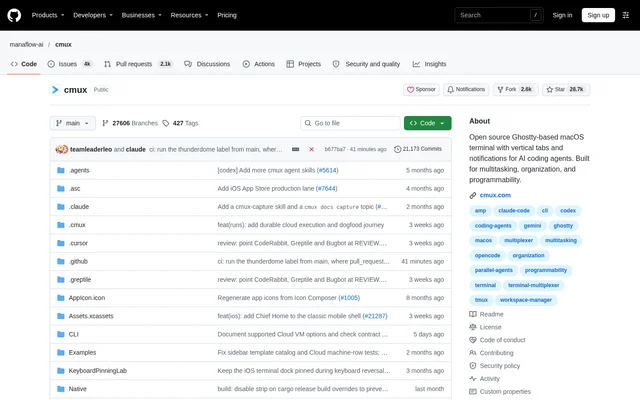
cmux is an open-source macOS terminal with an integrated browser, workspace management, and notifications for AI coding agents. Designed for developers handling parallel coding sessions, cmux brings terminal activity and agent attention signals into a native application. The project uses Swift and AppKit for the application and libghostty for terminal rendering.
cmux adds a sidebar that exposes context for each workspace rather than relying only on terminal tab titles. Workspace entries show git branches, linked pull request status and numbers, working directories, listening ports, and recent notification text. Existing Ghostty configuration supplies themes, fonts, and colors.
What cmux can do
cmux combines terminal organization with browser control and agent notifications. Developers can divide work across workspaces and splits, inspect project context in the sidebar, and identify sessions waiting for attention. The CLI and socket API expose controls for building custom workflows around these capabilities.
- cmux highlights waiting agents with blue pane rings and illuminated tabs.
- cmux collects pending notifications in a panel and jumps to the latest unread item.
- cmux splits terminal and browser panes horizontally and vertically.
- cmux lets agents inspect accessibility trees, click elements, fill forms, and evaluate JavaScript.
- cmux imports browser cookies, history, and sessions from Chrome, Firefox, Arc, and other browsers.
- cmux launches Claude Code teammates as native splits without tmux.
- cmux runs project-specific commands defined in cmux.json.
How cmux works
cmux can be installed by opening the DMG and dragging the application into the Applications folder, or through the project's Homebrew tap and cask. The Homebrew cask installs shell completions for zsh, bash, and fish. Other installation methods require adding the matching completion command to the shell startup file.
cmux supports remote workspaces through its SSH command. Browser panes route through the remote network so remote localhost services are accessible, and dragging an image into a remote session uploads the image through scp. For agent notifications, cmux recognizes terminal notification sequences and provides a notify command that developers can connect to agent hooks.
Who cmux is for
cmux serves developers who prefer terminal-based coding workflows and need to organize multiple agents or projects on macOS. The repository describes parallel Claude Code and Codex sessions as a motivation for the project. Browser scripting, workspace metadata, and remote connections also support development tasks that cross terminal and web interfaces.
- cmux helps developers track parallel coding-agent sessions across workspaces.
- cmux lets Claude Code interact with a development server through a browser pane.
- cmux supports remote development with SSH workspaces and remote browser routing.
- cmux lets developers automate workspace creation, pane splitting, and keystroke delivery.
cmux pricing and installation options
cmux is free and GPL-licensed, with source code available in the public repository. The documented installation options are a recommended DMG download and Homebrew. The DMG installation auto-updates through Sparkle, while Homebrew users can update through the cask upgrade command.
cmux also offers a separate nightly application built automatically from the latest main commit. The nightly application has its own bundle identity and Sparkle update feed, allowing installation alongside the stable version. The repository directs nightly bug reports to GitHub Issues or the designated Discord channel.
cmux strengths and limitations
cmux brings workspace context, terminal splits, browser automation, and agent notifications into a native macOS application. Compatibility with existing Ghostty configuration supports familiar terminal styling. The project presents these capabilities as programmable building blocks rather than a prescribed agent workflow, leaving developers to compose their own automation.
- cmux is a macOS application, so the documented desktop installation targets that operating system.
- cmux requires hook configuration when developers connect its notify command to agent events.
- cmux requires project-specific actions to be defined in cmux.json before those actions appear in the command palette.
cmux FAQ
What is cmux?
cmux is an open-source, Ghostty-based macOS terminal for developers working with AI coding agents. cmux combines vertical workspace tabs, terminal splits, agent notifications, and an in-app browser with CLI and socket API controls for custom automation.
Is cmux free?
cmux is free and GPL-licensed. cmux is available through a DMG download or Homebrew, with source code in the public repository. The DMG installation supports automatic updates through Sparkle, and a separate nightly application is also available.
Does cmux support Claude Code?
cmux supports Claude Code workflows through agent notification hooks, browser interactions, and Claude Code Teams. The cmux claude-teams command launches teammate mode with teammates displayed as native splits, including sidebar metadata and notifications, without requiring tmux.
Does cmux have an API for automation?
cmux provides a CLI and socket API for creating workspaces, splitting panes, sending keystrokes, and controlling the browser. The browser API supports accessibility-tree snapshots, element references, clicks, form filling, and JavaScript evaluation.
Can cmux connect to remote machines over SSH?
cmux creates remote workspaces through its SSH command and can run an initial command in the first remote terminal. Browser panes use the remote network, and dragging an image into a remote session uploads the image through scp.
From the community
No reviews yet
Be the first to review this tool. What you write helps the next person choose.