What is BossConsole?
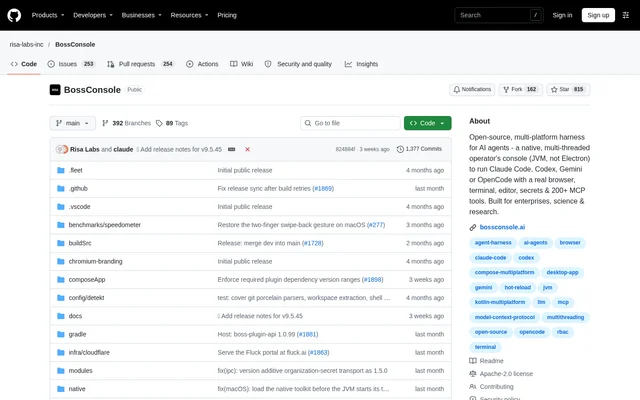
BossConsole is an open-source desktop harness for AI agents that combines a browser, terminal, editor, and extensible tools in a shared workspace. BossConsole is built for enterprises, science, and research, including teams creating always-on agents for business tasks. Users can keep a webpage beside an agent conversation, inspect files, review changes, and follow actions in the workspace.
BossConsole runs on the JVM using Kotlin and Compose Multiplatform rather than Electron. Desktop versions support macOS, Windows, and Linux. The project separates the desktop host from its tools: plugins release independently, while the host provides workspace interfaces, authentication, and sharing.
What BossConsole can do
BossConsole gives agents access to tools supplied by active plugins through a local MCP server. Supported coding agents include Claude Code, Codex, Gemini CLI, and OpenCode. Users select the tools an agent can call, while the workspace keeps browser activity, command output, and files available for direct inspection.
- BossConsole opens real webpages with navigation and page-interaction tools.
- BossConsole places terminal commands and code editing beside the active task.
- BossConsole organizes projects with saved Spaces and split panes.
- BossConsole adds Git, run configurations, and logs through Toolbox.
- BossConsole supports plugins for Docker, Kubernetes, notebooks, and browser automation.
- BossConsole provides Tool Creator for scaffolding plugins and Tool Evolver for inspecting existing tools.
How BossConsole works
BossConsole installation starts with a desktop installer, account sign-in, and initial tool selection through Toolbox. Users can open a terminal and connect an existing coding agent through Toolbox → MCP or the BossTerm AI menu. The local MCP server discovers tools from active plugins, and available capabilities depend on installed plugins and access settings.
BossConsole also supports always-on agents through Fluck Agent when the application and agent remain running on a machine that stays online. Users can return to these agents at fluck.ai. Shared terminals and application windows are accessible at cli.risaboss.com with the same account, subject to sharing settings and the session's permitted access.
Who BossConsole is for
BossConsole targets enterprise, science, and research workflows, alongside developers using coding agents. The workspace supports tasks that combine web research, command execution, file inspection, and code changes. Teams building agents for customers or internal business work can assemble the browser, editor, terminal, and plugins around their requirements.
- Developers can connect existing coding agents to workspace tools.
- Researchers can keep source webpages visible beside agent conversations.
- Business teams can create always-on agents for recurring work.
- Plugin authors can scaffold and improve custom tools.
BossConsole licensing and access
BossConsole is licensed under Apache-2.0 and is available through source code and desktop installers. The repository lists Homebrew and DMG installation for macOS, MSI installers for Windows, and DEB, RPM, and JAR options for Linux. Download links resolve to the latest stable release, while the release history allows users to select a specific version.
BossConsole strengths and limitations
BossConsole combines a visible agent workspace with selectable tool access, roles, permissions, and credential references. Many plugins can hot-reload while the host stays open. These controls have explicit boundaries: permission checks apply to tools declaring requirements, administrator users bypass role checks, and credential handling does not prevent an authorized recipient from exposing a secret.
- BossConsole does not sandbox an external agent, and plugins run in the host process.
- BossConsole tool disabling does not cancel work already authorized.
- BossConsole full-window hosting is a macOS 14+ preview requiring Screen Recording permission.
- BossConsole allows only one controller to hold a shared window's input lease at a time.
- BossConsole infrastructure updates can require a restart.
BossConsole FAQ
What is BossConsole?
BossConsole is an open-source, multi-platform desktop harness for AI agents. BossConsole combines a browser, terminal, editor, and plugin tools in a workspace where users can inspect agent activity, organize tasks, and interact with the same files and webpages.
Which AI coding agents does BossConsole support?
BossConsole supports connecting Claude Code, Codex, Gemini CLI, and OpenCode to workspace tools. Users connect an agent through Toolbox → MCP or the BossTerm AI menu, then choose which tools the agent can call through the local MCP server.
Which operating systems does BossConsole support?
BossConsole supports desktop use on macOS, Windows, and Linux, with platform-specific installers listed in the repository. Full-window hosting has a narrower scope: that feature is currently a macOS 14+ preview and requires Screen Recording permission.
Is BossConsole open source?
BossConsole is an open-source project licensed under Apache-2.0. The desktop host and tools live in separate repositories, and plugins release independently. Users can obtain desktop installers or follow the repository's development instructions to work with the source.
Can BossConsole run always-on agents?
BossConsole supports creating always-on agents through Fluck Agent, provided BossConsole and the agent remain running on a machine that stays online. Users can return to their agents at fluck.ai and access shared sessions through cli.risaboss.com according to sharing settings.
Does BossConsole sandbox AI agents?
BossConsole does not sandbox external agents. BossConsole provides per-tool switches, roles, permissions, and credential references for supported calls, but plugins run in the host process. Disabling a tool does not cancel work already authorized, and authorized recipients can still expose secrets.
From the community
No reviews yet
Be the first to review this tool. What you write helps the next person choose.