What is Comfy Workflows?
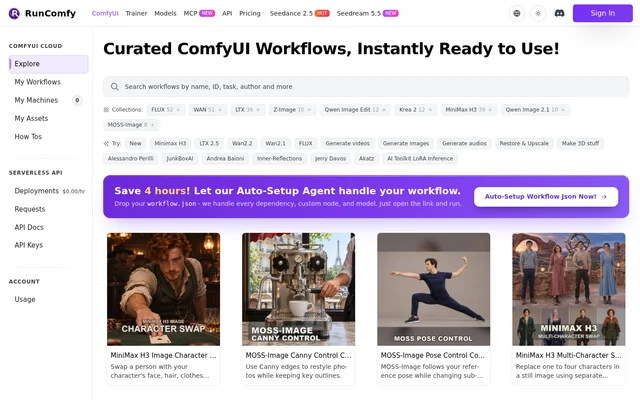
Comfy Workflows is RunComfy’s online catalog of ready-to-run ComfyUI workflows for artists and other creators. It covers both media generation and editing, with collections for model families such as FLUX, WAN, LTX, and Qwen Image Edit. The Explore page also groups workflows by task, so creators can start with a goal such as generating video or restoring and upscaling an image rather than choosing a model first.
What Comfy Workflows can do
Comfy Workflows lists workflows for creating new media from text or references and for making targeted changes to existing assets. Individual listings describe what each workflow changes or preserves. For example, a MOSS-Image workflow uses edges to guide a restyle, while a MiniMax H3 workflow replaces video characters while keeping the original audio.
- Generate images from text prompts or guide image edits with a reference.
- Edit masked areas with inpainting or extend borders with outpainting.
- Create transparent RGBA assets for compositing.
- Generate videos from reference images with synchronized audio.
- Transfer motion to a character or control camera moves from a still image.
- Create song covers guided by the original melody.
- Turn a still image into Gaussian splats, GLB meshes, and orbit previews.
How Comfy Workflows works
Comfy Workflows offers curated workflows alongside an Auto-Setup option for existing ComfyUI workflow files. Users can submit a workflow.json file to the Auto-Setup Agent, which handles dependencies, custom nodes, and models, then open a link to run the workflow. The cloud interface lists My Workflows, My Machines, and My Assets. A separate Serverless API area lists Deployments, Requests, API Docs, and API Keys.
Who Comfy Workflows is for
Comfy Workflows is aimed at artists and creators working with AI-generated media, as well as ComfyUI users who already have a workflow file to run. The catalog covers still-image tasks such as poster layouts and product visuals, as well as video tasks such as transferring a performance to a new character. Reference-based workflows are useful when an existing image, pose, or clip needs to guide the result.
- Design posters with controlled text and object placement.
- Change lighting, materials, or outfits in an existing image.
- Transfer a performance to a new character while preserving the audio.
- Generate a 3D asset from a reference image.
Comfy Workflows pricing and plans
Comfy Workflows links to a resource called Free ComfyUI Online and shows an hourly amount in the Serverless API navigation. The supplied page does not explain what that display applies to or provide a plan table. It does not say which workflows, cloud machines, or API deployments are included with free access, or what they cost after any free usage.
Strengths and limitations of Comfy Workflows
Comfy Workflows makes it possible to browse by model or by the result a creator wants, with listings that distinguish tasks such as masked edits, character swaps, and camera control. The Auto-Setup Agent also handles dependencies for users bringing their own workflow files. Some workflows still require specific source material, and the page does not explain the costs of running them.
- Reference-guided workflows require the relevant source images, clips, or audio.
- Auto-Setup requires a workflow.json file.
- Plan prices and free usage limits are not specified on the page.
Getting started with Comfy Workflows
Comfy Workflows provides an Explore page for browsing the catalog. The task groups offer a starting point for users who know the output they want, while the model collections suit users looking for a particular model family. Users with an existing ComfyUI workflow can take the separate Auto-Setup route by uploading a workflow.json file and opening the resulting link.
Comfy Workflows FAQ
What is Comfy Workflows?
Comfy Workflows is RunComfy’s online library of curated ComfyUI workflows. Artists and creators can browse ready-to-run options for generating images, videos, audio, and 3D assets or for editing, restoring, and upscaling existing media.
Is Comfy Workflows free?
Comfy Workflows links to Free ComfyUI Online, but the supplied page does not specify what free access includes or list plan prices. The link does not establish that every workflow, cloud machine, or serverless API deployment is free.
Can I upload my own ComfyUI workflow to Comfy Workflows?
Comfy Workflows accepts a workflow.json file through its Auto-Setup Agent. The agent handles dependencies, custom nodes, and models so users can open a link to run the submitted workflow.
What can I create with Comfy Workflows?
Comfy Workflows lists workflows for generating images, videos, song covers, and 3D assets. The catalog also includes tools for editing photos, extending image borders, replacing video characters, and transferring motion from source footage.
Does Comfy Workflows have a serverless API?
Comfy Workflows lists a Serverless API area with Deployments, Requests, API Docs, and API Keys. The supplied page shows these navigation entries but does not describe API request formats or deployment pricing.
From the community
No reviews yet
Be the first to review this tool. What you write helps the next person choose.