What is Cuey?
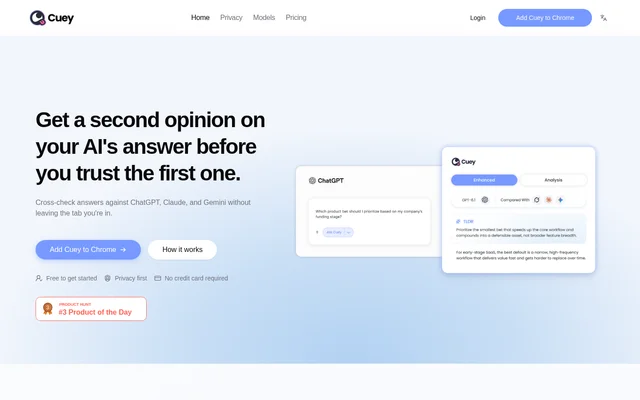
Cuey is a browser application for comparing answers from multiple language models without leaving the AI tool a user already has open. Cuey is aimed at frequent AI users who want to cross-check responses before relying on them. ChatGPT, Claude, and Gemini are examples of the AI tools where Cuey supports this workflow.
What Cuey can do
Cuey brings answers from different language models into a single comparison workflow. The goal is to reduce hallucination risk by giving users other responses to consider before acting on an answer. Cuey also supports portability for both memory and prompt workflows across AI services.
- Cuey compares answers from multiple language models.
- Cuey supports cross-checking AI responses without switching tabs.
- Cuey keeps memory portable across AI services.
- Cuey keeps prompt workflows portable across AI services.
How Cuey works inside existing AI tools
Cuey lets users stay in their existing ChatGPT, Claude, or Gemini workflow while comparing answers from other models. A user who wants another answer to consider can make that comparison without moving between tabs. The Models page lists the supported models, and the application listing identifies Chrome OS, Windows, and macOS.
Who Cuey is for
Cuey is for people who use AI to gather information, get advice, or think through questions that require judgment. The comparison workflow is relevant when a user wants to review more than one model's response before deciding what to do. The Free plan also accommodates casual use and lightweight AI tasks.
- Compare AI responses to a research question.
- Cross-check advice before acting on it.
- Review different model answers to a question that requires judgment.
Cuey pricing and plans
Cuey offers a Free plan for evaluation, casual use, and lightweight AI tasks, and a paid Pro plan for daily workflows. Both plans include all 20+ models. The plan choice depends on how often users compare answers rather than which models they want to use. Pro offers more room for daily comparisons, priority access, and access to 500MB of file storage.
Strengths and limitations of Cuey
Cuey lets users cross-check answers without leaving their current AI tool, and the Free plan does not restrict which models they can compare. That makes Free suitable for evaluating the comparison workflow with the full model selection. The main plan trade-off is how often users can compare answers and which additional benefits are included.
- Free has less room for daily comparisons than Pro.
- Priority access is a paid Pro benefit.
- Access to 500MB of file storage is a paid Pro benefit.
Getting started with Cuey
Cuey recommends starting with the Free plan to evaluate the comparison workflow. The Models page shows which models are supported, and the Pricing page outlines the differences between Free and Pro. A paid upgrade is intended for users who need more daily comparisons, priority access, or file storage.
Cuey FAQ
What is Cuey?
Cuey is a browser application that compares answers from multiple language models within existing AI tools such as ChatGPT, Claude, and Gemini. Cuey also helps keep memory and prompt workflows portable across AI services.
Is Cuey free?
Cuey has a Free plan that includes all 20+ models and is intended for evaluation, casual use, and lightweight tasks. A paid Pro plan provides more room for daily comparisons, priority access, and 500MB of file storage.
Can I use Cuey without leaving ChatGPT?
Cuey lets users compare answers from multiple models without leaving ChatGPT or switching tabs. The same comparison workflow is available within Claude and Gemini, and Cuey lists supported models on its Models page.
What can you use Cuey for?
Cuey can be used to cross-check AI-generated advice, research, and answers to questions that require judgment. Comparing responses from different models before acting is intended to reduce the risk of relying on a hallucinated answer.
Do Cuey Free and Pro include the same models?
Cuey includes all 20+ models on both Free and Pro. Pro is intended for users who need more daily comparisons, priority access, and paid file storage rather than access to a different set of models.
From the community
No reviews yet
Be the first to review this tool. What you write helps the next person choose.