What is Prefind?
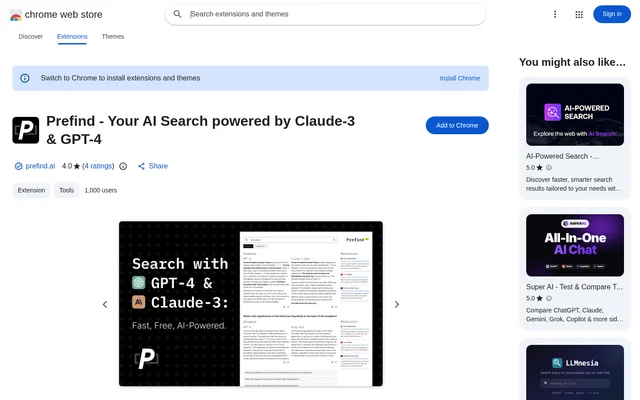
Prefind is an AI search tool available as a Chrome extension for research, learning, and everyday questions. The Chrome Web Store listing names GPT-4 and Claude-3 Opus as the models behind the search experience. Prefind lets users compare model answers to a query and is described as working alongside major search engines.
What Prefind can do
Prefind takes a question as input and presents a concise answer after retrieving and analyzing information. The listing describes the answers as context-aware and highlights answer comparison as a way to examine different responses to the same question. Those capabilities make the extension relevant both for quick lookups and for exploring a topic.
- Prefind answers search queries using GPT-4 and Claude-3 Opus.
- Prefind lets users compare responses from different models.
- Prefind retrieves and analyzes information before presenting a concise answer.
- Prefind works alongside major search engines.
How Prefind works
Prefind is installed through the Add to Chrome button on its Chrome Web Store listing. The setup instructions tell users to sign in and press Cmd/Ctrl+M to open Prefind. The listing also says no additional accounts are needed, but does not specify which account is used to sign in.
Prefind starts the search with a question entered by the user. According to the listing, Prefind fetches and analyzes information, then presents an answer. Although the listing says Prefind works alongside major search engines, it does not name specific search engines or explain how that compatibility works.
Who Prefind is for
Prefind is aimed at people who are researching a subject, learning about a new topic, or satisfying their curiosity. Prefind supports both straightforward lookups, where a concise response may be enough, and questions where a reader wants to see how the models' answers differ before continuing their search.
- Look up information while researching a subject.
- Ask a question about an unfamiliar topic.
- Compare model responses to an everyday question.
Prefind pricing and plans
Prefind is described as having a free plan, with an optional upgrade for unlimited access. Although the listing also calls the search experience completely free, its plan description distinguishes free access from unlimited access. The listing does not give a price for the upgrade or specify the usage limits of the free plan.
Strengths and limitations of Prefind
Prefind gives readers different model responses to consider instead of showing only one answer, and its keyboard shortcut provides a way to open the tool after setup. The Chrome Web Store privacy disclosure is also relevant when deciding whether to use the extension: it lists web history and website content among the data Prefind handles.
Prefind also discloses handling personally identifiable information and financial and payment information. The publisher declares that it does not sell data outside approved use cases, use or transfer it for purposes unrelated to the extension's core functionality, or use or transfer it to determine creditworthiness or for lending.
- The listed installation path is for Chrome.
- Unlimited access is described as an upgrade.
- The privacy disclosure lists web history and website content among the data handled.
Prefind FAQ
What is Prefind?
Prefind is an AI search Chrome extension that uses GPT-4 and Claude-3 Opus to answer questions. Prefind retrieves and analyzes information, presents concise answers, and lets users compare responses from different models.
Is Prefind free?
Prefind offers a free plan and an optional upgrade for unlimited access. The Chrome Web Store listing does not say how much the upgrade costs or specify the usage limits of the free plan.
How do you open Prefind in Chrome?
Prefind opens with the Cmd/Ctrl+M keyboard shortcut after installation and sign-in, according to the Chrome Web Store instructions. The listed installation method is to select Add to Chrome on the extension's store page.
Can Prefind compare GPT-4 and Claude-3 Opus answers?
Prefind lets users compare answers from different models and lists GPT-4 and Claude-3 Opus as the models behind its search. The listing presents answer comparison as a way to review different responses to a question.
What can you use Prefind for?
Prefind can be used to research a subject, learn about an unfamiliar topic, or look up an everyday question. Prefind provides concise answers and lets users compare responses when they want to see how different models address a query.
From the community
No reviews yet
Be the first to review this tool. What you write helps the next person choose.