What is CupboardCuisine?
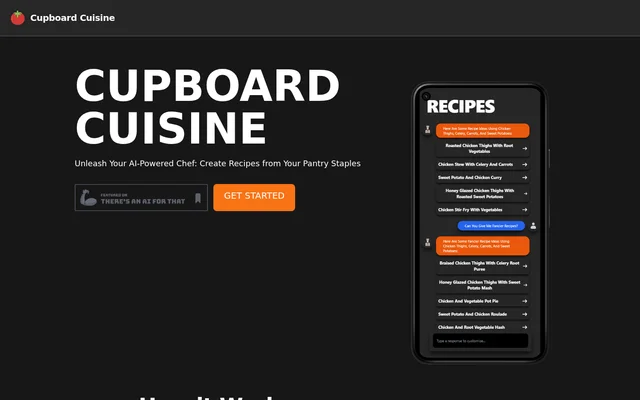
CupboardCuisine is an AI recipe generator for home cooks who want to decide what to make based on the food they already have. Instead of starting with the name of a dish, cooks start with ingredients from their pantry and refrigerator. CupboardCuisine uses that list to suggest recipes suited to the available items, giving cooks a way to turn an inventory of ingredients into a shortlist of possible meals.
What CupboardCuisine can do
CupboardCuisine supports recipe discovery as well as the steps that follow once a cook has found a dish. The results view is for browsing suggestions, while the recipe detail view is where cooks can customize a selected recipe. CupboardCuisine also provides instructions and cooking tips so that the selected result serves as a recipe to follow, not just as a meal idea.
- CupboardCuisine collects ingredients from the pantry and refrigerator.
- CupboardCuisine analyzes the ingredient list and generates personalized recipe suggestions.
- CupboardCuisine lets cooks browse a variety of suggested dishes.
- CupboardCuisine lets cooks customize a recipe in its detail view.
- CupboardCuisine provides detailed cooking instructions and tips.
- CupboardCuisine lets cooks save and share recipes.
How CupboardCuisine works
CupboardCuisine starts with an ingredient collection screen. The cook enters what is available in the pantry and refrigerator, and the AI analyzes those items to produce a set of recipes. The ingredient list is the basis for the results, so the workflow begins with what the cook has on hand rather than a search for a particular recipe.
CupboardCuisine then presents a variety of dishes based on the available ingredients. Cooks can browse those results before opening one to see its details. The detail screen is where the page places further customization, after the initial set of suggestions has been generated and before the cook begins following the instructions.
Who CupboardCuisine is for
CupboardCuisine is for home cooks who have ingredients on hand but have not decided what to make. The ingredient-first approach is useful when the starting point is a pantry staple or something already in the refrigerator rather than a planned dish. The page also frames using available ingredients as a way to reduce food waste and presents browsing as a way to choose a meal for an occasion.
- Find meals that make use of pantry staples.
- Look for dishes that use ingredients already in the refrigerator.
- Browse different meal ideas before choosing a dish for an occasion.
CupboardCuisine pricing and website access
CupboardCuisine has Get Started and Find Recipes options on its website, but the page does not state whether access is free or paid. The page describes what happens after a cook enters ingredients, including how suggestions are generated and how a selected recipe can be customized. Those workflow details explain how to begin using the recipe tool, not what access costs.
Getting started with CupboardCuisine
CupboardCuisine offers a Get Started option on its website. The first step shown is to gather the ingredients available in the pantry and refrigerator and enter them on the ingredient collection screen. After browsing the resulting suggestions, cooks can open a dish, adjust the recipe details, and use the instructions and tips to prepare it. The page also describes saving and sharing recipes.
Pros and cons
What works
- Recipe suggestions start with ingredients already on hand.
- Multiple suggestions give cooks a choice before they commit to a dish.
- Cooking instructions are presented without a long background story.
CupboardCuisine FAQ
What is CupboardCuisine?
CupboardCuisine is an AI recipe generator that suggests dishes based on ingredients users enter from their pantry and refrigerator. Cooks can browse the suggestions, open a recipe to customize its details, and follow the cooking instructions and tips.
Who is CupboardCuisine for?
CupboardCuisine is for home cooks who want meal ideas based on ingredients they already have. Cooks can start with available pantry and refrigerator items instead of choosing a dish first, then browse recipes tailored to those ingredients.
How does CupboardCuisine generate recipes from ingredients?
CupboardCuisine uses AI to analyze the ingredients a cook enters and generate personalized recipe suggestions. The workflow starts on an ingredient collection screen and continues to a results view where the cook can browse dishes that match the available items.
Can you customize a recipe in CupboardCuisine?
CupboardCuisine lets cooks customize a recipe after selecting it from the results. Opening a suggestion brings up a recipe detail screen where the cook can make adjustments before using the detailed instructions and cooking tips.
Can you save or share CupboardCuisine recipes?
CupboardCuisine presents saving and sharing as options after finding a recipe. The recipe workflow begins with pantry and refrigerator ingredients, then provides suggestions that cooks can browse, customize, and prepare using the cooking instructions and tips.
From the community
No reviews yet
Be the first to review this tool. What you write helps the next person choose.