What is Devin?
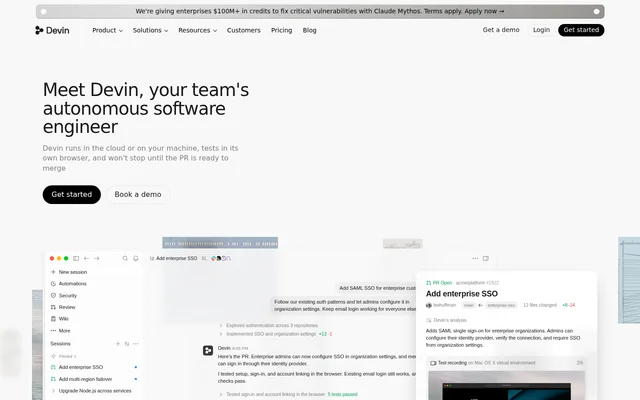
Devin is an AI software engineer that helps developers and engineering teams move from an engineering task to a pull request. Devin supports feature planning, implementation, testing, code review, and ongoing maintenance. The website describes an autonomous workflow in which Devin works on assigned tasks and prepares changes for review.
Devin runs in the cloud or on a developer’s machine. Cloud execution allows delegated work to continue when a laptop is closed, while parallel cloud agents can divide larger tasks. The product also provides codebase exploration tools, including diagrams and code maps that update as the codebase changes.
What Devin can do
Devin combines software implementation with testing, review, and maintenance capabilities. The website demonstrates feature development, bug fixes, dependency upgrades, and architecture changes, alongside browser-based verification. Devin also supports proactive engineering work through automations and security swarms that look for vulnerabilities, performance issues, and gaps in test coverage.
- Devin implements features and prepares pull requests.
- Devin tests application workflows in its own browser.
- Devin records interactions with the software it builds.
- Devin Review identifies bugs and vulnerabilities in code changes.
- Devin maintains codebase diagrams and code maps.
- Devin schedules recurring work and responds to configured triggers.
How Devin works
Devin accepts delegated work through Devin Cloud, Desktop, CLI, and mentions in collaboration tools. Developers can describe a feature, bug, or investigation, then follow the resulting work and pull request. In Slack and Teams, Devin reads the conversation thread and responds to follow-up messages while working on the task.
Devin spins up Windows, Mac, and Linux virtual machines as needed to build and test software. Browser testing can include recorded interactions with the completed changes. For larger assignments, Devin splits work across parallel cloud agents, manages those agents, and reports back. Scheduled workflows and event triggers extend this workflow to recurring engineering tasks.
Who Devin is for
Devin serves developers and engineering teams that want to delegate implementation, investigation, and maintenance work. The page’s examples span application features, authentication changes, dependency upgrades, failing tests, and API incidents. Teams can also use Devin to review changes before production or turn existing issue reports and specifications into engineering work.
- Engineering teams can delegate feature implementation and bug fixes.
- Developers can use Devin to investigate API errors and add regression tests.
- Maintainers can automate dependency upgrades and failed CI fixes.
- Reviewers can use Devin to find bugs and vulnerabilities in proposed changes.
- Teams can schedule issue cleanup and follow up on inactive tickets.
Devin strengths and workflow considerations
Devin brings coding, browser verification, pull request review, and recurring maintenance into a connected engineering workflow. Cloud and local access give developers different ways to assign and iterate on work. Continued cloud execution is useful for delegated tasks that should run independently of a developer’s laptop, while collaboration-tool mentions keep task discussions in their existing threads.
Getting started with Devin
Devin provides get-started and demo-booking options on the website. The workflow examples begin with a concrete task, such as implementing a feature, fixing a failing test, or investigating an alert. Developers can choose cloud delegation, Desktop or CLI iteration, or a collaboration-tool mention, then inspect the resulting changes, testing evidence, and pull request.
Devin FAQ
What is Devin?
Devin is an AI coding agent and autonomous software engineer for developers and engineering teams. Devin supports feature implementation, bug fixes, browser testing, pull request preparation, code review, and scheduled or trigger-based engineering maintenance.
Does Devin run locally or in the cloud?
Devin runs in the cloud or on a developer’s machine, with Cloud, Desktop, and CLI workflows described on the website. Devin can coordinate parallel cloud agents for larger tasks and continue working while the developer’s laptop is closed.
Can Devin test applications in a browser?
Devin tests applications in its own browser and records interactions with the software it builds. Devin can spin up Windows, Mac, and Linux virtual machines as needed for building and testing, including end-to-end verification of application workflows.
Does Devin work with Slack and Teams?
Devin accepts task assignments through mentions in Slack and Teams. Devin reads the conversation thread, responds to follow-up messages, and starts work, allowing developers to delegate tasks from an existing discussion rather than only through a separate development interface.
What engineering tasks can Devin automate?
Devin supports scheduled workflows and trigger-based automations for bugs, failed CI, alerts, and repetitive maintenance. Devin can also triage issues, work from assigned tickets or specification pages, and use security swarms to investigate vulnerabilities, performance issues, and test coverage gaps.
Can Devin review code for bugs and vulnerabilities?
Devin includes Devin Review, which finds bugs and vulnerabilities before code reaches production. Devin also lets teams assign fixes from review findings, connecting the review workflow with implementation rather than only reporting potential problems.
From the community
No reviews yet
Be the first to review this tool. What you write helps the next person choose.