What is Cursor?
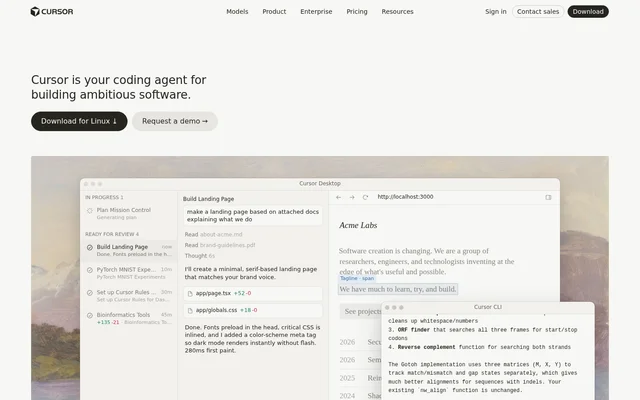
Cursor is an AI coding agent for developers and software teams building software. Cursor combines a desktop development interface, command-line assistance, and autonomous cloud agents. Developers can hand off implementation tasks while retaining responsibility for decisions and reviewing completed work. The product supports both targeted edits and broader agent-driven development.
Cursor is available for macOS, Windows, and Linux. Cursor also extends development work into Slack and GitHub, allowing teams to collaborate with agents and review pull requests within existing workflows. Access ranges from a free plan with limited AI usage to paid subscriptions for individuals, teams, and enterprises.
What Cursor can do
Cursor supports software development from planning through implementation and review. Cursor agents can take on coding tasks, while cloud agents use their own computers to build, test, and demonstrate features. Model selection includes providers named on the page, although availability and billing depend on the selected subscription.
- Cursor agents can turn development instructions into code.
- Cursor cloud agents can build, test, and demo features for review.
- Cursor can launch agents that work in parallel.
- Cursor provides command-line coding assistance.
- Cursor collaborates in Slack and reviews pull requests in GitHub.
- Cursor offers models from OpenAI, Anthropic, Gemini, SpaceXAI, and Cursor.
How Cursor works
Cursor accepts development requests through its desktop and command-line interfaces. The website demonstrates an agent planning a feature, identifying implementation tasks, and producing changes. The command-line interface shows commands, file references, and shell access. The website also provides a terminal installation command and a desktop download path.
Cursor cloud agents run on their own computers and return completed work for review, including feature demonstrations. Cursor can also receive a request through Slack and return a pull request. These workflows let developers delegate tasks without limiting agent interaction to the desktop interface.
Who Cursor is for
Cursor serves individual developers, software teams, and enterprise engineering organizations. Cursor supports developers who want assistance with specific edits as well as teams delegating larger tasks to autonomous agents. Team subscriptions add administration and shared settings, while Enterprise includes additional access, spending, network, and audit controls.
- Cursor helps developers plan and implement application features.
- Cursor lets teams assign coding work through Slack.
- Cursor supports parallel work on development tasks through cloud agents.
- Cursor provides AI code reviews for teams working with pull requests.
Cursor pricing and plans
Cursor offers Free at $0/month with limited AI usage, agent requests, and chat requests. Paid individual subscriptions are Plus at $8/month, Premium at $30/month, Super at $100/month, and Ultra at $200/month. Teams starts at $30/user/month, while Enterprise has custom pricing.
Cursor Plus is restricted to Grok models. Premium and higher plans include cloud agents, automations, code hosting, and AI code reviews. Third-party model usage is not included in monthly subscription prices and must be purchased separately. Listed prices exclude applicable taxes and fees, and cancellation must occur at least 24 hours before renewal to avoid additional charges.
Cursor strengths and limitations
Cursor combines interactive coding assistance with autonomous development workflows across desktop, terminal, Slack, and GitHub. Cursor also provides team administration, usage analytics, and privacy settings on team plans. The main access constraints concern usage allowances, plan-specific capabilities, and separate charges for third-party models rather than a single subscription covering every feature.
- Cursor Free has limited agent and chat requests.
- Cursor Plus offers only Grok models.
- Cursor reserves cloud agents and AI code reviews for Premium and higher plans.
- Cursor charges separately for third-party model usage.
Cursor FAQ
What is Cursor?
Cursor is an AI coding agent for building software through desktop, terminal, and cloud workflows. Cursor helps developers delegate coding tasks, plan features, and review completed work, with cloud agents that can build, test, and demonstrate changes.
Is Cursor free?
Cursor offers a Free plan at $0/month with limited AI usage, agent requests, and chat requests. Cursor also offers paid individual, Teams, and Enterprise plans. Cloud agents and AI code reviews are available on Premium and higher plans.
How much does Cursor cost?
Cursor individual paid plans cost $8/month for Plus, $30/month for Premium, $100/month for Super, and $200/month for Ultra. Cursor Teams starts at $30/user/month, and Enterprise pricing is custom. Third-party model usage is billed separately, and listed prices exclude applicable taxes and fees.
Does Cursor work with Slack and GitHub?
Cursor collaborates in Slack and reviews pull requests in GitHub. The website demonstrates assigning a coding task by mentioning Cursor in Slack, followed by a response linking to a pull request and options to open the work in Cursor or on the web.
Which operating systems does Cursor support?
Cursor supports macOS, Windows, and Linux according to the website's software application data. Cursor also provides a command-line interface, and the homepage includes a terminal installation command alongside its desktop download option.
Which AI models can Cursor use?
Cursor offers model choices from OpenAI, Anthropic, Gemini, SpaceXAI, and Cursor. Cursor Plus is restricted to Grok models. Third-party models are available on Premium and higher plans, with usage purchased separately from the monthly subscription at API list prices.
From the community
No reviews yet
Be the first to review this tool. What you write helps the next person choose.