What is Draw3D?
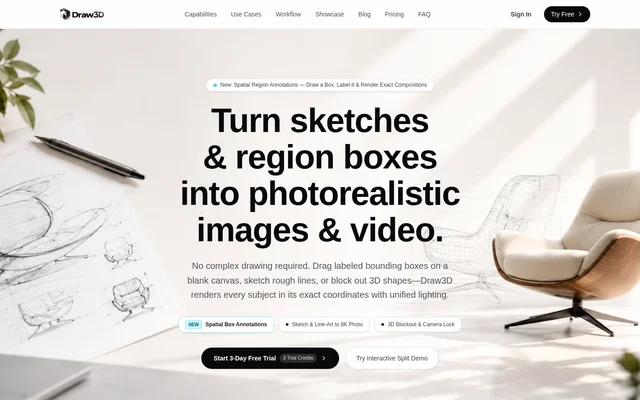
Draw3D is a browser-based AI design and rendering tool for converting visual concepts into photorealistic images and cinematic video. Draw3D serves designers, architects, artists, and studios working from sketches, architectural plans, CAD massings, or rough scene layouts. The service runs in a web browser using cloud GPUs, and the page positions spatial control as the main distinction from text-only image generation.
Draw3D accepts labeled bounding boxes as an alternative to detailed drawing. Users can define subjects and their positions on a blank canvas, sketch rough lines, or supply basic shapes. Draw3D describes its rendering process as preserving spatial placement while combining the subjects into a scene with unified lighting.
What Draw3D can do
Draw3D combines image generation, scene composition, editing, and motion tools within a shared credit system. The listed capabilities cover initial concept rendering through higher-resolution output and animated presentations. Draw3D also provides material and lighting controls, allowing users to specify surface appearance and scene mood alongside the geometry supplied in the input.
- Draw3D renders labeled region boxes as subjects within a unified scene.
- Draw3D converts sketches and architectural line work into photorealistic images.
- Draw3D renders 3D blockouts and CAD massings without UV unwrapping.
- Draw3D edits selected regions with inpainting and material styles.
- Draw3D generates turntable clips and camera flythrough animations.
- Draw3D creates seamless panoramic environment maps.
- Draw3D upscales concept renders to 8K.
How Draw3D works
Draw3D starts with browser-canvas drawing, a CAD outline, or an uploaded design image. The workflow also describes importing screenshots from Blender, SketchUp, or Maya. The file FAQ lists PNG, JPG, and WebP uploads exported from applications including Photoshop, Procreate, Rhino, and AutoCAD; these are image-based inputs rather than evidence of direct application integrations.
Draw3D then lets users choose materials such as concrete, brushed aluminum, and glass, set lighting moods, and adjust depth weight. Output options include production renders, variations, and motion clips. The pricing table additionally lists GLB, OBJ, and viewport captures for blockout rendering, while its video output specification names 1080p MP4.
Who Draw3D is for
Draw3D addresses hobbyists, regular creators, architects, directors, power users, studios, and design agencies in its plan descriptions. The examples focus on architecture, product sketches, concept art, and blockout visualization. Draw3D is relevant when a creator already has a layout, drawing, or geometry reference and wants to develop that input into a rendered presentation or motion sequence.
- Architects can render architectural plans and CAD massings.
- Product designers can visualize sketches and industrial design concepts.
- Artists can develop concept art from rough line work.
- Directors can animate storyboard drawings or photo keyframes.
Draw3D pricing and plans
Draw3D offers Starter, Basic, and Professional subscriptions with monthly or annual billing options. Every plan begins with a 3-day free trial containing 3 credits, with $0 due initially. Full plan credits unlock automatically after the trial. The displayed annual-billing offers list Starter at $9 per month, Basic at $15 per month, and Professional at $39 per month.
Draw3D lists monthly allowances of 120 credits for Starter, 200 credits for Basic, and 1,000 credits for Professional. Sketch rendering, blockout rendering, region editing, and panorama generation each cost 1 credit in the tool table. Cinematic video and storyboard motion cost 20 credits. The page states that subscriptions can be canceled anytime.
Draw3D strengths and limitations
Draw3D supports several ways to define composition rather than requiring detailed drawing or a text prompt alone. Spatial boxes, edge conditioning, material controls, and viewport captures support workflows built around existing design references. Draw3D also groups still-image rendering, editing, panoramas, and motion under shared credits, although the credit cost differs substantially between still-image tools and cinematic video.
- Draw3D limits trial access to 3 days and 3 credits.
- Draw3D charges 20 credits for cinematic video, compared with 1 credit for sketch rendering.
- Draw3D uses different plan names in its commercial-rights FAQ and subscription cards, leaving the exact license mapping unclear.
Draw3D FAQ
What is Draw3D?
Draw3D is a browser-based AI rendering tool that converts sketches, architectural drawings, labeled region boxes, and 3D blockouts into photorealistic images and cinematic video. Draw3D provides spatial depth, material, lighting, and camera-related controls for designers, architects, artists, and studios.
Is Draw3D free?
Draw3D offers a 3-day free trial with 3 credits on each paid plan and $0 due initially. Draw3D lists Starter, Basic, and Professional subscriptions, with full plan credits unlocking automatically when the trial ends. The page states that users can cancel anytime.
What files can Draw3D import?
Draw3D lists PNG, JPG, and WebP uploads exported from Photoshop, Procreate, Blender, SketchUp, Maya, Rhino, or AutoCAD viewport captures. Draw3D also lists GLB, OBJ, and viewport captures in its blockout-rendering credit table.
Can Draw3D turn sketches into video?
Draw3D can generate camera motion, depth shifts, and movement from a single photo keyframe or storyboard drawing. Draw3D lists turntable and camera flythrough animation as 1080p MP4 outputs, with cinematic video and storyboard motion costing 20 credits.
Can Draw3D renders be used commercially?
Draw3D lists commercial licenses in its subscription cards, including a full agency license for Professional. Draw3D's FAQ instead assigns full commercial rights to Pro and Studio plans, which do not match the listed subscription names, so the page leaves the exact plan-to-license mapping unclear.
How does Draw3D control image composition?
Draw3D uses labeled spatial boxes, spatial depth control, and edge conditioning to guide subject placement and preserve input geometry. Draw3D lets users position subjects on a canvas or supply sketches and blockouts, then adjust materials, lighting, and depth weight before rendering.
From the community
No reviews yet
Be the first to review this tool. What you write helps the next person choose.