What is EbSynth?
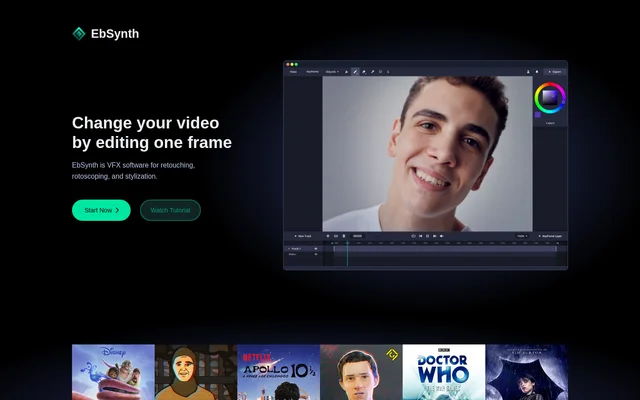
EbSynth is VFX software for changing video by editing individual keyframes and propagating those changes across a shot. EbSynth supports retouching, rotoscoping, and stylization for artists working with filmed performances and animation. Šárka Sochorová and Ondřej Jamriška created EbSynth at Secret Weapons to support artistic control and storytelling.
EbSynth uses a texture-synthesis algorithm for keyframe propagation, not generative models trained on external datasets. The propagation process uses the supplied video and keyframes to produce its result. EbSynth also includes an optional Generate Image feature that uses AI to generate keyframes.
What EbSynth can do
EbSynth applies painted changes across video rather than requiring artists to repaint every frame. The listed workflows cover hand-drawn animation effects, footage correction, and painterly animation styling. EbSynth also supports separate video tracks and transparent keyframes for elements that need independent corrections or different keyframe timing.
- EbSynth turns painted performance keyframes into hand-drawn animation effects.
- EbSynth supports video touch-ups, digital makeup, and colorization.
- EbSynth propagates painterly textures from keyframes onto line art.
- EbSynth supports isolated corrections using transparent keyframes on separate tracks.
- EbSynth offers optional AI-generated keyframes through Generate Image.
How EbSynth works
EbSynth recommends starting with a single keyframe and adding further keyframes by correcting broken areas in synthesized frames. Keyframes should show clear poses and visible content, with painted shapes aligned to the underlying video. Independently moving elements, such as backgrounds, faces, or eyes, can be handled on separate video tracks.
EbSynth runs in a web browser on desktop devices, with Chrome recommended for long or high-resolution projects. Projects stay on the user's computer, but browser rendering temporarily uploads video and keyframes to servers. EbSynth states that these files are deleted immediately after results are returned and are not shared or used internally.
Who EbSynth is for
EbSynth is intended for artists who want to control video appearance through painted keyframes. The examples cover both live-action footage and existing animation, including performance-to-animation work, cosmetic corrections, and textured line art. Separate tracks allow artists to treat elements such as eyes or backgrounds independently.
- EbSynth supports artists turning filmed performances into painted animation.
- EbSynth supports video retouching through touch-ups, digital makeup, and colorization.
- EbSynth supports animation styling by transferring painterly textures to line art.
EbSynth pricing and plans
EbSynth offers Free, Pro, and Studio plans. Free costs $0 and includes core functions with 720p MP4 exports. Pro costs $20 per month and adds 1080p and 4K exports, PNG output with alpha, and priority processing. Studio costs $200 per month per seat and provides a Windows desktop app for local processing without footage uploads.
EbSynth strengths and limitations
EbSynth combines artist-painted keyframes with automated propagation, reducing the need for manual tracking in the described retouching workflows. The Free plan provides access to core functions without a time limit, while Studio offers fully offline processing. Results still depend on keyframe alignment and optical flow calculated from the guiding video.
- EbSynth is available only on desktop devices.
- EbSynth requires paid plans for higher-resolution exports or fully offline processing.
- EbSynth may produce stretchy or ripple-like artifacts when painted shapes do not match video frames.
- EbSynth tracking is harder with shiny or flat materials and motion blur.
EbSynth FAQ
What is EbSynth?
EbSynth is VFX software for retouching, rotoscoping, and stylization. EbSynth propagates edits from painted keyframes across video, supporting hand-drawn animation effects, digital makeup, colorization, and painterly textures for line art.
Is EbSynth free?
EbSynth offers a Free plan with core functions, no time limit, and 720p MP4 exports. EbSynth Pro costs $20 per month for higher-resolution exports, PNG output with alpha, and priority processing. Studio costs $200 per month per seat for local Windows processing.
Does EbSynth use AI?
EbSynth does not use AI for keyframe propagation. EbSynth uses a texture-synthesis algorithm that processes the supplied video and keyframes without generative models trained on external datasets. An optional Generate Image feature uses AI to generate keyframes.
Can EbSynth run offline?
EbSynth supports fully offline processing through the Studio plan, which includes a Windows desktop app. EbSynth Studio keeps footage on local machines without uploads, while browser rendering temporarily uploads video and keyframes to servers.
Which browser and devices does EbSynth support?
EbSynth is available only on desktop devices and recommends Chrome, especially for long or high-resolution projects. EbSynth advises laptop users to ensure the browser uses a dedicated graphics card for optimal performance.
Does EbSynth store uploaded videos?
EbSynth states that projects stay on the user's computer. EbSynth temporarily uploads video and keyframes for server rendering, then immediately deletes those files after returning results. EbSynth states that files are never shared or used for internal purposes.
From the community
No reviews yet
Be the first to review this tool. What you write helps the next person choose.