What is Face Swap?
Face Swap is an online AI tool from Akool for replacing faces in photos and videos. Face Swap serves content creators, marketing teams, social media users, and e-commerce teams that need personalized visual content. The browser-based application supports individual edits alongside group, animated, batch, generative, and live face swap scenarios.
Face Swap focuses on preserving expressions, skin texture, lighting, and identity consistency across outputs. The page describes uses ranging from short social videos to brand campaigns and personalized consumer experiences. Akool also presents customer examples involving airline advertising, interactive marketing, and personalized children's storybooks.
What Face Swap can do
Face Swap combines face replacement with controls for group images, apparent age, and generated identities. Face Swap supports still images and moving video, with features intended to maintain visual consistency as expressions, camera angles, and lighting change. The page also describes automated batch processing and real-time transformations for live creative applications.
- Face Swap replaces faces in photos and full-motion videos.
- Face Swap automatically swaps multiple faces in group photos without manual masking.
- Face Swap processes multiple visual assets through batch workflows.
- Face Swap supports live face replacement for livestreams, meetings, and events.
- Face Swap creates generative face swaps using AI prompts and identity controls.
- Face Swap changes apparent facial age through ReAge Mode.
- Face Swap exports up to 4K depending on the target asset.
How Face Swap works
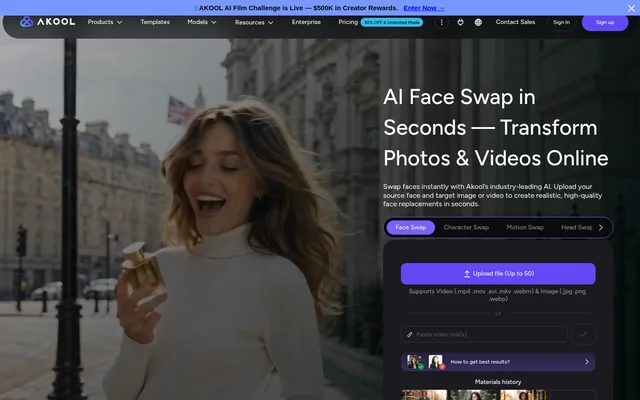
Face Swap follows a workflow of selecting a swap type, uploading media, assigning a face to replace, and generating the result. Face Swap provides built-in demo assets as an alternative to personal uploads. The upload area also accepts pasted video links and lists support for uploading up to 50 files.
Face Swap accepts video files in .mp4, .mov, .avi, .mkv, and .webm formats, and images in .jpg, .png, and .webp formats. Face Swap also provides an API for face swaps, age changes, and filtering. The API description includes customizable settings, simultaneous task handling, and processing for large files.
Who Face Swap is for
Face Swap is aimed at teams and individuals producing personalized visual media. Face Swap's listed audiences include creators making entertainment content, agencies developing advertising variations, and e-commerce teams showing products on different models. Corporate training teams can replace spokesperson faces with internal staff when adapting instructional videos.
- Face Swap helps creators produce skits, parodies, and creative videos.
- Face Swap lets marketers create personalized ads without reshooting.
- Face Swap supports product presentations using different models.
- Face Swap enables face replacement in corporate training and tutorial videos.
- Face Swap supports memes and entertainment content for social media.
Face Swap pricing and credit requirements
Face Swap uses a credit-based studio workflow, with the face replacement tool listed at 4+ credits. The surrounding studio also lists credit requirements for character, motion, head, hair, and clothing swaps. The supplied page does not state monetary subscription prices, credit purchase prices, or whether a free credit allowance is available.
Face Swap strengths and limitations
Face Swap brings photo, video, group, batch, and live workflows into an online tool with API access. Face Swap's automatic multi-face support removes the need for manual masking in group photos, while demo assets provide a way to explore the workflow. Output resolution is conditional on the target asset rather than a uniform export guarantee.
- Face Swap requires credits for the studio tools listed on the page.
- Face Swap makes high-resolution export dependent on the target asset.
- Face Swap lists specific supported upload formats rather than unrestricted file compatibility.
Face Swap FAQ
What is Face Swap?
Face Swap is Akool's web-based AI tool for replacing faces in photos and videos. Face Swap supports group images, animated content, batch processing, generative face swaps, and live face replacement for creative and marketing workflows.
How much does Face Swap cost?
Face Swap is listed at 4+ credits in Akool's swap studio. Face Swap's supplied page does not state monetary subscription prices, credit purchase prices, or a free credit allowance, so a cash cost cannot be determined from this text.
What file formats does Face Swap support?
Face Swap supports .mp4, .mov, .avi, .mkv, and .webm video files, plus .jpg, .png, and .webp images. Face Swap's upload area also accepts pasted video links and lists an upload limit of up to 50 files.
Can Face Swap replace multiple faces in a group photo?
Face Swap can automatically replace multiple faces in group photos without manual masking. Face Swap also offers batch workflows for processing multiple visual assets, alongside separate support for animated content and full-motion video.
Does Face Swap have an API?
Face Swap provides API access for face swaps, age changes, and filtering. Face Swap's API description includes customizable settings, simultaneous task management with dynamic capacity, and large-file processing, with documentation linked from the page.
Who is Face Swap for?
Face Swap is for content creators, YouTubers, marketers, agencies, e-commerce teams, social media users, and corporate training teams. Face Swap's listed uses include skits, personalized ads, product presentations on different models, memes, and spokesperson replacement in training videos.
From the community
No reviews yet
Be the first to review this tool. What you write helps the next person choose.