What is Fillout?
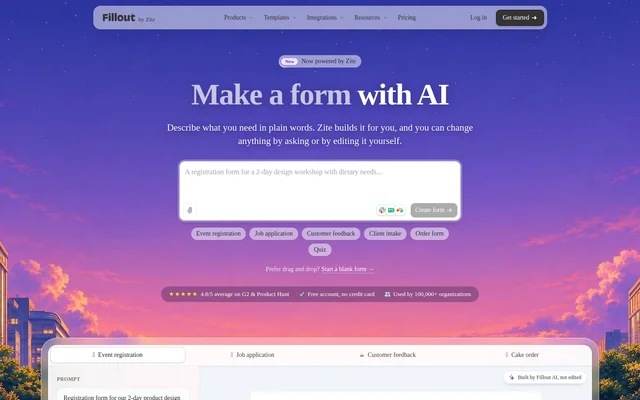
Fillout is an online form builder that offers AI-assisted creation powered by Zite alongside a drag-and-drop editor. Fillout helps teams create registration forms, applications, surveys, quizzes and other data collection forms from a description rather than starting with a template. The AI workflow also accepts existing questions or an uploaded PDF.
Fillout presents the AI-generated form as an editable draft, not an automatically published result. Users can ask for revisions or change text, colors and images themselves. The page describes uses ranging from event registration and customer feedback to hiring, client intake, orders and scholarship applications.
What Fillout can do
Fillout combines form generation with tools for collecting, processing and acting on responses. The AI builder writes questions, selects inputs, checks answers and applies branding. Beyond the initial draft, the page describes conditional questions, scoring, payments, booking connections and automated follow-ups, with response data available in a Zite database.
- Fillout generates forms from plain-language prompts, pasted questions or uploaded PDFs.
- Fillout supports conditional questions, multi-step pages and live totals.
- Fillout creates surveys with ratings and quizzes with scoring.
- Fillout accepts one-time or subscription payments through Stripe.
- Fillout connects booking forms to Google Calendar, Outlook or Calendly.
- Fillout uses AI fields to summarize, tag and score responses.
- Fillout generates PDFs from responses and collects signatures.
How Fillout works
Fillout starts the AI workflow with a description, pasted questions or a PDF uploaded through the prompt box. Users then sign up with Google or Microsoft, and Zite builds the form into their new workspace. Users can request changes in plain language, edit through Design mode or, for developers, open the code.
Fillout keeps the form unpublished until the user chooses Publish. A published form can be shared through a link, embedded on a website or distributed using a printed QR code. Responses are saved in the Zite database for filtering, sorting and exporting, and can also be sent to connected apps.
Who Fillout is for
Fillout serves teams and individuals who need structured information from applicants, customers, clients, attendees or community members. The source provides prompt examples with specific fields and design instructions, including resume uploads for hiring, dietary requirements for events and deposits for cake orders. These examples show how form content and appearance can be specified together.
- Fillout helps event organizers collect registrations, meal preferences and RSVPs.
- Fillout helps hiring teams collect contact details, resumes and salary expectations.
- Fillout helps service businesses collect client intake information and quote requests.
- Fillout helps customer teams gather feedback, ratings and callback requests.
- Fillout helps educators and application teams create scored quizzes and scholarship forms.
Fillout pricing and plans
Fillout's AI workflow uses Zite, whose free plan includes 50 AI credits a month, 5,000 database records and no per-user fees. A credit card is not required. Paid Zite plans add more credits, custom domains and removal of Zite branding. The source does not provide prices for those Zite upgrades.
Fillout's separate pricing page lists a free plan with unlimited forms, unlimited seats and 1000 responses/mo. The displayed annual-billing rates are $15 per month for Starter, $40 for Pro and $75 for Business. Higher plans add response capacity and features such as branding removal, custom domains, analytics and priority support.
Fillout strengths and limitations
Fillout offers both conversational form creation and a separate manual editor, giving users different ways to build and revise forms. Fillout also connects collection with downstream tasks such as payments, PDF generation, signatures and follow-up messages. The main access and plan constraints concern required accounts, AI credits, response allowances and paid customization features.
- Fillout requires a free Zite account for the AI creation workflow.
- Fillout's Zite-powered free access includes a limited monthly AI credit allowance.
- Fillout's Zite-powered custom domains and branding removal require paid plans.
- Fillout's free drag-and-drop plan limits monthly responses.
Fillout FAQ
What is Fillout?
Fillout is an online form builder with AI creation powered by Zite. Fillout turns descriptions, pasted questions or PDFs into editable forms, surveys and quizzes, and also offers a separate drag-and-drop editor for manual form building.
Is Fillout's AI form builder free?
Fillout offers free AI form creation through Zite, with 50 AI credits a month, 5,000 database records and no credit card required. Paid Zite plans add credits, custom domains and removal of Zite branding.
Can Fillout turn a PDF into an online form?
Fillout can turn an uploaded PDF into an online form with matching fields. Users select the paperclip in the prompt box and choose Upload a PDF. Fillout also accepts pasted questions and provides a dedicated PDF-to-form converter.
Which apps does Fillout connect to?
Fillout sends responses to Google Sheets, Airtable, Notion, Slack, HubSpot and other apps. Fillout also supports Stripe payments and booking connections with Google Calendar, Outlook or Calendly.
Can you customize and share Fillout AI forms?
Fillout supports customization through plain-language change requests or manual editing of text, colors and images in Design mode. Forms remain unpublished until Publish is selected. Published forms can be shared by link, embedded on websites or accessed through printed QR codes.
Where does Fillout store AI form responses?
Fillout saves AI form responses in the Zite database, where users can filter, sort and export submissions. Users can also ask Zite to build a dashboard for reviewing responses or send responses to connected apps.
From the community
No reviews yet
Be the first to review this tool. What you write helps the next person choose.