What is Forms.app?
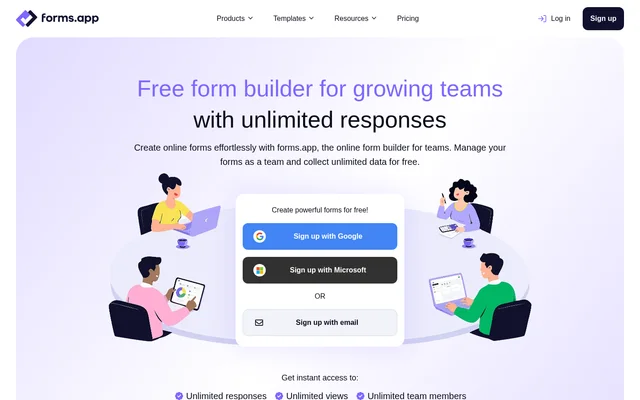
Forms.app is an online form builder for teams collecting information through applications, surveys, registrations, orders, and other forms. Forms.app combines visual form editing, AI-assisted creation, collaboration, and response analysis. Teams can build forms from scratch or use customizable templates, then distribute forms through links or website embeds.
Forms.app supports workflows described by customers in marketing, public-sector applications, association applications, and digital reporting. The product includes form design, data collection, electronic signatures, and payment collection within the same builder. Access begins with account registration through Google, Microsoft, or email, and a free plan is available.
What Forms.app can do
Forms.app provides tools for creating questions, controlling form behavior, collecting submissions, and reviewing results. AI capabilities cover form generation, question alternatives, multiple-choice answer options, and response insights. The form editor also supports practical collection requirements such as document uploads, product listings, electronic signatures, and payments.
- Forms.app generates forms from a description of the requested form.
- Forms.app suggests alternative question wording and multiple-choice answer options.
- Forms.app shows or hides questions using conditional logic.
- Forms.app collects file uploads and electronic signatures.
- Forms.app accepts payments through Stripe and PayPal.
- Forms.app tracks submissions in real time and provides filters and AI insights.
- Forms.app exports signed forms as PDFs.
How Forms.app works
Forms.app offers account registration with Google, Microsoft, or email. Users can select a pre-built template, describe a form to the AI creator, or arrange fields with the drag-and-drop editor. Customization includes question logic, page breaks, appearance settings, and mobile-responsive layouts. Forms can be shared through unique links, embedded on websites, or displayed as pop-ups.
Forms.app connects collected information with other services through integrations and webhooks. Named integrations include Google Sheets, Microsoft Excel, Slack, Mailchimp, HubSpot, Google Drive, and Zapier. Teams can organize forms into folders, assign access permissions, and receive email or push notifications about responses.
Who Forms.app is for
Forms.app serves teams that need shared responsibility for creating forms and collecting information. The website describes marketing campaigns, event management, provider applications, and digital reports as customer uses. Templates also address recruiting, bookings, customer satisfaction, and orders, giving teams starting points for different collection tasks.
- Marketing teams can collect customer and prospect information for campaigns and events.
- Application teams can request supporting documents through file upload forms.
- Businesses can collect bookings, product orders, and payments.
- Teams can gather feedback through customer satisfaction surveys.
- Organizations can replace handwritten reports with digital forms.
Forms.app pricing and plans
Forms.app offers Free, Grow, and Scale plans, with unlimited responses and team members on every plan. Free includes 5 forms, 10 MB of storage, payment collection, conditional logic, e-signatures, custom CSS, and advanced analytics. The Free plan requires no credit card and is described as having no cost forever.
Forms.app lists Grow at 15 USD per month and Scale at 24 USD per month when billed annually. Grow includes 25 forms, 100 GB of storage, branding removal, and drop-off analysis. Scale adds unlimited forms and file storage, custom domain options, saved drafts, and partial responses. Monthly billing is also offered.
Forms.app strengths and limitations
Forms.app combines unlimited response collection and team membership with a free plan that includes logic, signatures, customization, and analytics. AI assistance spans form preparation and response review, while integrations support connected workflows. Plan selection still matters because form capacity, storage, branding controls, and some response collection features differ between tiers.
- Forms.app limits Free accounts to 5 forms and 10 MB of file storage.
- Forms.app reserves branding removal and drop-off analysis for Grow and Scale.
- Forms.app reserves custom domain options, saved drafts, and partial responses for Scale.
Forms.app FAQ
What is Forms.app?
Forms.app is an online form builder for teams that supports AI-assisted form creation, drag-and-drop editing, and response analysis. Forms.app can collect applications, feedback, registrations, orders, payments, file uploads, and electronic signatures through forms shared by link or embedded on websites.
Is Forms.app free?
Forms.app offers a free plan with unlimited responses, views, and team members, without requiring a credit card. The free plan includes 5 forms, 10 MB of storage, conditional logic, e-signatures, custom CSS, and advanced analytics. Paid Grow and Scale plans add capacity and features.
How does Forms.app use AI?
Forms.app uses AI to generate forms from descriptions, suggest alternative question wording, and create multiple-choice answer options. Forms.app also provides AI insights about responses, and the pricing page lists response summarization, response translation, and a PDF-to-form importer among its AI capabilities.
Which integrations does Forms.app support?
Forms.app lists integrations with Google Sheets, Microsoft Excel, Slack, Discord, Intercom, Mailchimp, HubSpot, ActiveCampaign, Google Drive, and Zapier, among others. Forms.app also supports webhooks and names Stripe and PayPal as payment partners for collecting payments through forms.
Can teams collaborate in Forms.app?
Forms.app supports collaboration with unlimited team members on every plan. Forms.app lets teams organize forms in folders and invite members with granular access permissions. The free plan includes team permissions and unlimited folders, alongside unlimited form responses.
What are the limits of the Forms.app free plan?
Forms.app limits the free plan to 5 forms and 10 MB of file storage while keeping responses and team members unlimited. Forms.app places branding removal and drop-off analysis in Grow, while custom domain options, saved drafts, and partial responses are included in Scale.
From the community
No reviews yet
Be the first to review this tool. What you write helps the next person choose.