What is FilterPixel?
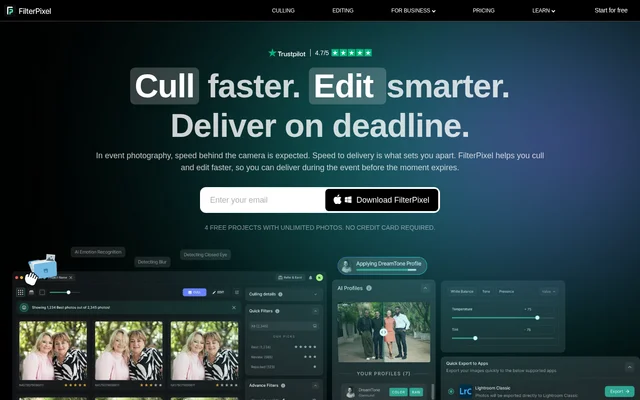
FilterPixel is an AI-powered photo culling and editing application for photographers and studios managing high-volume shoots. FilterPixel brings image import, selection, editing, and export into a connected workflow on Windows and macOS. The application focuses on event photography, where photographers need to review large collections and prepare client galleries under deadline pressure.
FilterPixel separates technical filtering from context-aware selection. Basic Cull assesses issues such as blur, focus, expressions, and composition, while DeepCull considers the genre and significance of a moment. Photographers retain control of final selections, with explanations intended to make the AI’s recommendations easier to review.
What FilterPixel can do
FilterPixel combines tools for choosing photos with tools for applying consistent edits. Selection features address technical quality, similar frames, and editorial relevance, while editing features use either a photographer’s learned style or built-in profiles. Existing tagging conventions can remain part of the workflow rather than being replaced by a different organizational system.
- FilterPixel uses Basic Cull to filter blur, focus, expression, and composition issues.
- FilterPixel uses DeepCull to score genre-specific selections and explain the reasons.
- FilterPixel groups similar photos in Survey Mode for frame-by-frame comparison.
- FilterPixel preserves every image in Review Mode.
- FilterPixel applies stars, color codes, and flags based on existing tagging preferences.
- FilterPixel adjusts white balance, exposure, color tone, and contrast.
- FilterPixel learns editing preferences from an edited Lightroom catalog.
- FilterPixel provides built-in AI profiles created by expert photographers.
How FilterPixel works
FilterPixel starts with sign-up and an app download. Photographers can load images directly from a memory card, with automatic backup and support for RAW, JPEG, or both. The selection workflow combines technical filtering, contextual assessment, and comparison tools, while Magic Number helps select a delivery set from a larger collection.
FilterPixel supports personalized editing through Style DNA, trained using an edited Lightroom catalog. Built-in expert profiles offer an alternative without training or setup. Finished images can be exported in RAW or JPEG formats and sent to Lightroom, Capture One, or Photo Mechanic to continue an existing photography workflow.
Who FilterPixel is for
FilterPixel serves photographers and studios working with large galleries from conferences, corporate events, sports, concerts, and weddings. FilterPixel also presents a business offering for organizers, venues, and platforms, where photographers continue shooting while photos are selected, branded, and delivered to the appropriate recipients during an event.
- FilterPixel helps conference photographers select keynote moments and audience reactions.
- FilterPixel helps sports photographers review peak action across image sequences.
- FilterPixel helps wedding studios apply a consistent editing style across galleries.
- FilterPixel supports event photo workflows for venues, resorts, theme parks, and in-house teams.
FilterPixel pricing and trial access
FilterPixel offers a free trial covering up to 4 projects, including importing, culling, editing, and exporting. The trial allows unlimited photos and does not require a credit card. Access begins by signing up and downloading the application. The supplied page does not specify paid plan names, subscription prices, or purchase terms after the trial.
FilterPixel strengths and limitations
FilterPixel combines explained selections, non-destructive review, personalized editing, and export connections to established photography applications. Genre-aware assessment adds context beyond technical filtering, while Survey Mode supports manual comparison of closely related frames. The main access constraint stated on the page is the project-limited free trial; custom editing-style training also depends on an edited Lightroom catalog.
- FilterPixel limits the free trial to up to 4 projects.
- FilterPixel requires an edited Lightroom catalog to train Style DNA.
- FilterPixel leaves final photo selections under the photographer’s control.
FilterPixel FAQ
What is FilterPixel?
FilterPixel is an AI photo culling and editing application for high-volume photographers and studios. FilterPixel combines importing, technical filtering, genre-aware photo selection, personalized editing, and export in a workflow available on Windows and macOS.
Is FilterPixel free?
FilterPixel offers a free trial for up to 4 projects with unlimited photos and no credit card required. The trial covers importing, culling, editing, and exporting. The supplied page does not state paid plan prices.
What is the difference between FilterPixel Basic Cull and DeepCull?
FilterPixel Basic Cull focuses on technical filtering and grouping similar images, while DeepCull evaluates moments, expressions, and context. DeepCull adapts to photography genres such as weddings, events, and sports, providing a score and reason for photo selections.
Does FilterPixel delete photos during culling?
FilterPixel does not delete images during review. FilterPixel uses Review Mode to organize photos while preserving every image, allowing photographers to revisit frames and retain control over final selections.
Does FilterPixel work with Lightroom and Capture One?
FilterPixel exports final images to Lightroom, Capture One, and Photo Mechanic, with RAW and JPEG export options. FilterPixel also uses an edited Lightroom catalog to train Style DNA for personalized editing.
Can FilterPixel learn a photographer’s editing style?
FilterPixel can learn an editing style through Style DNA using an edited Lightroom catalog. FilterPixel applies learned tones, colors, and adjustments across photos, while built-in expert profiles provide an alternative that does not require training.
From the community
No reviews yet
Be the first to review this tool. What you write helps the next person choose.