What is Flint?
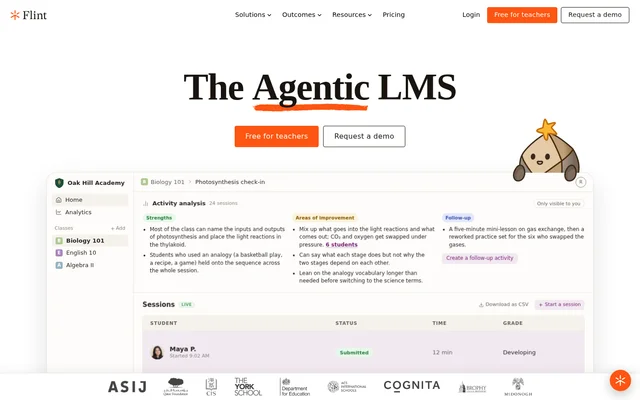
Flint is an AI learning management system for school teachers and students. Teachers use Flint to create and share activities, while students work through material with an AI tutor. The examples on the site cover subjects including math, science, English, and world languages. The classroom dashboard also shows how teachers can track activity sessions and review what students understood or struggled with.
What Flint can do
Flint combines student practice and feedback with tools for teachers to review class performance. The site describes students asking follow-up questions, checking where their work went wrong, and practicing material at a level suited to them. Teachers can review individual session records and see which difficulties recur across the class.
- Teachers can create and share classroom activities.
- Flint adapts assignments to students' skill levels.
- Students can get feedback as they work.
- Students can practice spoken language through roleplay.
- Teachers can track live sessions and export session records as a CSV.
- Teachers can create follow-up activities from the activity analysis view.
How Flint works
Flint shows a workflow in which teachers open a class activity and monitor student sessions. The live session table shows start times, submission status, time spent, and marks where available. In the photosynthesis example, the activity analysis highlights a recurring mix-up between carbon dioxide and oxygen. The suggested response is a short lesson on gas exchange followed by revised practice for the students who confused the gases.
Who Flint is for
Flint is for teachers who want students to practice independently while retaining a view of how the class is doing. The page includes examples from elementary, middle, and high school classrooms. Students can ask questions they might hesitate to raise in class, while teachers can offer different levels of practice or use class performance trends to form groups around a particular skill.
- Prepare for unit tests with personalized review.
- Revise a narrative using a teacher's editing checklist.
- Practice spoken Spanish through roleplay.
- Review science concepts with guided questions.
- Group students for practice on a shared learning gap.
Flint pricing and plans
Flint is advertised as free for teachers, and the website also offers a demo request. The page does not list a subscription price, describe paid plans, or spell out which features are included in the free teacher offering. The free claim on the page is specifically about teachers.
Flint strengths and limitations
Flint gives teachers a way to connect what students do during practice with what to teach next. The activity analysis example separates strengths from areas for improvement and proposes a specific follow-up. The analysis is marked as visible only to the teacher, so this example shows a planning view rather than a student-facing report. Teachers can also supplement AI-generated feedback with their own comments.
Getting started with Flint
Flint's classroom examples show how a teacher can start with a familiar task, such as a chapter review or a writing revision activity, and share it with a class. Teachers in the examples upload an editing checklist or provide resources and detailed instructions when creating an activity. Once students start working, the teacher can monitor sessions and use the activity analysis to decide whether follow-up practice is needed.
Flint FAQ
What is Flint?
Flint is an AI learning management system for teachers and students. Teachers can create classroom activities and review student progress, while students can use Flint for guided practice, tutoring, and feedback on their work.
Is Flint free for teachers?
Flint is advertised as free for teachers, and its website offers a demo request. The page does not give subscription prices, describe paid plans, or explain which features are included in the free teacher offering.
Can Flint adapt classroom activities to different skill levels?
Flint can adapt activities to a student's skill level. Teachers on the site describe using the same activity with students who need more time on the basics and students who are ready to move on to more complex material.
How does Flint help teachers track student progress?
Flint shows live session details such as start times, submission status, time spent, and marks where available. Its activity analysis summarizes class strengths and areas for improvement, and teachers can download session records as a CSV.
Can students use Flint to practice speaking a language?
Flint supports spoken language practice through conversation and roleplay. In one example, a Spanish teacher describes speaking with Flint in Spanish and getting follow-up questions based on the initial prompt.
From the community
No reviews yet
Be the first to review this tool. What you write helps the next person choose.