What is GanttPRO’s AI Gantt chart maker?
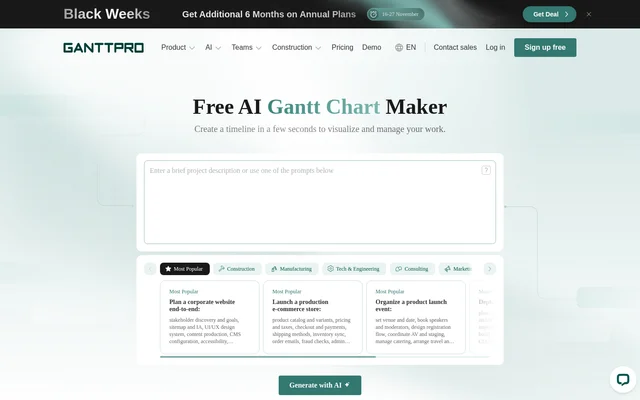
GanttPRO’s AI Gantt chart maker is a free tool for creating timelines that help people visualize and manage project work. The page illustrates what those timelines can cover with examples ranging from residential construction and manufacturing process changes to mobile app releases and documentary production. The common purpose is to represent the work on a project timeline, even when the activities differ substantially by industry.
What GanttPRO’s AI Gantt chart maker can do
GanttPRO’s AI Gantt chart maker creates project timelines, which the page describes as taking a few seconds. The examples go beyond naming a project and list the work involved. A product launch event, for instance, includes booking speakers, coordinating staging, arranging travel, handling event-day logistics, and gathering attendee feedback.
- The chart maker can visualize a website project from discovery through handover.
- The chart maker can outline a documentary schedule from research to distribution.
- The chart maker can map a solar farm installation from permits to commissioning.
- The chart maker can represent a mobile app launch from feature definition to monitoring.
How GanttPRO’s AI Gantt chart maker works
GanttPRO’s AI Gantt chart maker pairs timeline creation with examples that describe a project goal and the activities the plan needs to cover. The corporate website example starts with stakeholder discovery and goals, then lists work such as site structure, design, content, accessibility, testing, launch, and handover. That example illustrates the level of detail shown on the page: a project objective followed by the work that belongs on its timeline.
Who GanttPRO’s AI Gantt chart maker is for
GanttPRO’s AI Gantt chart maker is relevant to people planning projects that span multiple stages. The construction examples cover new builds and renovations, while the manufacturing examples address changes such as installing automation or expanding production capacity. The software and engineering examples include releasing a mobile app and migrating a legacy system to the cloud.
- Construction: Schedule an office renovation from layout design to walkthrough.
- Manufacturing: Plan assembly line automation from equipment selection to rollout.
- Software: Outline a cloud migration from architecture assessment to cutover.
- Events: Coordinate a product launch from venue selection to post-event reporting.
GanttPRO’s AI Gantt chart maker pricing
GanttPRO’s AI Gantt chart maker is presented as free on the page featuring the timeline generator and project examples. The free label refers to the chart maker described on that page, which is intended to create a timeline for visualizing and managing work. The supplied page text does not specify usage limits or describe paid plans for the chart maker.
Strengths and limitations of GanttPRO’s AI Gantt chart maker
GanttPRO’s AI Gantt chart maker is presented with examples detailed enough to show what belongs in different project schedules. A hospital wing plan includes regulatory and operational steps such as inspections, staff training, and patient transfer, while an e-commerce plan includes checkout, inventory, and post-launch support. The supplied text focuses on generating a timeline and does not establish which editing or sharing options are available after generation.
GanttPRO’s AI Gantt chart maker FAQ
What is GanttPRO’s AI Gantt chart maker?
GanttPRO’s AI Gantt chart maker is a free tool that creates timelines to help people visualize and manage project work. The page shows examples for projects such as corporate websites, product launch events, construction, manufacturing, and mobile app development.
Is GanttPRO’s AI Gantt chart maker free?
GanttPRO’s AI Gantt chart maker is listed as free on the product page. The free label describes the timeline generator, which the page says creates a timeline to help people visualize and manage their work.
Who is GanttPRO’s AI Gantt chart maker for?
GanttPRO’s AI Gantt chart maker is for people who need to visualize and manage project work on a timeline. The page includes examples for construction, manufacturing, and software projects, as well as work such as planning a product launch event or producing a documentary.
Can GanttPRO’s AI Gantt chart maker be used for construction schedules?
GanttPRO’s AI Gantt chart maker includes construction planning examples for projects such as a residential complex, a commercial office renovation, and a bridge. The residential example covers work from site surveys and permits through final inspections and handover documentation.
What software projects can GanttPRO’s AI Gantt chart maker help plan?
GanttPRO’s AI Gantt chart maker shows examples for launching a mobile app, migrating a legacy system to the cloud, and deploying a SaaS MVP. The mobile app example covers activities such as defining user flows, building the backend and frontend, testing, and monitoring after launch.
From the community
No reviews yet
Be the first to review this tool. What you write helps the next person choose.