What is Tomsplanner?
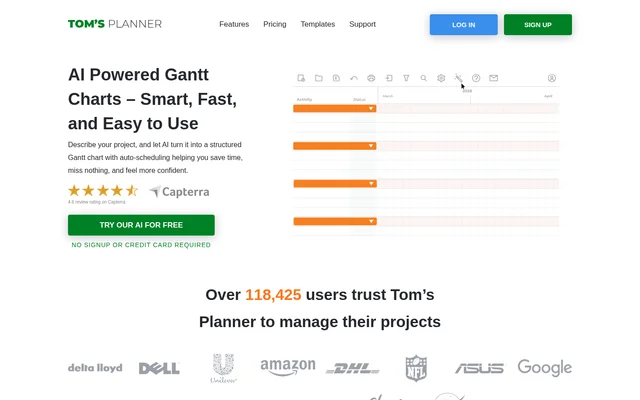
Tomsplanner is an online Gantt chart maker with an AI assistant that converts written project descriptions into structured plans. Tomsplanner serves people who need to organize project phases, activities, and timelines without starting from an empty chart. A description can be brief, such as a house-building project, or more detailed.
Tomsplanner treats AI output as a first version rather than a replacement for manual planning. Users can collaborate with the assistant through further instructions, adjust the chart themselves, and retain control over the details and final result. The website also provides templates covering several project types.
What Tomsplanner can do
Tomsplanner combines AI-assisted project breakdowns with Gantt chart editing tools. The assistant can create a new plan, refine its structure, or help improve an existing chart. Scheduling assistance is available when users provide a start and end date, while manual controls remain available for adjustments.
- Tomsplanner generates logical project phases and activities from a description.
- Tomsplanner schedules tasks within supplied dates while considering dependencies and avoiding overlaps.
- Tomsplanner suggests missing activities and breaks complex tasks into new phases.
- Tomsplanner restructures existing phases according to user instructions.
- Tomsplanner supports drag-and-drop time blocks and flexible progress tracking.
- Tomsplanner filters charts by resources, activities, teams, icons, and dates.
How Tomsplanner works
Tomsplanner begins with a project description entered in the AI Assist form. Advanced options let users specify the number of phases and activities per main phase. After generation, users can add instructions to revise the breakdown, or manually add, remove, and edit activities and phases.
Tomsplanner works in browsers, including those on mobile devices and tablets, although the website notes that a computer may be more convenient for extensive planning. Tomsplanner uses OpenAI’s API to process project input. Submitting the generation form grants permission to share that input with OpenAI for analysis and processing.
Who Tomsplanner is for
Tomsplanner supports people who need help deciding how to structure a project as well as those refining an existing schedule. The template collection covers construction, design and media, event planning, finance and entrepreneurship, information technology, marketing and advertising, and general project management. Examples connect the chart-making workflow to specific planning tasks.
- Tomsplanner provides templates for residential construction and landscaping schedules.
- Tomsplanner provides templates for cloud migration and IT infrastructure planning.
- Tomsplanner provides templates for rebranding and interior design projects.
- Tomsplanner provides templates for music festival planning.
Tomsplanner pricing and plans
Tomsplanner offers AI-generated Gantt charts free of charge without requiring signup at the start. Saving a generated chart and continuing to work on it requires a free Personal account. The Personal account allows only one Gantt chart. Paid Professional and Unlimited accounts allow multiple charts and enable printing, exporting, and online sharing.
Tomsplanner strengths and limitations
Tomsplanner combines a free initial generation workflow with both conversational refinement and direct chart editing. Language detection allows suggestions to follow the language of the project description, with English, Chinese, Hindi, and Arabic given as examples. The template library offers an alternative starting point that AI can customize and automatically schedule.
- Tomsplanner requires an account to save a generated chart and continue editing.
- Tomsplanner limits the free Personal account to one Gantt chart.
- Tomsplanner reserves printing, exporting, and online sharing for paid accounts.
- Tomsplanner relies on OpenAI processing, which may conflict with organizational restrictions on ChatGPT use.
Tomsplanner FAQ
What is Tomsplanner?
Tomsplanner is an online Gantt chart maker with AI assistance for project planning. Tomsplanner turns written project descriptions into phases and activities, supports automatic scheduling within supplied dates, and lets users refine plans through AI instructions or manual editing.
Is Tomsplanner free?
Tomsplanner offers free AI chart generation without initial signup. Saving and continuing work requires a free Personal account, which allows one Gantt chart. Paid Professional and Unlimited accounts support multiple charts and add printing, exporting, and online sharing.
Can Tomsplanner automatically schedule project tasks?
Tomsplanner can automatically schedule tasks when users provide project start and end dates. Tomsplanner considers dependencies, avoids overlaps, and organizes activities chronologically within that timeframe. Users can also manually adjust the generated Gantt chart.
Can Tomsplanner customize an existing project plan?
Tomsplanner can improve an existing Gantt chart by suggesting missing activities, breaking a complex task into a new phase, or restructuring an entire phase. Users can provide refinement instructions or manually add, remove, and edit activities and phases.
Does Tomsplanner share project descriptions with OpenAI?
Tomsplanner uses OpenAI’s API to analyze and process project input. The website states that API submissions are not used to train models, but are retained for a limited period. Tomsplanner advises that organizations restricting ChatGPT use should likely avoid AI Assist as well.
Does Tomsplanner work on mobile devices?
Tomsplanner AI Assist works in any browser, including browsers on mobile devices and tablets. Tomsplanner notes that a computer may be more convenient for extensive planning, while browser access allows users to generate charts on mobile devices.
From the community
No reviews yet
Be the first to review this tool. What you write helps the next person choose.