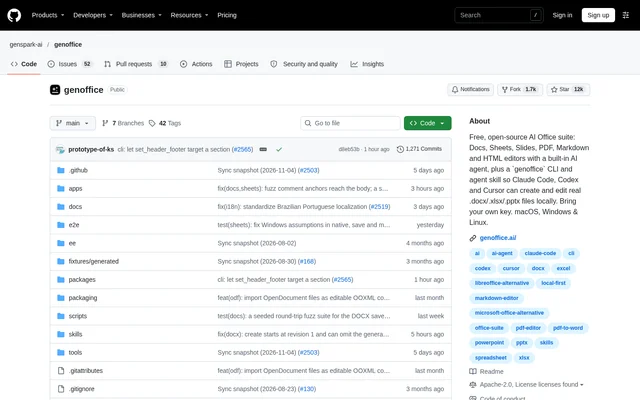
What is GenOffice?
GenOffice is a free, open-source office suite with a built-in AI agent for documents, spreadsheets, presentations, PDFs, Markdown and HTML. GenOffice runs on macOS, Windows and Linux and opens and saves native .docx, .xlsx and .pptx files. The suite supports direct editing by users as well as local file creation and editing through coding agents.
GenOffice keeps file operations on the user's machine and sends AI calls to the selected provider. The repository describes byte-preserving editing: only edited content is rewritten, while untouched file content survives unchanged. Documents therefore remain in formats that Word, Excel and PowerPoint can reopen, rather than becoming chat-only outputs.
What GenOffice can do
GenOffice combines document editors with an AI panel that reads relevant content and applies changes inside files. AI edits can be inspected through tracked changes and diffs, with rollback available. Spreadsheet answers can cite specific cells, PDF answers can cite pages, and answers across starred documents identify the source files.
- GenOffice edits Word documents and supports mail merge from spreadsheet or CSV recipient lists.
- GenOffice builds spreadsheets with live formulas, charts, pivot tables and slicers.
- GenOffice generates editable PowerPoint decks and supports recorded slide narration.
- GenOffice edits PDF text in place and converts PDFs to Word, Excel or PowerPoint locally.
- GenOffice builds self-contained HTML pages with visual editing and source access.
- GenOffice edits plain Markdown with wiki links, embedded notes, backlinks and a graph view.
- GenOffice searches local file contents and answers questions across starred files with citations.
How GenOffice works
GenOffice opens local files in the appropriate editor, where users can edit directly or ask the AI panel to make changes. Users can also select a passage and submit an anchored instruction through Ask AI. AI access uses Genspark sign-in or a supplied provider key, with support for providers including Claude, OpenAI and Gemini, plus OpenAI-compatible endpoints and local servers.
GenOffice also ships a command line and an agent skill for Claude Code, Codex, Cursor, Gemini CLI, GitHub Copilot, OpenCode and Windsurf. These workflows create, convert, read and edit Office files without opening a window. Local search uses a SQLite full-text index; optional TypeSafe Jev reranking sends search-result excerpts to the configured service.
Who GenOffice is for
GenOffice serves people who work with Office files and want AI assistance inside editable documents. GenOffice also supports coding-agent users who need document operations in local workflows. The included editors cover report editing, spreadsheet analysis, presentation creation, linked notes and HTML mockups, while starred-file questions support checking information across a selected document collection.
- GenOffice helps document users revise reports with reviewable AI changes.
- GenOffice helps spreadsheet users build summaries and inspect cited workbook cells.
- GenOffice helps presentation users draft and revise editable slide decks.
- GenOffice helps coding-agent users automate local Office-file operations.
GenOffice pricing and access
GenOffice is described as free and open source, and the repository lists the Apache-2.0 license. Desktop downloads are available for macOS on Apple Silicon and Intel, Windows on x64 and Arm, and Linux through deb, rpm and AppImage packages. AI access supports signing in with Genspark without supplying keys or bringing a key for a supported provider.
GenOffice strengths and limitations
GenOffice combines local editing and conversion with native Office-file output, reviewable AI changes and multiple provider choices. GenOffice also preserves untouched file content and provides cited answers for document questions. These capabilities sit alongside explicit boundaries around imported formats, hidden text and optional search reranking that matter when choosing a workflow.
- GenOffice opens ODF, legacy Word and Hancom documents as editable OOXML copies but does not save them in their source formats.
- GenOffice hides selected text from the app's AI, but CLI, MCP tools and headless export still read that text.
- GenOffice sends excerpts off-device when optional search reranking is enabled; the local index stays on-device.
GenOffice FAQ
What is GenOffice?
GenOffice is a free, open-source AI office suite for macOS, Windows and Linux. GenOffice edits native Word, Excel and PowerPoint files alongside PDF, Markdown and HTML, with an AI agent that reads files, applies changes and shows edits for review.
Is GenOffice free?
GenOffice is described as free and open source, with an Apache-2.0 license listed in the repository. GenOffice supports AI access through Genspark sign-in or a user-supplied key for supported providers, including OpenAI-compatible endpoints and local servers.
Does GenOffice keep files local?
GenOffice opens, edits, saves and converts files on the user's machine. GenOffice sends AI calls to the chosen provider, and optional TypeSafe Jev search reranking sends excerpts from top search results off-device when enabled. The local search index itself stays on-device.
Can GenOffice work with Claude Code, Codex and Cursor?
GenOffice ships a command line and an agent skill that support Claude Code, Codex and Cursor, along with other named coding agents. GenOffice lets these agents create, convert, read and edit real Office files locally without opening an application window.
Which file formats does GenOffice support?
GenOffice opens and saves .docx, .xlsx and .pptx files and edits PDF, Markdown and HTML. GenOffice also imports ODF, legacy Word and Hancom documents as editable OOXML copies, but saving those imports writes OOXML rather than the original source format.
Can GenOffice convert PDFs to Word?
GenOffice converts PDFs into editable Word documents on-device and also supports Excel and PowerPoint conversion targets. GenOffice opens the converted Word document beside the source in Docs, and scanned pages pass through the system OCR.
From the community
No reviews yet
Be the first to review this tool. What you write helps the next person choose.