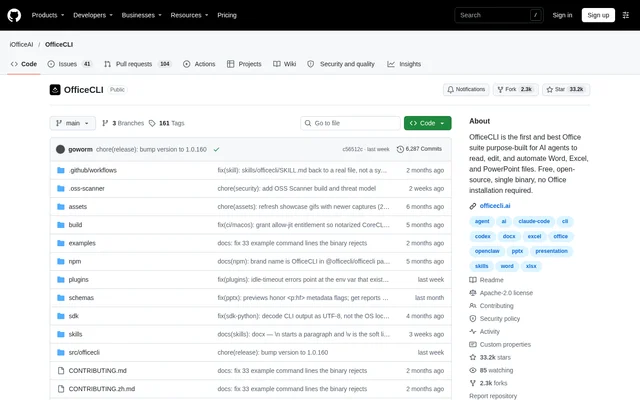
What is OfficeCLI?
OfficeCLI is an open-source command-line Office suite designed for AI agents to read, edit, and automate Word, Excel, and PowerPoint files. OfficeCLI also serves developers and teams building document workflows. The GitHub project provides a self-contained binary that operates without a Microsoft Office installation or a separately installed runtime.
OfficeCLI combines document manipulation with a built-in rendering engine. OfficeCLI can render supported documents to HTML or PNG, allowing an agent to inspect the visual result rather than relying only on document structure. The repository describes this as a render, look, and fix loop for document creation and revision.
What OfficeCLI can do
OfficeCLI supports creating documents from scratch, reading existing content, and modifying individual elements across supported Office formats. OfficeCLI exposes plain-text and structured JSON output, alongside commands for changing document content and presentation. Format-specific capabilities include Word tracked changes, Excel pivot tables, and PowerPoint animations.
- OfficeCLI creates, reads, and modifies .docx, .xlsx, and .pptx files.
- OfficeCLI reads document text, structure, styles, and formulas.
- OfficeCLI analyzes formatting issues, style inconsistencies, and structural problems.
- OfficeCLI modifies text, fonts, colors, layouts, formulas, charts, and images.
- OfficeCLI adds, removes, moves, and copies document elements.
- OfficeCLI renders documents to HTML or PNG for visual inspection.
How OfficeCLI works
OfficeCLI uses commands to create files, add content, inspect elements, and save changes. The documented presentation workflow creates a blank file, starts a browser-based live preview, and adds a slide from another terminal. OfficeCLI refreshes the preview when add, set, or remove commands change the document.
OfficeCLI can install its binary into PATH and register its skill with detected AI coding agents, including Claude Code, Cursor, Windsurf, and GitHub Copilot. OfficeCLI also provides a skill file that an agent can read to learn installation and command usage. AionUi offers a separate desktop interface for natural-language document creation and editing powered by OfficeCLI.
Who OfficeCLI is for
OfficeCLI targets AI agents, developers, and teams that need repeatable document creation, editing, extraction, or validation. OfficeCLI supports headless automation in Docker and containerized environments, as well as document pipelines in CI/CD environments. The listed team workflows include cloning document templates, populating templates with data, and checking documents automatically.
- OfficeCLI helps developers generate reports from databases or APIs.
- OfficeCLI supports bulk find-and-replace operations and style updates.
- OfficeCLI lets AI agents generate presentations from user prompts.
- OfficeCLI extracts structured document data into JSON.
- OfficeCLI supports automated document validation before delivery.
OfficeCLI pricing, license, and installation
OfficeCLI is free and open source under the Apache-2.0 license. OfficeCLI is available through GitHub Releases, installation scripts, and package managers. The repository lists Homebrew for macOS and Linux, Scoop for Windows, and npm for fetching the native binary appropriate to the user's platform.
OfficeCLI provides downloadable binaries for macOS, Linux, and Windows, including ARM64 and x64 variants. OfficeCLI embeds the .NET runtime, so users do not need to manage that runtime separately. Installation can be verified with the version command, and the documented configuration supports disabling automatic background update checks.
OfficeCLI strengths and interface considerations
OfficeCLI brings document editing, structured inspection, and rendering together in a single binary without requiring Microsoft Office. OfficeCLI supports both automated workflows and visual feedback through browser previews. The documented direct interface is command-line based; users seeking natural-language desktop interaction are directed to AionUi, which uses OfficeCLI underneath.
OfficeCLI FAQ
What is OfficeCLI?
OfficeCLI is a free, open-source command-line Office suite for creating, reading, editing, and automating Word, Excel, and PowerPoint files. OfficeCLI is designed for AI agents and also supports developer and team document workflows without requiring Microsoft Office.
Is OfficeCLI free?
OfficeCLI is free and open source under the Apache-2.0 license. OfficeCLI is distributed as a self-contained binary through GitHub Releases, installation scripts, and package managers, with no Microsoft Office installation required.
Does OfficeCLI require Microsoft Office or a separate runtime?
OfficeCLI does not require Microsoft Office or a separately installed .NET runtime. OfficeCLI ships as a self-contained binary with the runtime embedded, and the repository provides installation options for macOS, Linux, and Windows.
Which AI coding agents work with OfficeCLI?
OfficeCLI can install its skill into detected AI coding agents, including Claude Code, Cursor, Windsurf, and GitHub Copilot. OfficeCLI also provides a skill file that teaches an agent how to install the binary and use its commands.
Can OfficeCLI preview documents visually?
OfficeCLI renders Word, Excel, and PowerPoint documents to HTML or PNG using a built-in rendering engine. OfficeCLI also offers a browser-based live preview that refreshes when add, set, or remove commands change a document.
Can OfficeCLI be used without command-line document editing?
OfficeCLI powers document creation and editing in AionUi, a separate desktop application that accepts natural-language requests. OfficeCLI's repository presents AionUi as the GUI option for people who prefer describing the document they want rather than issuing document-editing commands.
From the community
No reviews yet
Be the first to review this tool. What you write helps the next person choose.