What is Cloudflare OS?
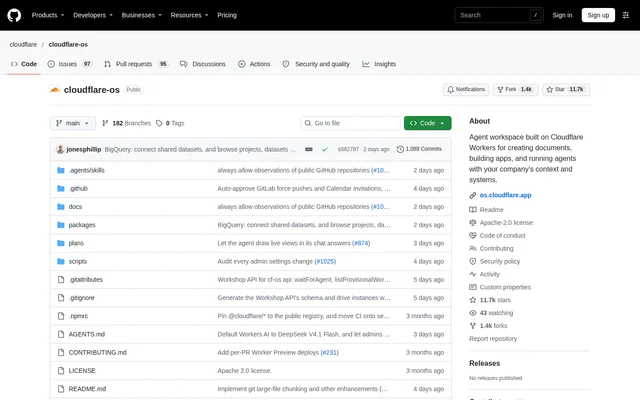
Cloudflare OS is an open-source AI productivity environment that combines company-aware agents, document creation, and application development. Originally developed for internal use at Cloudflare, Cloudflare OS supports work across roles including engineering and sales. Despite the name, Cloudflare OS is not a traditional computer operating system.
Cloudflare OS is designed for companies to copy and customize into their own workspace. The operating-system analogy describes both an environment for company productivity and infrastructure for managing AI workloads. Agent chat, sandboxed application development, and the Gatekeepers security framework form the core of that environment.
What Cloudflare OS can do
Cloudflare OS combines a general-purpose agent with tools for creating and modifying applications. The agent performs tasks by writing and executing code snippets, but users do not have to use Cloudflare OS for coding. Requests can produce documents, new applications, or direct actions involving connected external resources.
- Cloudflare OS builds, tests, and debugs Gadgets from user requests.
- Cloudflare OS creates slide decks using a built-in slides Blueprint.
- Cloudflare OS keeps Gadgets private by default and supports collaborative sharing.
- Cloudflare OS turns existing Gadgets into reusable application Blueprints.
- Cloudflare OS connects agents and Gadgets to external services through Gatekeepers.
- Cloudflare OS supports major AI model providers and self-hosted models.
How Cloudflare OS works
Cloudflare OS runs each Gadget as a separate sandboxed application instance. Users can ask an agent to change that application's code rather than depend on a fixed set of features. Cloudflare OS uses Durable Objects for workspaces and Dynamic Worker Facets for Gadgets, with Gatekeepers managing connections to remote services.
Cloudflare OS Gatekeepers wrap service APIs with a Cap'n Web API, handle authorization, restrict access to intended resources, and log actions. For actions requiring approval, Gatekeepers simulate outcomes locally so an agent can continue working. Users can subsequently approve or reject queued actions individually or in bulk.
Who Cloudflare OS is for
Cloudflare OS serves companies that want an adaptable AI workspace for employees across technical and non-technical roles. Organizations can supply company context and connect systems through controlled access mechanisms. Developers can customize the source, while other employees can request applications or task execution through the agent interface.
- Sales teams can request slides for an upcoming customer meeting.
- Teams can create and share collaborative whiteboard applications.
- Engineering teams can request issue dashboards for attached GitHub repositories.
- Employees can ask agents to correct typos in attached Google Docs.
Cloudflare OS licensing and deployment
Cloudflare OS is distributed as an open-source repository under the Apache-2.0 license. The quick-start path requires pnpm and uses the pnpm run-local command to run the stack locally with wrangler and workerd. The repository also describes deployment to a Cloudflare account and running on an organization's own servers through workerd.
Cloudflare OS strengths and limitations
Cloudflare OS combines customizable applications with sandboxing and resource-specific access controls. Deferred approvals allow agents to continue without immediately committing external changes, while action logs support review. Source availability and support for workerd also give organizations options for adapting the workspace and choosing where to run the software.
- Cloudflare OS remains an early-access release under heavy development with acknowledged rough edges.
- Cloudflare OS local quick-start execution is explicitly not intended for production use.
- Cloudflare OS GitHub and Google examples depend on configuring the corresponding integrations.
Cloudflare OS FAQ
What is Cloudflare OS?
Cloudflare OS is an open-source AI productivity environment built on Cloudflare Workers for creating documents, building applications, and running agents with company context. Cloudflare OS is not a traditional computer operating system; the project combines agent chat, sandboxed Gadgets, and Gatekeeper security controls.
Is Cloudflare OS open source?
Cloudflare OS is an open-source project distributed under the Apache-2.0 license. Cloudflare OS is intended for organizations to copy and customize into their own company workspace, with source code available in the GitHub repository.
Can Cloudflare OS run on your own servers?
Cloudflare OS can run on an organization's own servers using workerd, the open-source Cloudflare Workers Runtime. Cloudflare OS also supports deployment to a Cloudflare account and a local quick-start setup using pnpm, wrangler, and workerd, although that local setup is not intended for production.
How does Cloudflare OS handle agent approvals?
Cloudflare OS uses Gatekeepers to simulate outcomes for actions requiring approval, allowing agents to continue while those actions remain pending. Cloudflare OS lets users approve or reject queued actions later, either individually or in bulk, and Gatekeepers log agent and Gadget activity for review.
Does Cloudflare OS integrate with GitHub and Google Docs?
Cloudflare OS includes examples for creating an issue dashboard from an attached GitHub repository and fixing typos in an attached Google Doc. Cloudflare OS requires the corresponding GitHub or Google integration to be configured before those examples can work.
From the community
No reviews yet
Be the first to review this tool. What you write helps the next person choose.