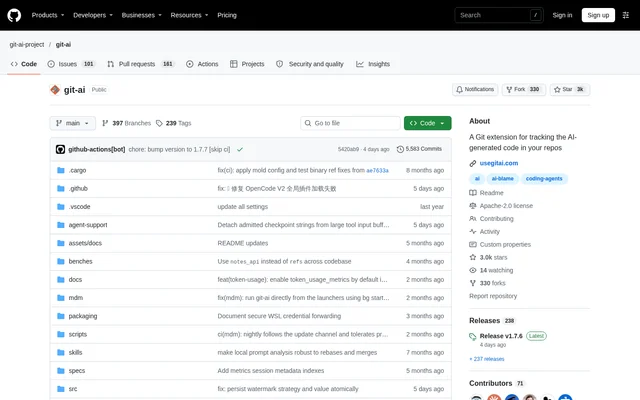
What is git-ai?
git-ai is an open-source Git extension for tracking AI-generated code in repositories. git-ai serves developers and engineering teams that want to identify which lines came from coding agents and retain the context behind those changes. Attribution connects generated code to the agent, model, and session responsible for writing it.
git-ai stores line-level attribution in Git Notes rather than relying on AI detection or heuristics. Coding agents report the lines they write, and attribution is attached to commits automatically. The project provides a local CLI alongside a teams version that adds broader development-lifecycle insights and secure prompt storage.
What git-ai can do
git-ai provides commands and attribution records for inspecting AI contributions at line, commit, and session level. git-ai statistics cover generated versus committed code, acceptance rates, and human overrides, with breakdowns by tool and model. The teams version extends these records with cross-repository reporting and connections to code review and production outcomes.
- git-ai links generated lines to their coding agent, model, session, and originating tool call.
- git-ai provides an AI blame command that supports standard git blame flags.
- git-ai exports attribution statistics as JSON.
- git-ai records human overrides and sessions where no generated code is accepted.
- git-ai preserves attribution through supported rebases, merges, cherry-picks, and stash operations.
- git-ai offers community editor plugins that show attribution and prompt context.
- git-ai connects token usage and cost to commits and pull requests.
How git-ai works
git-ai provides installation commands for Mac, Linux, Windows through WSL, and Windows PowerShell. After installation, developers continue prompting agents and committing through their existing Git tools. git-ai requires no per-repository setup or Git hooks, and commits can come from the agent, a Git client, the Git CLI, or existing Git aliases.
git-ai receives checkpoints when coding agents write code or modify files through Bash commands. On commit, git-ai stores attribution in Git Notes. After supported history-changing operations, git-ai analyzes the final code state and copies or merges attribution into updated commits. git-ai manages agent hooks and checks or updates them daily.
Who git-ai is for
git-ai supports individual developers who want local attribution without a login and engineering teams evaluating coding-agent usage across repositories. The teams version connects GitHub, GitLab, Bitbucket, or Azure DevOps and combines attribution with development-lifecycle information. These connections support analysis of code acceptance, review rework, token spending, and production outcomes.
- git-ai helps developers inspect which lines were generated by coding agents.
- git-ai helps reviewers examine prompts behind generated code.
- git-ai helps teams measure AI-code acceptance and durability.
- git-ai helps organizations relate token spending to pull requests, repositories, teams, and contributors.
- git-ai helps teams trace incidents back to originating AI sessions.
git-ai pricing and access
git-ai provides a free, open-source CLI under the Apache-2.0 license. The CLI works locally and offline without a login or team setup. The repository supplies installation commands and documentation. A separate teams version adds secure prompt storage and organization-wide insights, with self-hosted or cloud deployment; the source does not state teams pricing.
git-ai strengths and limitations
git-ai combines explicit agent-reported attribution with an existing Git workflow, avoiding a separate AI-code detection step. git-ai preserves attribution across many common Git operations and keeps formatter changes from being reassigned to humans. Coverage still depends on the operation and agent working directory, and some hosted merge workflows require additional components.
- git-ai does not track file renames made with git mv.
- git-ai does not track git filter-branch, git filter-repo, or git replace operations.
- git-ai may miss Bash-created file attribution when an agent is not operating from the repository root.
- git-ai requires Bash commands to run inside the relevant repository when an agent edits multiple repositories.
- git-ai requires the teams version or open-source CI Actions for hosted Squash and Merge or Rebase and Merge attribution.
git-ai FAQ
What is git-ai?
git-ai is an open-source Git extension that tracks AI-generated code at line level. git-ai links code to the agent, model, and session that created it, then stores attribution in Git Notes so developers can inspect contributions through blame and statistics commands.
Is git-ai free?
git-ai provides a free, open-source CLI under the Apache-2.0 license. git-ai works locally and offline without a login or team setup. A separate teams version adds secure prompt storage and organization-wide analytics, but the source does not state its pricing.
Does git-ai detect AI-generated code?
git-ai does not use AI or heuristics to detect generated code. git-ai records explicit reports from coding agents through checkpoints when they write or modify files, then attaches line-level attribution to commits, linking generated lines to the responsible agent, model, and session.
Which editors and source-control services does git-ai support?
git-ai lists community attribution plugins for VS Code, Cursor, Windsurf, Antigravity, and Emacs magit. git-ai also offers a teams version that connects GitHub, GitLab, Bitbucket, or Azure DevOps to aggregate repository insights and trace agent sessions through the development lifecycle.
Does git-ai preserve attribution after rebasing or merging?
git-ai preserves attribution through supported operations including rebase, cherry-pick, stash, merge, and commit amendments. git-ai requires the teams version or open-source CI Actions for hosted Squash and Merge or Rebase and Merge workflows. File renames, bulk history rewrites, and object replacements are not tracked.
Does git-ai require agents to commit the code?
git-ai does not require coding agents to make commits. git-ai attaches attribution when developers commit through a Git client, the Git CLI, or their own Git aliases. Installation requires no per-repository setup or Git hooks, while git-ai manages the agent hooks used for attribution.
From the community
No reviews yet
Be the first to review this tool. What you write helps the next person choose.