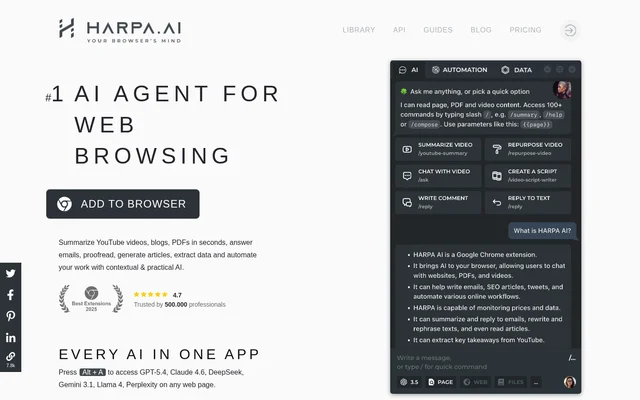
What is HARPA AI?
HARPA AI is a browser extension that combines a hybrid AI engine with web automation. HARPA AI helps professionals and teams work with information on websites, in email, in PDF documents and on YouTube. The extension can interpret page content and perform browser actions, connecting text generation and analysis with tasks such as data extraction and form filling.
HARPA AI supports connections to OpenAI, Anthropic Claude, Google Gemini, DeepSeek, Perplexity and Meta Llama. Local model support is also available. The website describes uses across productivity, marketing, copywriting, learning, recruiting and product development rather than limiting the extension to a single type of work.
What HARPA AI can do
HARPA AI provides page-aware prompts and automations for reading, writing, research and monitoring. HARPA AI can summarize existing material, generate new text and use information from the current website in its responses. Browser automation capabilities extend beyond chat to navigating pages, extracting information and entering content back into websites.
- HARPA AI summarizes web pages, PDF documents and YouTube videos.
- HARPA AI categorizes Gmail messages, summarizes threads and drafts contextual replies.
- HARPA AI generates articles and adapts text to a user's writing style.
- HARPA AI performs SEO audits and extracts long-tail keywords.
- HARPA AI monitors website changes, price drops and product availability.
- HARPA AI navigates websites, clicks buttons, fills forms and extracts data.
- HARPA AI creates image-generation prompts for Midjourney, DALL-E and Leonardo AI.
How HARPA AI works
HARPA AI is installed as a browser extension, with the website recommending the official Chrome Web Store. Users can open the assistant with Alt + A or the browser toolbar icon. Generative AI features require a connection to an AI service, such as a ChatGPT account, an OpenAI API key, ClaudeAI, Google Gemini, OpenRouter or CloudGPT.
HARPA AI can read website content, pass information through a connected language model and paste results back into a page. Automation workflows can connect with Zapier, Make.com and n8n, including remote browser control. HARPA AI runs on the user's computer, but prompts are sent to connected AI providers for processing rather than processed exclusively locally.
Who HARPA AI is for
HARPA AI serves professionals and teams whose work involves browser-based research, writing or repetitive website tasks. The website names marketing, SEO, copywriting, HR, recruiting, learning and product development as use areas. HARPA AI also supports everyday information tasks, including summarizing documents, searching for answers and tracking changes to online content.
- HARPA AI helps marketers research keywords, segment audiences and create content calendars.
- HARPA AI helps copywriters draft social posts, articles, video scripts and product descriptions.
- HARPA AI helps recruiting users review CVs and job offers or draft professional replies.
- HARPA AI helps learners practice languages, understand grammar and create study plans.
- HARPA AI helps product development users write, inspect and translate code between languages.
HARPA AI pricing and plans
HARPA AI offers a basic free tier and a demo period for premium features. The Basic S plan starts at $12 per month paid annually and includes a CloudGPT connection, cloud command storage and chat history. HARPA AI also supports external AI service connections, and the website identifies OpenAI API key connections as paid.
HARPA AI strengths and limitations
HARPA AI brings contextual writing, summarization, monitoring and browser actions into one extension. Multiple model connections and ready-to-use automations provide different ways to handle website tasks. The website states that HARPA AI does not log conversations or actions and does not store prompts on its servers, while also explaining that connected AI providers receive prompts for processing.
- HARPA AI does not currently work with Google Sheets.
- HARPA AI may need site permissions, fingerprint protection or ad-blocker settings adjusted on some websites.
- HARPA AI depends on transcript availability for YouTube transcript-based tasks.
- HARPA AI requires an AI provider connection for generative AI features.
HARPA AI FAQ
What is HARPA AI?
HARPA AI is a browser extension that combines generative AI with web automation. HARPA AI can summarize website content, draft emails, generate articles, extract data, monitor pages and perform browser actions such as clicking buttons and filling forms.
Is HARPA AI free?
HARPA AI offers a basic free tier and a demo period for premium features. The Basic S plan starts at $12 per month paid annually and includes CloudGPT, cloud command storage and chat history. Generative AI features require a connected AI service.
Does HARPA AI work with Zapier, Make.com and n8n?
HARPA AI supports automation connections with Zapier, Make.com and n8n. HARPA AI can trigger automation chains and support remote browser control for tasks that navigate websites, extract data, click buttons and fill forms.
Does HARPA AI keep data private?
HARPA AI runs on the user's computer and states that conversations and actions are not logged. HARPA AI does not store prompts on its servers, but prompts are sent to connected AI providers such as OpenAI, Google or ClaudeAI for processing.
Can HARPA AI summarize YouTube videos and PDFs?
HARPA AI summarizes YouTube videos and PDF documents, as well as web pages. YouTube features include extracting key takeaways, answering questions about videos and jumping to timestamps. Transcript-based video features depend on a transcript being available.
Does HARPA AI work with Google Sheets?
HARPA AI does not currently work with Google Sheets. Some other websites may require changes to browser fingerprint protection, site permissions or ad-blocker settings before the extension opens or functions correctly.
From the community
No reviews yet
Be the first to review this tool. What you write helps the next person choose.