What is Hovercode?
Hovercode is a web-based QR code generator for businesses and creators that need editable destinations, branded designs, and scan tracking. Hovercode combines dynamic QR codes with short links, landing pages, and forms. A free-forever plan provides access to core capabilities, while paid subscriptions expand creation limits, analytics, and organizational features.
Hovercode distinguishes dynamic codes from static codes through a redirect link. Static codes store a destination permanently and cannot be edited or tracked. Dynamic codes point to a redirect link, allowing Hovercode users to change the destination after distribution and measure scans without replacing the printed code.
What Hovercode can do
Hovercode supports both QR code design and the destinations people reach after scanning. Hovercode users can apply branding, create linked resources, and review campaign activity. Some capabilities are included in the free plan, while custom domains, detailed scan analytics, API access, and organizational controls depend on the subscription.
- Hovercode changes dynamic QR code destinations after printing.
- Hovercode adds logos, brand colors, shapes, and circular frames to QR codes.
- Hovercode tracks total and unique scans automatically.
- Hovercode creates short links and multi-link landing pages.
- Hovercode builds forms for feedback, registrations, and surveys.
- Hovercode generates GS1 Digital Link QR codes for retail packaging.
- Hovercode provides API access, bulk QR code generation, and CSV exports on selected plans.
How Hovercode works
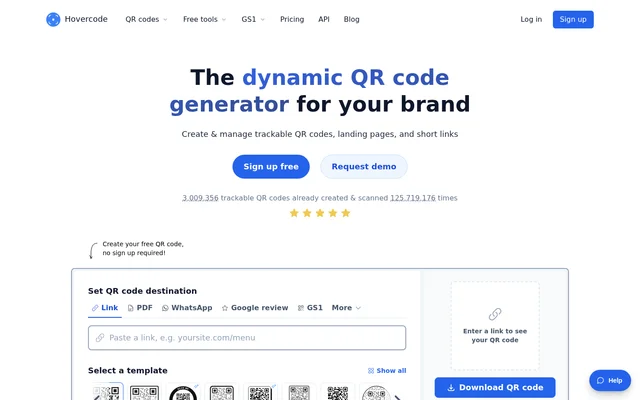
Hovercode offers a QR code creation flow that starts with setting a destination, selecting a template, and adding a logo. Hovercode allows users to try QR code creation without signing up. For dynamic codes, users update the destination in the dashboard, and the existing printed code points to the new link immediately.
Hovercode uses redirect domains such as hov.to by default. A paid custom-domain option lets users display their own domain in the redirect link. Dynamic codes automatically record scans; paid analytics add scan time, device, browser, and estimated city and country. Selected plans also support prompting visitors to share a more accurate GPS location.
Who Hovercode is for
Hovercode serves businesses and creators managing branded links between printed materials and online content. Marketing teams can compare campaign performance, while packaging and retail users can connect consumers to product information. Organizations managing shared campaigns can use team management on selected plans, with additional workspaces and enterprise access controls available higher in the plan range.
- Hovercode helps marketers measure scans from posters and promotional materials.
- Hovercode helps packaging teams link products to information through GS1 Digital Links.
- Hovercode helps businesses collect feedback and registrations through QR-linked forms.
- Hovercode helps creators share multiple links and resources on a landing page.
Hovercode pricing and plans
Hovercode offers a free-forever plan with 3 dynamic QR codes, 3 short links, 1 multi-link page, unlimited static codes, and unlimited scans within fair use. Basic analytics retain 3 months of history. Hovercode requires no credit card for this plan and does not run ads when people scan codes.
Hovercode lists monthly pricing of €11 for Pro, €37 for Business, €93 for Business Plus, and €239 for Scale. Pro includes 100 dynamic codes in total, while Business allows 600 per month, Business Plus allows 2,000 per month, and Scale allows 5,000 per month. Annual billing offers 12 months for the price of 10.
Hovercode strengths and limitations
Hovercode combines editable printed codes, branding, scan measurement, and linked content creation in one service. Hovercode includes logo customization and unlimited scans within fair use on the free plan. Higher plans support operational needs such as bulk generation, API access, team management, and SSO with Okta, Microsoft Entra, or Google Workspace on Scale.
- Hovercode restricts free analytics to total and unique scans with 3 months of history.
- Hovercode requires deletion or an upgrade once an in-total creation limit is reached.
- Hovercode makes content above free-plan limits inactive after cancellation until resubscription.
- Hovercode stops serving content through custom domains after cancellation.
- Hovercode cautions that default city and country estimates are not always accurate.
Hovercode FAQ
What is Hovercode?
Hovercode is a dynamic QR code generator for businesses and creators. Hovercode creates editable, trackable QR codes with custom branding, plus short links, landing pages, and forms. Hovercode is available on the web with free and paid plans.
Is Hovercode free?
Hovercode offers a free-forever plan with 3 dynamic QR codes, unlimited static QR codes, unlimited scans within fair use, and basic analytics. Hovercode also includes 3 short links and 1 multi-link page on the free plan, with no credit card required and no ads.
Can Hovercode change a QR code link after printing?
Hovercode allows users to change the destination of a dynamic QR code after printing by updating the link in the dashboard. Hovercode applies the new destination immediately without reprinting. Static QR codes cannot be updated because their destination is stored directly in the code.
What scan analytics does Hovercode provide?
Hovercode tracks total and unique scans for dynamic QR codes on the free plan. Hovercode paid plans add scan time, device, browser, and estimated city and country. Selected plans also allow visitors to be prompted to share a more accurate location using GPS.
Does Hovercode have an API?
Hovercode includes API access on Business, Business Plus, and Scale plans. Hovercode also offers bulk QR code generation and CSV exports on those plans. Hovercode lists webhooks on Business Plus, with Scale including everything in Business Plus.
What happens to Hovercode QR codes after cancellation?
Hovercode keeps the first 3 dynamic QR codes active after cancellation. Hovercode makes additional codes, short links, and pages beyond free-plan limits inactive without deleting them, and custom-domain content stops working. Hovercode automatically reactivates previously created content when the subscription resumes.
From the community
No reviews yet
Be the first to review this tool. What you write helps the next person choose.