What is ImgUpscaler?
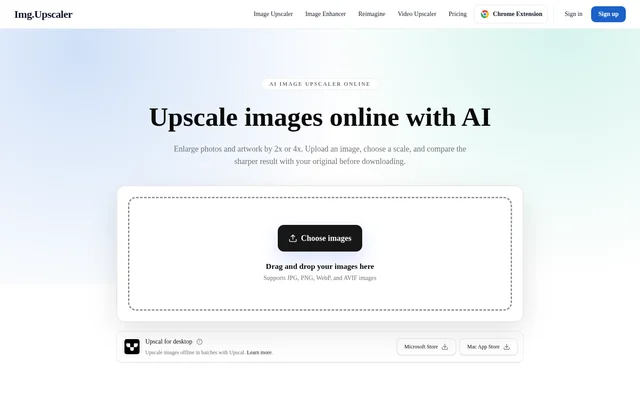
ImgUpscaler is an online AI image upscaler that enlarges photos and artwork while generating detail for clearer edges and textures. ImgUpscaler supports browser-based work with portraits, product photos, anime, illustrations, and scanned pictures. Users can enlarge images for web or print and compare the processed output with the original before downloading.
ImgUpscaler applies the selected enlargement scale to both width and height. The available choices are 2x and 4x, rather than a promise of an exact reconstruction of missing image information. The website explicitly advises checking generated details, particularly faces, lettering, and logos, before using the results.
What ImgUpscaler can do
ImgUpscaler combines image enlargement with visual comparison and download options. The main workflow handles individual images, while paid plans add batch processing for larger sets of product or client images. Supported upload formats include JPG, PNG, WebP, and AVIF, covering both photos and graphics.
- ImgUpscaler enlarges image width and height by 2x or 4x.
- ImgUpscaler generates detail to sharpen edges and textures.
- ImgUpscaler displays an original-versus-result comparison slider.
- ImgUpscaler processes up to 8 images per batch on paid plans.
- ImgUpscaler downloads completed batch results individually or in a ZIP file.
- ImgUpscaler provides a 4K enhancement option on paid plans.
How ImgUpscaler works
ImgUpscaler starts with an image upload through the image chooser or drag-and-drop area. Users select 2x or 4x enlargement, then inspect the output against the original using the comparison slider. The page also offers an Edit option for further adjustments before downloading, without describing those editing controls in detail.
ImgUpscaler lets paid users choose a scale for a batch and review each completed image before saving results. Large uploads may be resized before processing. Uploaded files and processed results are automatically deleted within 24 hours after processing, providing a stated retention window for images handled through the service.
Who ImgUpscaler is for
ImgUpscaler serves users who need more resolution for existing images rather than a new image created from scratch. The website highlights regular creators, commercial users, and people handling higher volumes of visuals. Its examples include small product photos, presentation images, illustrations with pixelated outlines, and older scanned pictures.
- ImgUpscaler enlarges product photos for web and print.
- ImgUpscaler processes batches of client images.
- ImgUpscaler adds generated detail to portraits and scanned photos.
- ImgUpscaler enlarges illustrations, anime, and presentation graphics.
ImgUpscaler pricing and plans
ImgUpscaler offers a Free plan with 50 credits per month, single-image processing, and ads, without requiring a paid subscription. Premium costs $9.90 per month and includes 500 monthly credits. Business costs $19.90 per month and includes unlimited credits. A successful image-processing task uses 1 credit on a metered plan.
ImgUpscaler paid plans include batches of up to 8 images, no ads, email support, and the enhancer’s 4K output option. Users can upgrade, downgrade, or cancel through the account billing page. Free and paid results may be used commercially, subject to applicable law and source-image rights. Web subscriptions and Upscal app licenses are sold separately.
ImgUpscaler strengths and limitations
ImgUpscaler provides a direct upload, preview, and download workflow with a free monthly credit allowance. The comparison slider helps users inspect results before use, and paid batch downloads reduce repeated handling of image sets. The stated limitations matter when preparing detailed visual assets: generated information can differ from the original, and larger uploads may be resized.
- ImgUpscaler requires a paid plan for batch processing.
- ImgUpscaler includes ads on the Free plan.
- ImgUpscaler limits paid batches to 8 images, including on Business.
- ImgUpscaler advises close inspection of faces, text, and logos.
- ImgUpscaler web access does not include separately purchased Upscal apps.
ImgUpscaler FAQ
What is ImgUpscaler?
ImgUpscaler is an online AI image upscaler that enlarges photos and artwork by 2x or 4x. ImgUpscaler generates detail to make edges and textures clearer and provides a comparison slider for reviewing the result before downloading.
Is ImgUpscaler free?
ImgUpscaler offers 50 free credits per month without a paid subscription. The Free plan processes one image at a time and includes ads. Premium provides 500 monthly credits for $9.90 per month, while Business provides unlimited credits for $19.90 per month.
Can ImgUpscaler upscale multiple images at once?
ImgUpscaler supports batches of up to 8 images on paid plans. Users choose a scale for the batch, review each result, and download completed images individually or together in a ZIP file. The Free plan processes one image at a time.
What image formats does ImgUpscaler support?
ImgUpscaler supports JPG, PNG, WebP, and AVIF uploads. Users can upload a photo or graphic, choose 2x or 4x enlargement, compare the processed result with the original, and download the output.
How long does ImgUpscaler store uploaded images?
ImgUpscaler automatically deletes uploaded images and processed results within 24 hours after processing. The stated deletion window covers both the source files submitted for enlargement and the resulting images.
Can ImgUpscaler results be used commercially?
ImgUpscaler allows commercial use of results from both free and paid plans, subject to applicable law and the rights associated with the source images. The website explicitly includes personal projects and client work among permitted uses under those conditions.
From the community
No reviews yet
Be the first to review this tool. What you write helps the next person choose.