What is iMyFone MagicMic?
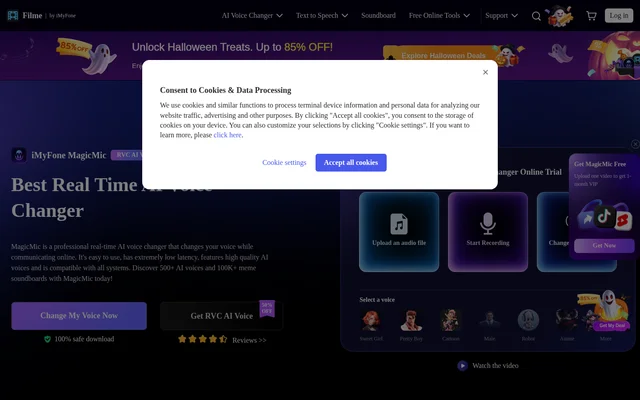
iMyFone MagicMic is an AI voice changer for modifying speech during online communication and transforming recorded audio. The software targets gamers, streamers and content creators who want different vocal characters or accompanying sound effects. The website describes real-time voice changing, file conversion and recording-based conversion as separate ways to use the product.
iMyFone MagicMic combines voice filters with a soundboard, voice customization controls and RVC AI voice models. Available voice styles include male, female, kid, cartoon, anime and robot voices. The product is offered through a free version and a paid full version, with an online trial for testing audio conversion.
What iMyFone MagicMic can do
iMyFone MagicMic supports both live voice transformation and changes to existing audio. Beyond selecting a preset voice, users can adjust sound parameters in Voice Studio and combine audio effects to create custom voices. The soundboard adds another layer of audio control through supplied effects, imported sounds and keyboard-triggered playback.
- iMyFone MagicMic changes microphone voices in real time on desktop.
- iMyFone MagicMic converts uploaded audio files and recorded speech.
- iMyFone MagicMic offers 500+ voice filters and 100K+ soundboard effects.
- iMyFone MagicMic supports custom sound effect imports.
- iMyFone MagicMic provides noise reduction for voice changing.
- iMyFone MagicMic assigns shortcut keys to voice changes and sound playback.
How iMyFone MagicMic works
iMyFone MagicMic uses selected audio input and output devices for its desktop workflow. After downloading the software, users select their headphones as the output device and their microphone as the input device. Selecting a voice filter then changes speech from the microphone. The website also provides guidance for using real-time voice changing in other applications.
iMyFone MagicMic places file and recording workflows in the Tool Box. File Voice Change accepts an uploaded audio file before a voice effect is selected. Record Voice captures speech through the microphone and then applies a chosen effect. Listed compatible applications include Discord, Twitch, OBS, Zoom, Skype, Google Meet and Microsoft Teams.
Who iMyFone MagicMic is for
iMyFone MagicMic is aimed at gamers, streamers and content creators, with additional examples covering online education, voice calls and dubbing. The source describes disguising a speaking voice, adding character voices to communication and using sound effects during entertainment. Voice Studio also serves users who want to adjust a voice rather than rely entirely on presets.
- Gamers can change voices and play sound effects during group chats.
- Streamers can add voice effects and soundboard audio to broadcasts.
- Educators can use different voices to play multiple roles in online lessons.
- Content creators can transform recordings for voiceover and dubbing work.
iMyFone MagicMic pricing and plans
iMyFone MagicMic follows a freemium model. The free version offers 5 voices daily and some popular sound effects. The paid full version includes 500+ real-time AI voices and unlimited soundboard effect imports for games or other applications. The supplied page links to purchasing and pricing, but does not state subscription amounts or billing periods.
iMyFone MagicMic strengths and limitations
iMyFone MagicMic brings live conversion, file conversion, recording tools and soundboard controls into the same product. Named compatibility with gaming, broadcasting and meeting applications makes the intended workflows concrete. Custom sound imports, adjustable voice parameters and shortcut controls provide alternatives to using only the supplied voice presets and sound effects.
- Real-time voice changing requires the desktop version.
- Free access covers daily voices and selected popular sound effects rather than the full library.
- The browser trial accepts MP3 and WAV uploads with a maximum file size of 5MB.
iMyFone MagicMic FAQ
What is iMyFone MagicMic?
iMyFone MagicMic is an AI voice changer for real-time microphone effects, audio file conversion and recorded voice transformation. iMyFone MagicMic also includes a soundboard, custom voice controls and noise reduction for gaming, streaming and online communication.
Is iMyFone MagicMic free?
iMyFone MagicMic offers a free version with 5 voices daily and some popular sound effects. The paid full version includes 500+ real-time AI voices and unlimited soundboard effect imports. The supplied page does not list purchase prices.
Does iMyFone MagicMic work with Discord and streaming apps?
iMyFone MagicMic lists compatibility with Discord, Twitch, YouTube, OBS and Facebook Live, alongside games and meeting applications. Desktop setup involves selecting a microphone input, headphones output and a voice filter before using the voice changer with another application.
Can iMyFone MagicMic change voices online without downloading?
iMyFone MagicMic provides an online trial that accepts MP3 and WAV audio uploads with a maximum file size of 5MB. Real-time voice changing is only supported in the desktop version, so live microphone conversion requires downloading the software.
Can iMyFone MagicMic create custom voices and use custom sounds?
iMyFone MagicMic includes Voice Studio for creating and customizing voices by adjusting sound parameters. iMyFone MagicMic also allows users to upload their own sound effects and assign shortcut keys to voice changes and sound effect playback.
From the community
No reviews yet
Be the first to review this tool. What you write helps the next person choose.