What is Infographic Ninja?
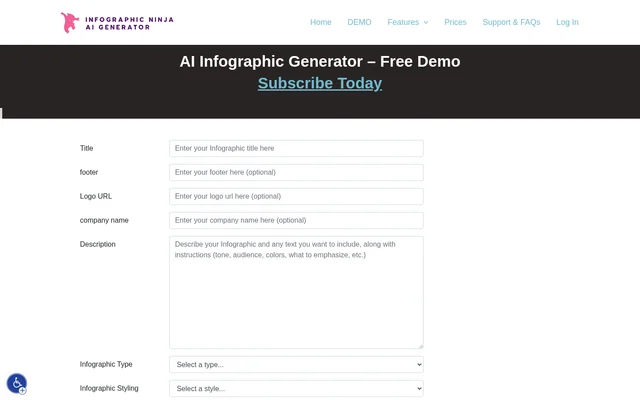
Infographic Ninja is an AI infographic generator that turns keywords, blog articles and uploaded PDFs into infographics. Infographic Ninja combines content generation with template-based design, allowing users to generate questions and answers from a keyword or supply their own text. The source describes both a free demo and an option to subscribe.
Infographic Ninja brings together infographic creation, visual customization and publishing features. Blog publishers and WordPress users can use the article input, image embed code and matching FAQSchema.org download. For branded content, the available controls cover icons, fonts and template colors, including color customization based on a logo.
What Infographic Ninja can do
Infographic Ninja provides controls for both the content and appearance of an infographic. Automatic icon selection can supply suitable icons, while customization options let users change visual elements. Infographic Ninja also supports optional content elements, so a design can omit a logo, subtitle, questions or titles.
- Infographic Ninja generates questions and answers from a keyword using AI.
- Infographic Ninja creates infographics from blog articles or uploaded PDFs.
- Infographic Ninja lets users write their own questions and answers.
- Infographic Ninja offers 30+ fonts and customizable header, footer and background colors.
- Infographic Ninja lets users change the number of entries from 3 to 7.
- Infographic Ninja previews an infographic before downloading.
How Infographic Ninja works
Infographic Ninja supports several starting points: a keyword for AI-generated questions and answers, a blog article, an uploaded PDF or manually written questions and answers. Infographic Ninja offers templates to choose from and automatically selects appropriate icons. Users can customize icons by name, color, black and white, stock photos or gradient.
Infographic Ninja includes a preview before download, buttons for instant social sharing and code for embedding the image in WordPress. The WordPress code includes a copy embed code button. Infographic Ninja also provides a FAQSchema.org download that matches the questions and answers used in the content.
Who Infographic Ninja is for
Infographic Ninja is relevant to people publishing blog content, preparing branded graphics or distributing infographics through WordPress and social media. These uses follow from the supported article input, logo-based color controls, embed code and sharing buttons. Infographic Ninja also supports PDF-based infographic creation and keyword-led question and answer content.
- Blog publishers can turn an article into an infographic.
- WordPress users can embed infographic images with the supplied code.
- Content creators can prepare branded infographics for social sharing.
Infographic Ninja pricing and access
Infographic Ninja offers a free demo, and the page also provides an option to subscribe. The supplied text does not list subscription prices, named plans or a breakdown of demo and subscription features. Infographic Ninja can therefore be described as offering demo access alongside a subscription option, without assigning specific features to either.
Infographic Ninja strengths and limitations
Infographic Ninja combines multiple content inputs with design controls and publishing outputs. Automatic icon selection, editable colors and fonts, previewing, WordPress embed code and matching FAQSchema.org downloads are concrete strengths of the stated feature set. Infographic Ninja also places a defined range on infographic entries, while the page leaves subscription terms and demo feature limits unspecified.
- Infographic Ninja allows entry counts from 3 to 7.
- Infographic Ninja does not state subscription prices in the supplied page text.
- Infographic Ninja does not explain which features are included in the free demo.
Infographic Ninja FAQ
What is Infographic Ninja?
Infographic Ninja is an AI infographic generator that supports keywords, blog articles and uploaded PDFs. Infographic Ninja combines question and answer generation with infographic templates, icon customization, font choices, color controls and publishing options.
Is Infographic Ninja free?
Infographic Ninja offers a free demo and a subscription option. The supplied page does not state subscription prices, describe named plans or explain which features are available in the demo versus a subscription.
Can Infographic Ninja turn a PDF or blog article into an infographic?
Infographic Ninja can generate an infographic from a blog article or an uploaded PDF. Infographic Ninja also supports keyword-based AI generation of questions and answers, along with the option to write questions and answers manually.
What design options does Infographic Ninja offer?
Infographic Ninja offers templates, automatic icon selection, icon customization and 30+ fonts. Infographic Ninja supports logo-based template colors, separate header, footer and background colors, optional logos and subtitles, and entry counts from 3 to 7.
Does Infographic Ninja support WordPress and FAQ schema?
Infographic Ninja provides WordPress code that embeds an infographic image and includes a copy embed code button. Infographic Ninja also offers a FAQSchema.org download matching the questions and answers, plus buttons for sharing on social media.
From the community
No reviews yet
Be the first to review this tool. What you write helps the next person choose.