What is Kittl?
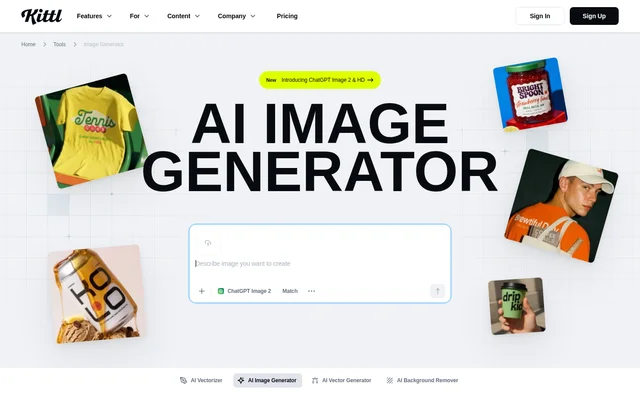
Kittl is a browser-based AI design workspace with an image generator for commercial visuals, merchandise, and brand assets. Kittl serves product businesses, sellers, designers, and agencies that need imagery for physical products and marketing. The image generator supports text prompts and, within the Kittl Editor, reference images that guide new generations.
Kittl combines image generation with tools for building designs and presenting products. The wider workspace includes mockups, typography, graphics, background removal, and vector tools. Generated images can become packaging artwork, product patterns, lifestyle imagery, or campaign assets rather than remaining separate from the design workflow.
What Kittl can do
Kittl generates images using model families including Flux, Ideogram, Seedream, Nano Banana, Google Imagen, ChatGPT, and Recraft. The page lists HD and 4K variants among the available options. Kittl also supports image-to-image generation to guide outputs with existing product photos, brand assets, or rough sketches.
- Kittl creates images from descriptive text prompts.
- Kittl uses reference images to guide generations in the Kittl Editor.
- Kittl lets users select image styles and aspect ratios.
- Kittl saves generated images to an uploads folder for use in designs.
- Kittl applies generated visuals to product mockups.
- Kittl provides background removal and image vectorization tools.
How Kittl works
Kittl starts the editor workflow with an existing design or a new project. Users select Kittl AI from the left toolbar, choose an image model, and enter a detailed prompt. Style and aspect ratio controls help define the output, while generated images remain available in the uploads folder for placement in designs.
Kittl recommends describing the object, style, and context together when writing prompts. Users can upload a reference image in the Kittl Editor when a new image needs to match existing material. Kittl also offers a standalone micro app for generating and downloading images, but reference-image functionality is not included there.
Who Kittl is for
Kittl is aimed at product businesses and creative teams producing launch materials, branding, and sales imagery. The website identifies small businesses, sellers, agencies, and designers as audiences. Kittl connects these audiences with uses ranging from packaging and labels to merchandise graphics, social content, advertising, and realistic product previews.
- Kittl helps product businesses create packaging artwork and label designs.
- Kittl helps sellers produce merchandise graphics and product listing visuals.
- Kittl helps agencies and designers develop advertising and brand assets.
- Kittl helps creative teams preview generated artwork on product mockups.
Kittl strengths and limitations
Kittl combines access to multiple image models with a design workflow that includes uploads, editing, and mockups. Reference-guided generation supports work based on existing brand materials. Access conditions matter, however: commercial product use requires a commercial plan, and reference-image generation is confined to the Kittl Editor rather than the standalone micro app.
- Kittl requires a commercial plan for generated images used on products sold.
- Kittl excludes reference-image functionality from the standalone micro app.
- Kittl charges subscription fees for Pro, Expert, and Max plans.
Kittl FAQ
What is Kittl?
Kittl is a browser-based AI design tool with an image generator for product imagery, merchandise graphics, packaging, and campaigns. Kittl combines text-to-image generation, reference-guided generation in its editor, and design tools such as product mockups.
Is Kittl free?
Kittl offers a Free Plan for trying AI-powered design and starting projects, alongside paid Pro, Expert, and Max subscriptions. Kittl requires a commercial plan for generated images used on merchandise, print-on-demand listings, and packaging for products sold.
Which AI image models does Kittl support?
Kittl lists image models from Flux, Recraft, Ideogram, Nano Banana, Seedream, Google Imagen, and ChatGPT. Kittl includes HD and 4K variants among its model options and lets users choose a model within the image-generation workflow.
Can Kittl use reference images?
Kittl supports reference images in the Kittl Editor, including product photos, brand assets, and sketches that guide new generations. Kittl does not include reference-image functionality in the standalone micro app, which supports image generation and downloads.
Can Kittl images be used on Etsy or Shopify products?
Kittl allows generated images on products sold through Etsy or Shopify under a commercial plan. Kittl identifies Pro, Expert, and Max as plans covering merchandise, print-on-demand listings, and packaging for products that users sell.
How do you generate an image with Kittl?
Kittl generates images from an existing design or new project through Kittl AI in the left toolbar. Users choose a model, enter a detailed prompt, and select a style and aspect ratio. Generated images save to the uploads folder.
From the community
No reviews yet
Be the first to review this tool. What you write helps the next person choose.