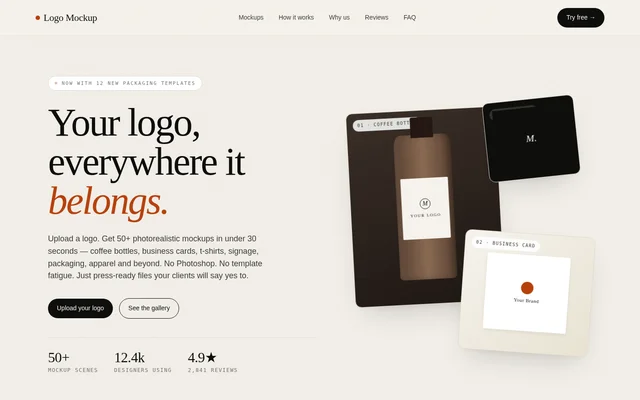
What is Logo Mockup Generator?
Logo Mockup Generator is a browser-based logo presentation tool for designers and teams that need to show brand artwork on physical products and surfaces. Logo Mockup Generator turns uploaded logos into mockups for apparel, packaging, signage, stationery and drinkware, using studio-photographed scenes rather than requiring users to assemble Photoshop templates.
Logo Mockup Generator uses scenes photographed in a Berlin studio and reconstructed as render-engine templates. The source describes these templates as responsive to the uploaded artwork, with shadows, reflections and fabric folds that are not simply baked into a flat image. The resulting renders support client presentations, portfolio projects and brand proposals.
What Logo Mockup Generator can do
Logo Mockup Generator combines logo placement, scene customisation and presentation exports in a browser workflow. The library includes coffee bottles, business cards, shirts, hoodies, tote bags, mugs, packaging boxes and storefront signs. Users can change the presentation setting while keeping the same uploaded brand artwork.
- Logo Mockup Generator accepts SVG, PNG, JPG and PDF uploads.
- Logo Mockup Generator preserves transparent backgrounds and handles light and dark variants.
- Logo Mockup Generator offers live adjustments to colours, surfaces, lighting angles and backgrounds.
- Logo Mockup Generator exports 4K PNG images and multi-page PDF brand presentations.
- Logo Mockup Generator provides layered PSD exports and brand-kit presets on the paid plan.
How Logo Mockup Generator works
Logo Mockup Generator starts with a logo upload, followed by scene selection and visual adjustments. Users choose a surface or product, change the colours, lighting angle or background, and see adjustments render live. The website recommends vector logos for the sharpest results and supports transparent backgrounds automatically.
Logo Mockup Generator runs entirely in the browser without Photoshop, Illustrator or a Figma plugin. Finished work can be downloaded as images or assembled into a PDF brand presentation. Paid users can export layered PSD files for further editing; for critical print colour, the source recommends proofing those files in Photoshop with the relevant print profile.
Who Logo Mockup Generator is for
Logo Mockup Generator serves freelance brand designers, agency teams and in-house designers presenting identity work. The supported outputs suit both client-facing proposals and public portfolio publishing. The commercial licence also allows renders to be used in case studies and to mock up packaging intended for production.
- Brand designers can show logo concepts on packaging, stationery and apparel.
- Agencies can prepare client decks and pitch slides.
- Portfolio creators can publish case studies on Behance and Dribbble.
- Design teams can create Instagram carousels from exported mockups.
Logo Mockup Generator pricing and plans
Logo Mockup Generator offers a free tier with 5 renders per day, full 4K resolution, no watermark and a commercial-use licence without attribution. The paid plan removes the daily render cap and unlocks layered PSD exports, brand-kit presets and a CMYK soft-proof toggle. The supplied page does not state the paid subscription price.
Logo Mockup Generator makes new scenes available to paid users and rotates those scenes into the free library after 60 days. Subscriptions can be cancelled from the dashboard. Previously exported files remain covered by the commercial licence, while stored projects remain in the account for 90 days after cancellation.
Logo Mockup Generator strengths and limitations
Logo Mockup Generator combines a browser-only workflow with adjustable render templates and commercially licensed exports, including on the free tier. The default colour space is sRGB, while paid users have a CMYK soft-proof option. The source distinguishes presentation work from mission-critical print proofing, for which additional Photoshop checks are recommended.
- Logo Mockup Generator limits free accounts to 5 renders per day.
- Logo Mockup Generator reserves PSD exports and CMYK soft-proofing for paid plans.
- Logo Mockup Generator prohibits reselling the mockup scenes as templates.
Logo Mockup Generator FAQ
What is Logo Mockup Generator?
Logo Mockup Generator is a browser-based design tool that places logos into product and branding mockup scenes. Logo Mockup Generator supports apparel, packaging, signage, stationery and drinkware presentations, with adjustable colours, surfaces, lighting and backgrounds.
Is Logo Mockup Generator free?
Logo Mockup Generator offers a free tier with 5 renders per day, full 4K resolution, no watermark and commercial-use licensing. A paid plan removes the daily cap and adds layered PSD exports, brand-kit presets and CMYK soft-proofing.
What file formats does Logo Mockup Generator support?
Logo Mockup Generator accepts SVG, PNG, JPG and PDF uploads and preserves transparent backgrounds automatically. Export options include 4K PNG images, multi-page PDF brand presentations and layered PSD files, with PSD exports requiring the paid plan.
Can Logo Mockup Generator renders be used commercially?
Logo Mockup Generator includes a perpetual commercial-use licence with every render, including free-tier exports. Permitted uses include client pitch decks, portfolio case studies, social posts and packaging mockups. Attribution is not required, but the mockup scenes cannot be resold as templates.
Does Logo Mockup Generator require Photoshop or other software?
Logo Mockup Generator runs entirely in the browser and does not require Photoshop, Illustrator or a Figma plugin. Users upload a logo, select scenes, adjust the appearance and export the results without installing design software.
Does Logo Mockup Generator use uploaded logos to train AI?
Logo Mockup Generator states that uploaded artwork is not used to train models or shared with third parties. Logos are stored on encrypted servers in Frankfurt, and users can permanently delete logos and renders from the dashboard, with deletions propagated within 24 hours.
From the community
No reviews yet
Be the first to review this tool. What you write helps the next person choose.