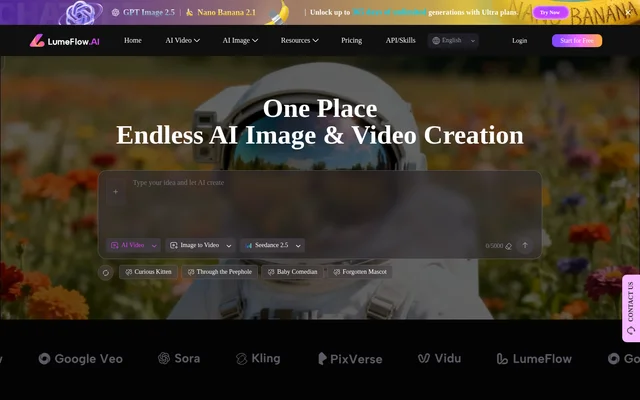
What is LumeFlow AI?
LumeFlow AI is an AI image and video generator for creators who want to make visuals from text or work with photos they already have. LumeFlow AI combines image and video generation with tools for animating still images, transferring movement, and creating talking clips. The page describes uses ranging from social sharing to professional projects.
What LumeFlow AI can do
LumeFlow AI offers separate workflows for creating new images, transforming existing photos, and generating video. The page lists video models including Sora 2, Kling AI, and Google Veo 3.1, and image models including Nano Banana, Flux Kontext Pro, and Seedream 4.0. LumeFlow AI also provides preset effects for images and videos.
- Generate a video from a text prompt.
- Animate a reference image using a prompt that describes movement or a camera effect.
- Create a new image from a written description.
- Restyle an uploaded photo with image-to-image generation.
- Apply movement from a reference using Mimic Motion.
- Generate timed mouth movements from text or an audio clip.
- Use preset effects such as Remove Text, Group Shot, and Flow Dance.
How LumeFlow AI works
LumeFlow AI starts the text-to-video workflow with a prompt and lets users set video parameters before generating a clip. For image-to-video, users supply a reference photo, choose a model, and describe the motion or camera effect they want. The reference photo provides the starting visual, while the prompt describes what should change as the clip plays.
LumeFlow AI uses different inputs for Mimic Motion and Lip Sync. With Mimic Motion, users upload a photo and select or upload a motion reference so the pictured subject can mirror the movement. With Lip Sync, users enter text or upload an audio clip, and LumeFlow AI uses that input to time the mouth movements.
Who LumeFlow AI is for
LumeFlow AI is for creators making visuals to share on social media or use in professional projects. The page names product demos, tutorials, and digital characters as uses for talking videos. The image examples show how a creator can work from an existing portrait or combine people from separate reference images in one scene.
- Create an image from a prompt for a social post.
- Make a talking clip for a tutorial or product demo.
- Combine people from separate reference photos in a selfie-style scene.
- Turn an existing portrait into a stylized illustration.
LumeFlow AI strengths and limitations
LumeFlow AI brings prompt-based generation, reference-based animation, and lip sync together with a choice of image and video models. Creators can choose a workflow based on whether they are starting with an idea, an existing photo, or speech. The main workflow constraint is that reference-based features need source material, while the listed price leaves the billing interval unclear.
- Image-to-video requires a reference photo.
- Mimic Motion requires a photo and a motion reference.
- The listed offer does not specify its billing interval.
LumeFlow AI FAQ
What is LumeFlow AI?
LumeFlow AI is an AI image and video generator that works with text prompts and existing images. LumeFlow AI also offers image and video effects, motion transfer from a reference, and lip sync for talking videos.
Can LumeFlow AI turn a photo into a video?
LumeFlow AI can turn a still photo into a video using a reference image and a text prompt. Users choose a model and describe the movement or camera effect they want the video to show.
How does lip sync work in LumeFlow AI?
LumeFlow AI generates timed mouth movements for talking videos from typed text or an uploaded audio clip. The page describes product demos, tutorials, and digital characters as examples of what users can make with Lip Sync.
Can LumeFlow AI restyle an existing image?
LumeFlow AI can transform an uploaded photo into a different style with its image-to-image workflow. The page shows examples such as turning a portrait into a manga-style illustration or giving an image a cinematic film photography look.
From the community
No reviews yet
Be the first to review this tool. What you write helps the next person choose.