What is Soulgen?
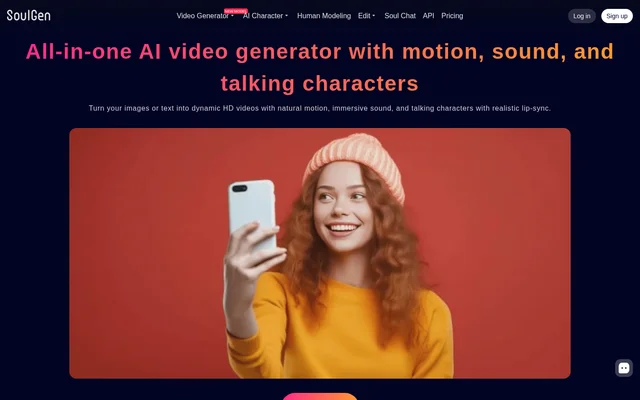
Soulgen is an AI video generator and image editing tool for creating videos, character portraits, and modified images. Soulgen accepts images or text for video generation and describes its outputs as HD videos with natural motion, sound, and talking characters with realistic lip-sync. The website also lists character creation, human modeling, image editing, and character chat tools.
Soulgen combines video creation with tools for changing still images. A reference photo can guide a character portrait toward someone’s likeness, while text prompts can direct additions, removals, and extensions within images. These capabilities support workflows involving both generated characters and uploaded visual material.
What Soulgen can do
Soulgen provides several video generation modes alongside character and image tools. The video menu lists image-to-video, text-to-video, reference-to-video, and video extension, while the pricing page also includes video editing. Image capabilities cover reference-based portraits, prompt-directed changes, and outpainting that expands a picture beyond its original boundaries.
- Soulgen generates videos from uploaded images or written prompts.
- Soulgen offers reference-to-video generation and video extension.
- Soulgen creates videos with sound and lip-synced talking characters.
- Soulgen uses reference photos to create lookalike character portraits.
- Soulgen adds, removes, and extends image content using text prompts.
- Soulgen expands images with backgrounds, characters, and other elements.
- Soulgen offers character text chat, image generation, and voice calls.
How Soulgen works
Soulgen describes an image-based video workflow that starts with uploading a reference image. The user then describes the desired video in a prompt, generates the result, and downloads the video. Text-to-video is also listed as an available generation mode, although the page does not provide a separate walkthrough for that route.
Soulgen image editing starts with an uploaded image or an existing creation. The user selects content in the image and enters text instructions for the requested change. Outpainting uses a resized image and a text prompt to add elements. Account access includes sign-up and login options, with optional Google Sign-In for authentication.
Who Soulgen is for
Soulgen is relevant to people who want to create videos from visual references or written descriptions, design character portraits, or modify images through text instructions. Soulgen also permits commercial use of generated videos when the content complies with applicable laws and does not infringe third-party rights. The page does not identify specific professions or industries.
- Soulgen can animate an uploaded reference image into a downloadable video.
- Soulgen can create a character portrait guided by a reference photo.
- Soulgen can change selected image content through written instructions.
- Soulgen can extend a picture with additional backgrounds or characters.
Soulgen pricing and plans
Soulgen offers a Pro plan whose listed benefits include access to all features, blur removal, priority queuing, and multitasking. Pro includes 100 credits each month, with 1200 total for the year. The supplied pricing text describes plan benefits and credit charges but does not provide a monetary subscription price.
Soulgen charges credits according to the selected feature and settings. Video charges vary by model, resolution, duration, and audio selection, while some reference-video uploads carry additional charges. Character images, human modeling, image editing, and chat have separate rates. Character creation costs 1 credit per image without Looks Like and 2 credits per image with Looks Like.
Soulgen strengths and limitations
Soulgen brings video generation, reference-based character creation, image editing, and outpainting into the same service. The published credit schedule distinguishes between models and settings, allowing users to see how choices affect credit consumption. Commercial video use is expressly permitted, but that permission depends on compliance with applicable laws and third-party rights.
- Soulgen generation and editing features consume credits at different rates.
- Soulgen charges additional credits for audio and certain reference-video uploads.
- Soulgen higher-resolution video options can require more credits.
- Soulgen commercial-use permission does not override third-party rights or content restrictions.
Soulgen FAQ
What is Soulgen?
Soulgen is an AI video generator and image editing tool that creates videos from images or text. Soulgen also supports talking characters with lip-sync, reference-based character portraits, prompt-directed image changes, and outpainting.
How is Soulgen priced?
Soulgen offers a paid Pro plan with 100 credits each month, or 1200 total for the year. Soulgen charges credits by feature, with video costs varying by model, resolution, duration, and audio settings. The supplied pricing page does not state a monetary subscription price.
How do you create a video with Soulgen?
Soulgen describes a workflow in which the user uploads a reference image, describes the desired video with a prompt, and generates and downloads the result. Soulgen also lists text-to-video, reference-to-video, and video extension tools.
Can Soulgen edit existing images?
Soulgen can edit uploaded images or existing creations using text prompts. Soulgen lets users select image content and request additions, removals, or extensions. Outpainting expands an image with prompted elements such as backgrounds and characters.
Can Soulgen videos be used commercially?
Soulgen allows commercial use of AI-generated videos when the content complies with applicable laws and does not infringe third-party rights. Soulgen also states that users generally have the right to use generated videos, provided the videos do not contain copyrighted or restricted content.
Does Soulgen require Google Sign-In?
Soulgen makes Google Sign-In optional for account authentication. Soulgen requests the Google Account email address for this purpose and states that Google user data is not used to generate images.
From the community
No reviews yet
Be the first to review this tool. What you write helps the next person choose.