What is Lunabot?
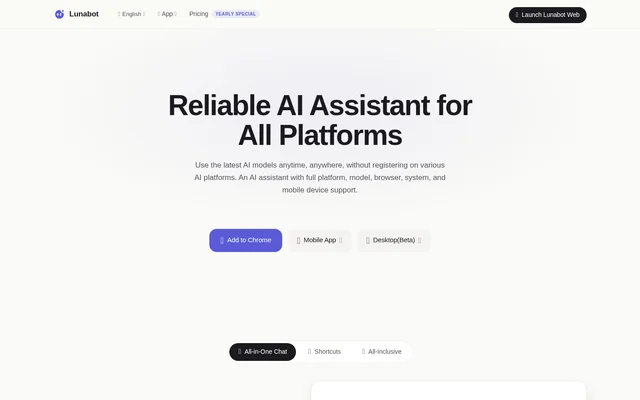
Lunabot is a cross-platform AI assistant that brings multiple AI models into a shared chat experience. Lunabot serves people who want help with writing, webpage content, documents, images, and voice conversations across their devices. The service supports model families including GPT-4o, Gemini, Claude, Mistral, and Ollama without requiring separate AI platform accounts or API keys.
Lunabot is available through browser extensions, a web interface, mobile apps, desktop apps, a Telegram bot, and Siri shortcuts. Mobile options include iOS and Android, while desktop options include macOS and Windows. The website labels desktop applications and Siri shortcuts as beta.
What Lunabot can do
Lunabot combines conversational assistance with tools for handling webpage content, documents, images, and speech. Chat memory retains requests and content within a conversation, reducing the need to enter the same material again. Custom AI commands and context-based shortcuts let users adapt recurring tasks to their workflow.
- Lunabot translates and summarizes webpage content through browser extensions.
- Lunabot answers questions about documents without requiring users to download them.
- Lunabot supports voice input, voice output, and multiple voice recognition models.
- Lunabot generates images from text and text from images.
- Lunabot synchronizes activity across browsers, mobile devices, and desktop applications.
- Lunabot provides desktop global hotkeys for access to AI assistance.
How Lunabot works across devices
Lunabot can be accessed by adding the Chrome extension, opening the web version, installing a supported app, or using the Telegram bot or Siri shortcut. The browser extension places AI assistance alongside webpage content, while the desktop assistant works without opening a browser. Mobile applications provide access on iOS and Android.
Lunabot supports cross-platform use on every plan, so a subscription applies across supported devices and applications. Cross-device synchronization connects the experience between those access points. For privacy, Lunabot states that the service uses encryption, provides a privacy control panel, and complies with data protection regulations such as GDPR.
Who Lunabot is for
Lunabot is suited to people who use AI assistance for content creation, reading, and everyday work across several devices. The website describes browser tools for translation and summaries, customizable prompts for specific tasks, and mobile access for work away from a desktop. A customer testimonial also describes writing tweets and Facebook posts.
- Lunabot helps writers prepare social media posts and other content.
- Lunabot helps webpage readers translate and summarize online material.
- Lunabot helps document readers ask questions about document contents.
- Lunabot supports people who prefer voice input and spoken responses.
Lunabot pricing and plans
Lunabot offers Free, Essential, Premium, and Super plans, with monthly and annual subscription options. Basic models are available free. The plans differ in model access, published rolling usage limits, model-cost safeguards, and advanced features. All plans support cross-platform use, and team and enterprise plans are available by contacting the service.
Lunabot strengths and limitations
Lunabot combines multiple model families and several access methods without requiring separate AI provider accounts or API keys. Chat memory, custom commands, synchronization, and document questions support recurring work across devices. The free plan provides an entry point, while the privacy control panel gives users controls over their data.
- Lunabot labels desktop applications and Siri shortcuts as beta.
- Lunabot applies anti-abuse rate limits and rolling model-cost safeguards to fair-use access.
- Lunabot varies model access and advanced features by plan.
Lunabot FAQ
What is Lunabot?
Lunabot is a cross-platform AI assistant for chatting with multiple AI models, working with documents, creating images, and using voice interaction. Lunabot is available through browser extensions, web access, mobile apps, desktop apps, Telegram, and Siri shortcuts.
Is Lunabot free?
Lunabot offers a Free plan with basic models, alongside paid Essential, Premium, and Super subscriptions. Lunabot plans differ in model access, advanced features, and usage safeguards, while all plans support cross-platform use.
Which AI models does Lunabot support?
Lunabot lists support for model families including GPT-4o, Gemini, Claude, Mistral, and Ollama. Lunabot groups models into access levels on the pricing page, with availability and usage safeguards depending on the selected plan.
Does Lunabot require an API key or ChatGPT account?
Lunabot does not require an API key or a ChatGPT account. Lunabot provides access to supported AI models through its own cross-platform service, avoiding the need for separate accounts on the individual AI platforms.
What can you use Lunabot for?
Lunabot supports webpage translation and summarization, document questions, content writing, image generation, and voice conversations. Lunabot also provides custom commands and chat memory for recurring tasks, plus synchronization across supported browsers, mobile devices, and desktop applications.
What devices and apps support Lunabot?
Lunabot supports Chrome, web access, iOS, Android, macOS, Windows, Telegram, and Siri shortcuts. Lunabot labels desktop applications and Siri shortcuts as beta, and all subscription plans support use across the supported platforms.
From the community
No reviews yet
Be the first to review this tool. What you write helps the next person choose.